
Best AI Tools for Business in 2026: A Small-Business Buying Guide
By M. Zaid Imran · Tests run November 4–5, 2026 · Prices checked November 3–6, 2026
Short answer: for a US small business, start with what you already pay for — Gemini in Google Workspace or Copilot in Microsoft 365. For proposals, emails, and spreadsheet analysis, compare ChatGPT and Claude: in our tests both got every fact and number right, and Claude’s free plan was as accurate as paid ChatGPT. For specific jobs, add a specialist: Canva for campaign graphics, Zapier for moving data between apps, Notion AI for finding answers in a team wiki.
How I tested: I ran the same five fictional business tasks in ChatGPT Plus, Claude Free, and Gemini (Google AI Pro) — a client email, a launch campaign, return-policy replies, meeting notes, and a CSV revenue analysis — then tested Canva AI, Zapier Copilot, and Notion AI on one task each. Microsoft Copilot, HubSpot Breeze, Fathom, and Tidio Lyro are covered from their documentation. Full side-by-side results: ChatGPT vs Claude and ChatGPT vs Gemini.

At a glance
| Tool · use case | How we covered it | Plan to check |
|---|---|---|
| ChatGPT · drafts and file analysis | Tested (Plus) | Plus $20/month |
| Claude · proposals and documents | Tested (Free) | Free; Team $25/seat |
| Gemini · Google Workspace | Tested (AI Pro, standalone app) | Your Workspace edition |
| Microsoft Copilot · Word, Excel, Outlook | Documentation | Business add-on $21/user |
| Canva AI · campaign graphics | Tested | Free tools; Pro $18/month |
| Zapier · app-to-app automation | Tested (Free) | Free 100 tasks/month |
| Notion AI · team wiki answers | Tested | Business $20/member (annual) |
| HubSpot Breeze · CRM follow-ups | Documentation | Free entry point |
| Fathom · meeting notes | Documentation | Free; Team $19/user |
| Tidio Lyro · routine support | Documentation | 50 free starter conversations |
US prices before tax, as of November 2026. Plans change often — confirm at checkout.
General assistants: what our tests showed
| Task | ChatGPT Plus | Claude Free | Gemini (AI Pro) |
|---|---|---|---|
| Client email from 7 facts | All facts | All facts | All facts |
| Launch campaign | Nothing invented | Added an assumption | Invented product details |
| Return-policy replies | All correct | All correct | All correct |
| Meeting notes | Missed a decision | Complete | Complete |
| CSV revenue ($470.00) | Correct | Correct | Correct |
ChatGPT: everyday drafting and file analysis
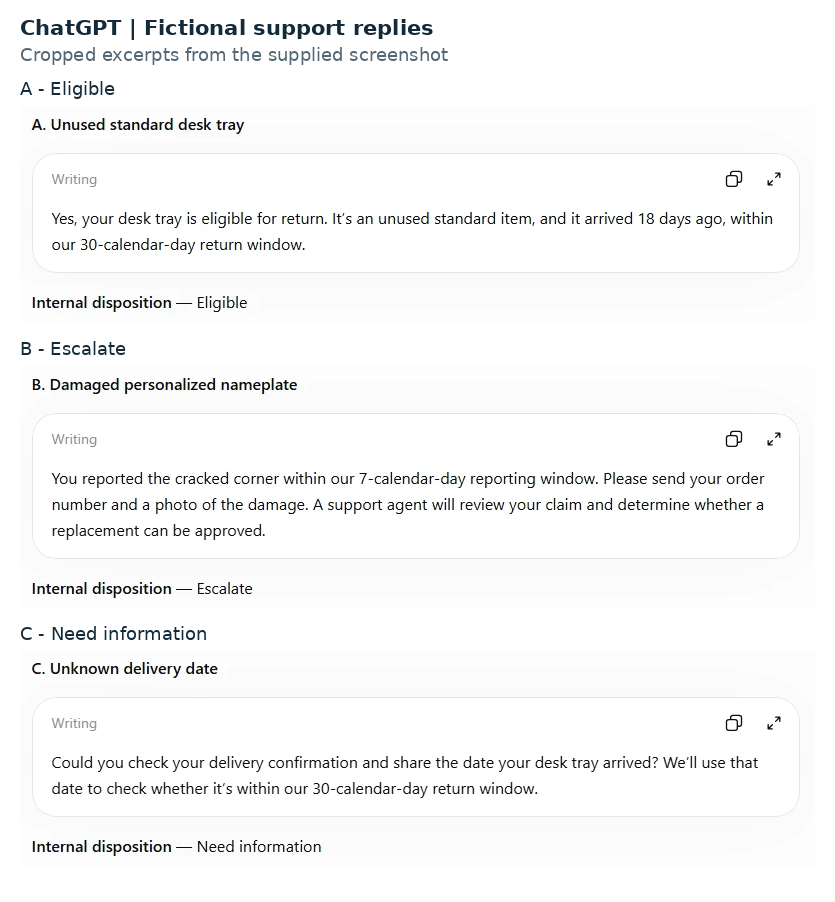
ChatGPT Plus was the most disciplined: it followed every format rule and added nothing to our briefs. In the customer-reply task it labeled all three cases correctly (Eligible, Escalate, Need information), asked for an order number and damage photo, and kept a human reviewer in the loop. Its one miss: leaving the unchanged budget out of the meeting notes.
Price (as of November 2026): Plus $20/month. Business Standard is $25/user/month, or $20 billed annually; OpenAI usually requires two seats, with a one-seat option for some new workspaces (billing guide). Business data is excluded from model training by default (OpenAI).
Choose it if: you work alone and want one assistant for emails, proposals, and spreadsheets. More in our ChatGPT review.
Claude: proposals and source documents
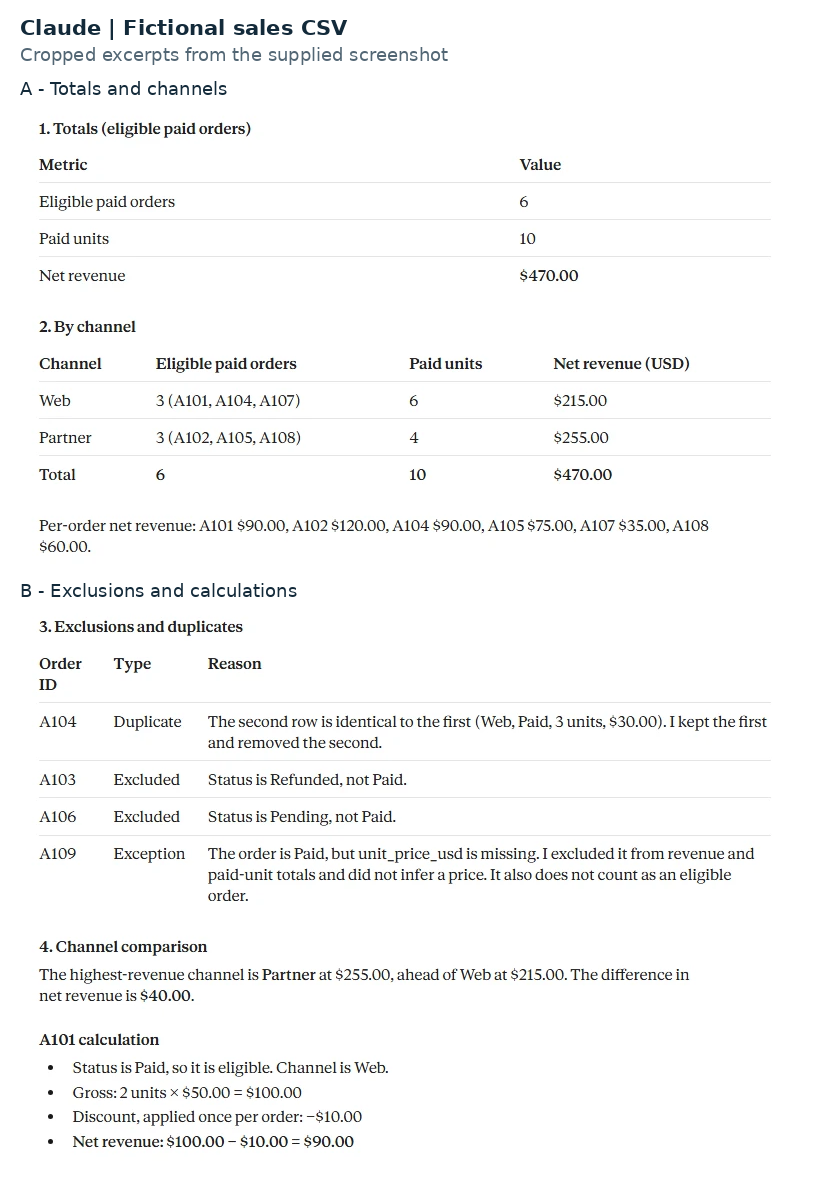
Claude Free matched ChatGPT on accuracy. Its project email kept every date, the fee, the scope, and the photography condition in exactly three bullets, and its CSV answer was complete: 6 orders, 10 units, $470.00, every exclusion listed, and the $40.00 channel gap. It did add an assumption to the campaign checklist (“US-only availability”) and an unmeasured workload estimate — check its drafts for additions.
Price (as of November 2026): Free; Team $25/seat/month, or $20 billed annually, for 2–150 people (pricing).
Choose it if: you draft from source documents and want strong results before paying anything. See our Claude review.
Gemini: for teams on Google Workspace
In the standalone app, Gemini was accurate on every number and gave the most complete meeting notes — but its campaign caption called the cable clips “adhesive,” which the brief never said. Inside Google Workspace, Gemini works in Gmail on Business Starter and adds Docs, Meet, and other apps from Business Standard (Workspace plans). We tested the standalone app, not the Workspace integration.
Price (as of November 2026): Workspace Business Starter $7, Standard $14, Plus $22 per user/month on a one-year commitment. Google AI Pro ($19.99/month) is a separate individual plan.
Choose it if: your team already works in Gmail, Docs, and Meet. See our Gemini review.
Microsoft 365 Copilot (documentation)
Worth it if your important work happens in Word, Excel, or Outlook. Check first whether Copilot Chat is already included with your plan. As of November 2026, the Copilot Business add-on lists $21/user/month paid yearly on top of an eligible Microsoft 365 plan, with an $18 first-year offer for eligible customers through December 31, 2026 — confirm the renewal price (pricing). Test it on one familiar workflow, and check spreadsheet totals against the source before sharing.
Specialist tools we tested
Canva AI: campaign graphics
I asked Canva’s AI for an editable 1080 × 1080 Instagram launch graphic for a fictional $34 “Desk Reset Kit,” using exactly four text elements and no discounts, delivery claims, or logos.
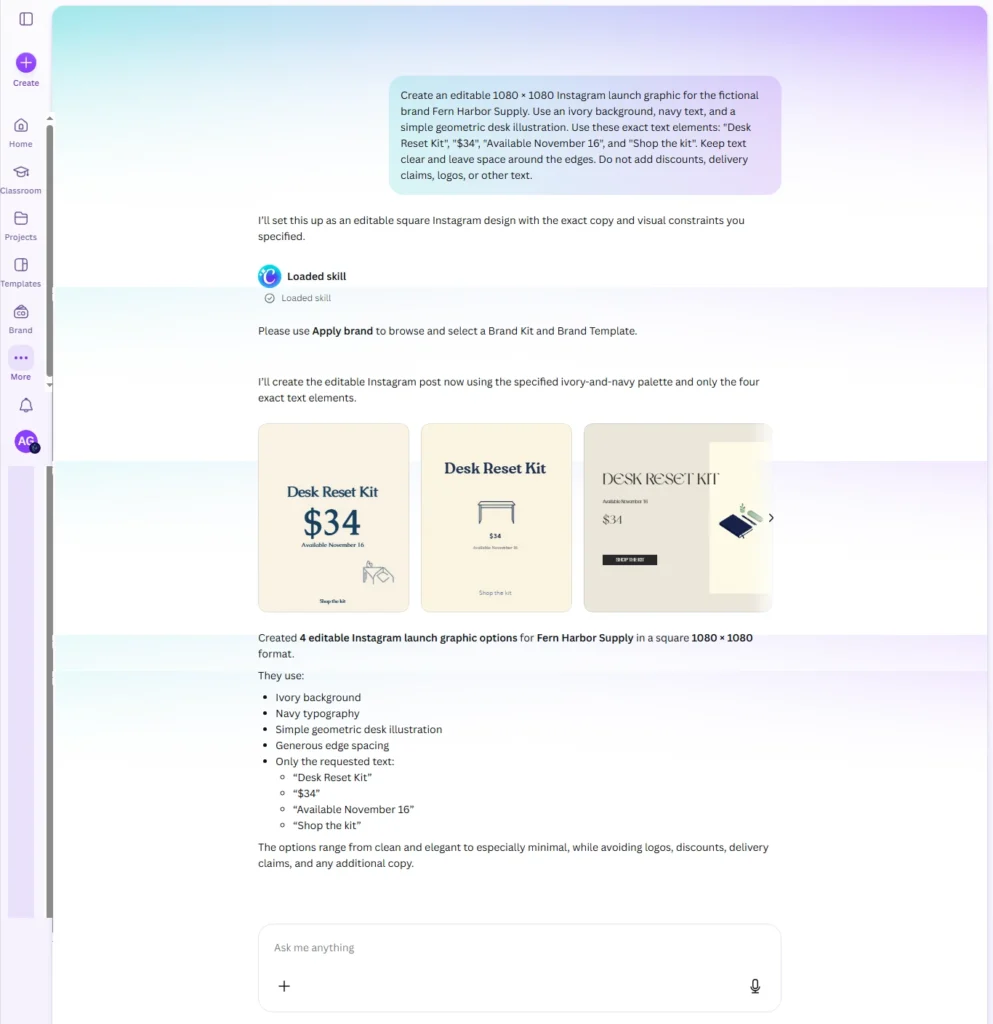
Result: Canva produced several on-brief options in ivory and navy using only the requested text — “Desk Reset Kit,” “$34,” “Available November 16,” and “Shop the kit” — with no invented offers. Three designs were visible in the preview (it said it made four). The text was small on two of them, so plan to resize before posting. That makes it a fast starting point for a small team, as long as someone edits and exports the final version.
Price (as of November 2026): selected AI tools on Free; Pro $18/month or $144/year; Business $25/person/month (Canva AI).
Zapier: moving data between apps
I asked Zapier Copilot on the free plan to create a two-step Zap: when a “Lead Intake” form is submitted, add a row to an “Incoming Leads” table, mapping name, email, and request — with no extra steps or emails.
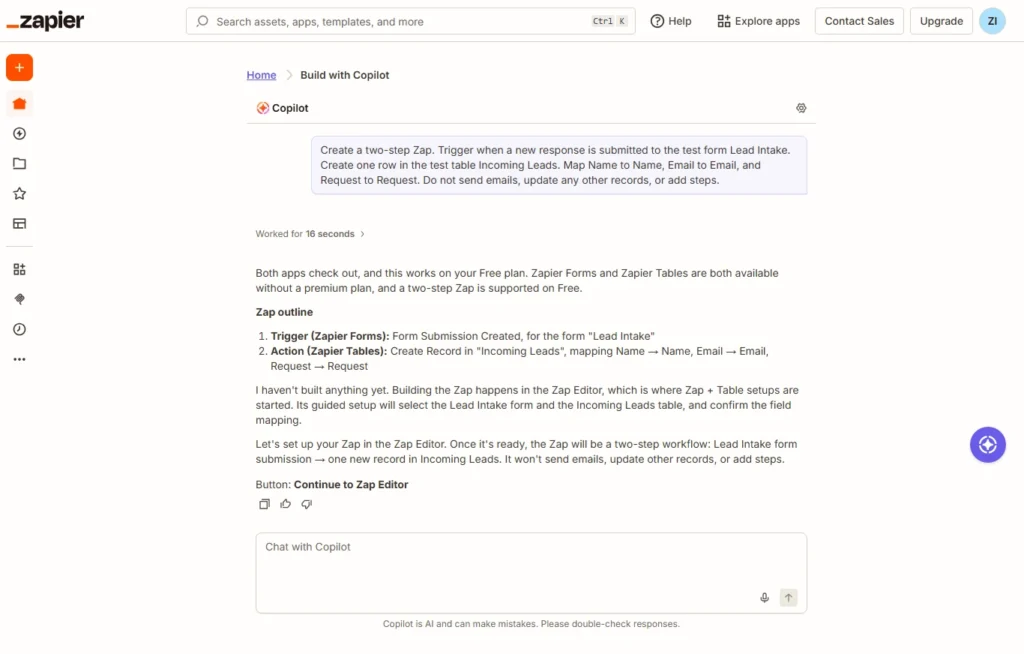
Result: Copilot confirmed the setup works on the free plan, outlined the trigger and action with the correct field mapping, and said plainly that it hadn’t built anything yet — the Zap is finished in the Zap Editor. That honesty is useful: Copilot plans, you build and test.
Price (as of November 2026): Free 100 tasks/month with two-step Zaps; Professional from $19.99/month (annual) adds multi-step Zaps; Team from $69/month (pricing).
Notion AI: answers from a team wiki
I created two pages: a current return policy (30 days; damage claims need human review) and an archived, never-approved draft (45 days; automatic replacement). Then I asked Notion AI for the current return window and whether damaged personalized items are replaced automatically — and told it not to use archived drafts.
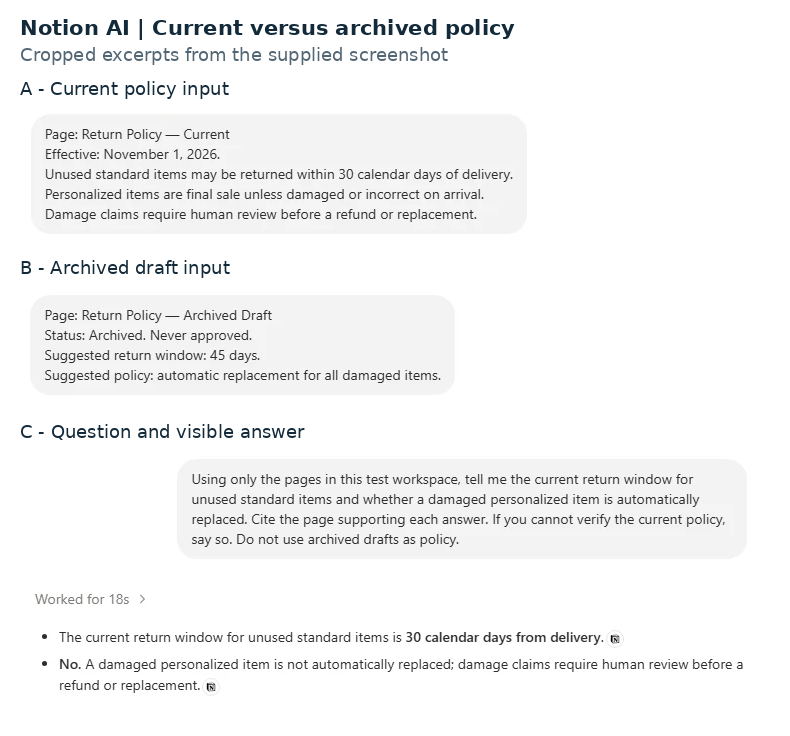
Result: correct on both — 30 days, and no automatic replacement — with citation markers on each answer. It ignored the tempting archived draft, which is exactly what you need from a wiki assistant.
Price (as of November 2026): limited AI trial on Free and Plus; Business $20/member/month billed annually. Notion says its AI providers keep data for 30 days or less (security).
Specialists from documentation
HubSpot Breeze Assistant
Summarizes CRM records, prepares for meetings, and drafts follow-ups from logged activity — useful only if your team keeps good records in HubSpot. There’s a free entry point; as of November 2026, separate agents use credits at $0.01 each, sold in 1,000-credit packs for $10 (credits).
Fathom
Records, transcribes, and summarizes meetings. As of November 2026, Free includes recording and basic summaries; Team is $19/user/month ($15 annually) with a two-user minimum (pricing). Get participants’ consent before recording, and test whether summaries keep conditional decisions conditional.
Tidio Lyro
An AI support agent that answers from your knowledge base and hands off to a person. As of November 2026, Tidio lists 50 one-time free AI conversations and a seven-day trial (pricing). Pilot it with a simple question, a missing-information case, and an exception that must reach a human — and check that the handoff actually arrives.
How to choose
| If you need to… | Start with |
|---|---|
| Draft emails, proposals, reports | ChatGPT or Claude |
| Work inside Gmail/Docs or Word/Excel | Gemini in Workspace or Microsoft Copilot |
| Make campaign graphics | Canva AI |
| Move form data into a table or CRM | Zapier |
| Find current policies in a wiki | Notion AI |
| Summarize meetings | Fathom |
| Answer routine support questions | Tidio Lyro (with a human handoff) |
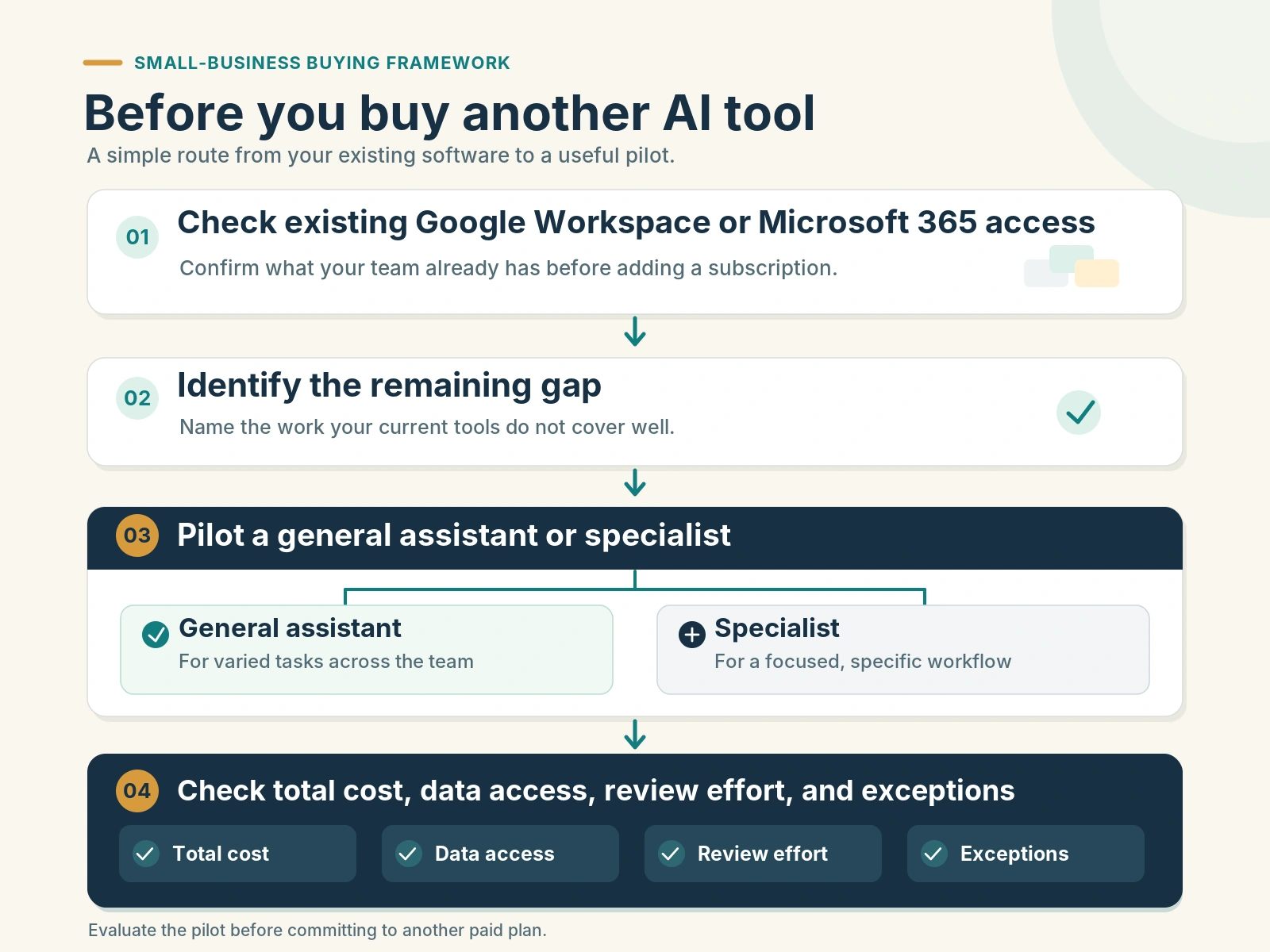
Pick one recurring task with a clear finish line — “turn Friday’s sales export into a channel summary that matches the source” — and pilot one tool on it before buying seats for everyone.
A practice CSV for your pilot
Save this as fictional-orders.csv. It includes a duplicate, unpaid orders, and a missing price:
order_id,channel,status,units,unit_price_usd,discount_usd
A101,Web,Paid,2,50,10
A102,Partner,Paid,1,120,0
A103,Web,Refunded,1,80,0
A104,Web,Paid,3,30,0
A104,Web,Paid,3,30,0
A105,Partner,Paid,2,40,5
A106,Web,Pending,1,60,0
A107,Web,Paid,1,35,0
A108,Partner,Paid,1,70,10
A109,Web,Paid,1,,0
Ask the assistant to count only Paid orders, remove the duplicate row, exclude the missing price, list every exclusion, and calculate net revenue as units × price − discount once per order.
| Channel | Orders | Units | Net revenue |
|---|---|---|---|
| Web | 3 | 6 | $215.00 |
| Partner | 3 | 4 | $255.00 |
| Total | 6 | 10 | $470.00 |
Partner leads by $40.00; A101 = 2 × $50 − $10 = $90.00. Excluded: A103 (refunded), A106 (pending), A109 (missing price), and the second A104 row (duplicate). ChatGPT, Claude, and Gemini all got these totals right in our test.
What AI tools cost
| Setup | Monthly cost (as of November 2026) |
|---|---|
| Solo consultant: ChatGPT Plus | $20 |
| Solo consultant: Claude Free + Zapier Free + Canva Free | $0 |
| Three people: ChatGPT Business | $75 monthly, or $60/month billed annually |
| Ten people: Google Workspace Business Standard (includes Gemini in apps) | $140 on a one-year commitment |
Before tax and usage charges. For metered tools, estimate a normal month’s tasks, credits, or conversations, and check what happens at the limit.
Privacy checks before connecting business data
- Training and retention: can the provider train on your data, and how long does it keep it?
- Permissions: who can see prompts, files, recordings, and summaries — and can you remove access?
- Integrations: can the tool only read your records, or also change them?
- Recovery: who reviews outputs, and can you undo an automated change?
Use fictional or approved data for the first pilot, as we did.
Common mistakes
- Paying twice: check what your office suite already includes.
- Buying seats before the pilot: start with the people who own the workflow.
- Testing only the easy case: include a duplicate record, an archived policy, or an exception that needs a person.
- Publishing AI marketing copy unchecked: in our tests, assistants added product details nobody gave them.
FAQ
What’s the best free AI tool for a small business?
Claude Free for writing and analysis — it matched paid ChatGPT on our five tasks — plus Zapier Free and Canva’s free AI tools for automation and graphics.
How do I know if an AI pilot is worth it?
Do the same task manually and with the tool. Compare the time to a usable result, including checking and fixing, and count errors that matter, like a wrong fee or total.
Should everyone use the same AI tool?
Standardize where people share a workflow or permissions; add a specialist for a distinct job, with one owner responsible for it.
Final verdict
Check what your office suite includes, then pilot one general assistant — ChatGPT for strict instruction-following, Claude for strong free results — on a task you can check. Add a specialist only for a recurring job it clearly handles, as Canva, Zapier, and Notion did in our tests.