Claude vs Gemini (2026): Which AI Is Worth Paying For?
By M. Zaid Imran · ToolsWorldAI · Updated October 14, 2026

You can get a polished answer from Claude or Gemini and still choose the wrong subscription. The problem usually appears later: your files do not fit, your preferred model hits a limit, or the assistant adds extra steps to work you already do in Google Docs.
My recommendation is to choose around your busiest task. I would try Claude first for focused writing and development work. Gemini would be my first stop for Google-centered productivity, image generation, and analyzing audio or video uploads.
Those are starting points. This Claude vs Gemini comparison explains the free plans, US subscription prices, important feature differences, and a practical way to decide which deserves your money.
Comparison basis: verified product documentation and original ToolsWorldAI comparison exercises with checked reference answers. Recommendations describe workflow fit; the exercises are fictional sample tasks, not completed Claude-versus-Gemini performance tests.
Gemini vs Claude: my quick verdict
For ToolsWorldAI readers, my deciding questions are simple: did the assistant preserve the facts, handle the exception, and leave something useful? The comparison exercises below make those questions easier to answer.
Here is where I would start:
| Your main need | My starting choice | What should decide it |
|---|---|---|
| Editing articles and following a detailed brief | Claude | How much rewriting remains after revisions |
| Working across a software repository | Claude with Claude Code | Whether changes pass your project’s tests |
| Gmail, Docs, and Google storage in one subscription | Gemini with Google AI Pro | How often you use the bundled benefits |
| Generating and editing images | Gemini | Whether the image meets your brief |
| Researching a topic across web sources | Either | Source quality and verifiable claims |
| Summarizing long documents | Either paid option | Your model, file limits, and retrieval accuracy |
| Casual questions on a tight budget | Try both free plans | Available features and usage limits |
Compare the assistant, plan, and model separately
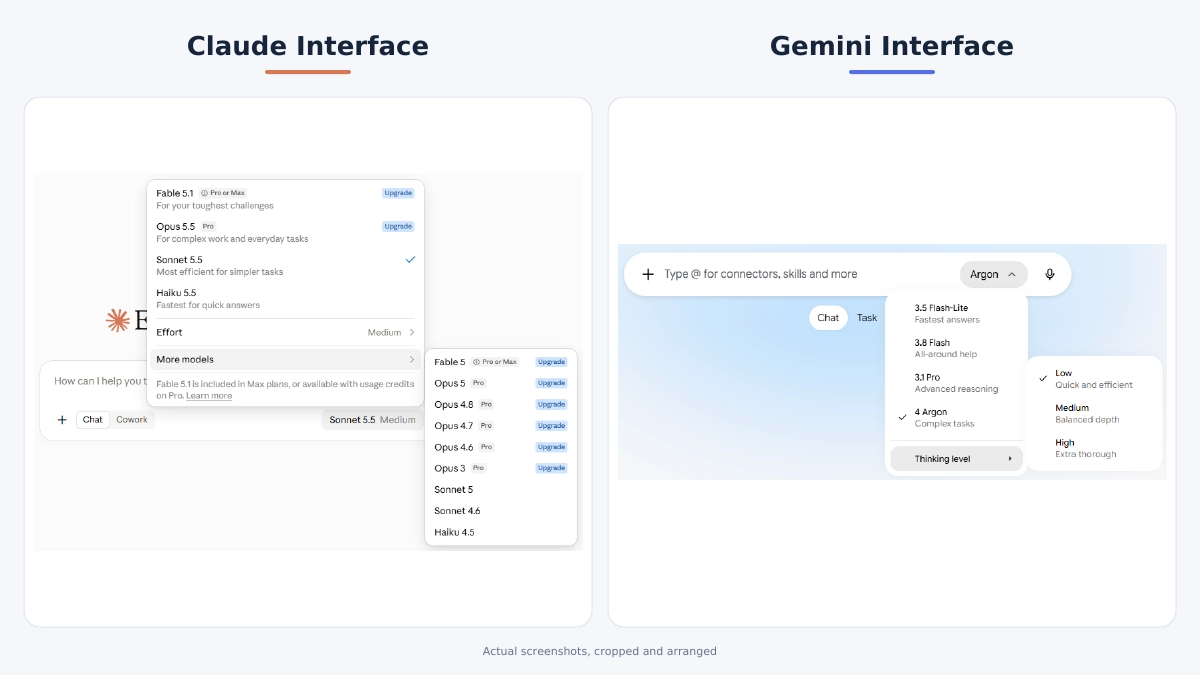
Claude and Gemini are product families. The model answering your prompt is only part of the experience; subscriptions also control tools and allowances.
Anthropic currently lists Claude Fable 5.1, Opus 5.5, Sonnet 5.5, and Haiku 5.5 in its model documentation. Google’s Gemini model guide describes Flash-Lite, Flash, Pro, and Argon, with access depending on your plan.
A Claude Sonnet vs Gemini Flash comparison is therefore different from comparing Claude Pro with Google AI Pro. Record the actual model and settings whenever you compare outputs.
Claude vs Gemini pricing: free plans and subscriptions
Both assistants have free access. Paying mainly buys more capacity and additional capabilities, although the details differ.
These are the standard individual prices relevant to most US readers:
| Plan | Listed price | Main reason to consider it |
|---|---|---|
| Claude Free | $0 | Try chat, web search, and file-related tasks within limits |
| Claude Pro | $20 monthly, or $200 billed annually | More usage, expanded Projects access, additional models, and Claude Code |
| Gemini without a Google AI plan | $0 | Everyday assistance within the current free allowance |
| Google AI Pro | $19.99 monthly | Expanded Gemini access, Google app features, and 5 TB storage |
Sources: Claude pricing and Google One US pricing. Claude’s listed prices exclude applicable tax. Check your checkout total and any promotional terms before subscribing.
Is Gemini still free in October 2026?
Yes, Gemini is still free to use. However, free access does not mean unrestricted access to every model.
Google’s current official model page lists free chat access as Auto or Flash-Lite. With Auto enabled, most prompts use Flash-Lite, while more demanding prompts may route to Flash or Pro. With Auto disabled, responses use Flash-Lite.
That is more nuanced than saying every free response must use Flash-Lite. Check the official availability table and the model shown in response details; access remains subject to change.
Claude’s current plan table lists Sonnet and Haiku access on Free, along with up to five Projects. That makes it worth trying for writing and coding questions before buying Pro. A paid upgrade should solve a capacity or feature problem you have actually encountered.
Claude Pro vs Google AI Pro: which offers better value?
The useful question is which subscription replaces more work or spending.
Claude Pro is worth considering when you repeatedly revise substantial drafts, organize work in Projects, or want Claude Code. Google AI Pro deserves attention if you also need its storage and Gemini features in Gmail and Docs. Count only benefits you will actually use.
Neither subscription promises unlimited heavy use. Claude’s limits depend on factors including model choice, conversation complexity, and effort. Its different product surfaces share usage allowances. Gemini’s limits also depend on compute use, with five-hour refreshes and weekly limits.
For an occasional email or explanation, stay free until a specific restriction interrupts useful work. For an app you are building, compare API billing separately from these consumer subscriptions.
Claude vs Gemini for writing and coding
Writing: compare the revision, too
For ToolsWorldAI-style articles, Claude would be my first paid trial because Projects and its document workflow fit repeated editing against a consistent brief. That is a workflow recommendation; it does not establish that every Claude draft is better.
Gemini becomes appealing when the writing task sits inside a Google workflow: turning an email discussion into a reply, expanding notes in Docs, or preparing material alongside your existing files.
The deciding test is a second instruction. A first draft can hide weak instruction-following behind smooth sentences.
I have included a writing exercise about BrightDesk, a fictional software product. Its supplied facts include a $12 monthly price, three team members, a seven-day trial, and CSV exports. The draft also contains an unsupported revenue guarantee.
Give both assistants the same instruction:
Rewrite the supplied paragraph in plain language, using no more than 55 words. Preserve the supplied product facts, remove unsupported promises, and explain what you removed. Do not add features or personal experience.
Here is a short excerpt showing the editorial standard:
Sample draft: “BrightDesk costs $12 per month for three users and guarantees that every business will double revenue in 30 days.”
My reference edit: “BrightDesk costs $12 per month for up to three team members.”
Fictional product; this reference edit is part of the worksheet.
The price and seat limit survive; the unsupported promise is removed. An assistant that keeps the guarantee or changes the price fails an important requirement, even if its prose reads well. The downloadable pack includes the full paragraph and a second revision prompt.
Claude vs Gemini for coding: the tool matters
My starting recommendation for a developer working across an existing repository is Claude Code. Anthropic documents a workflow that can read the codebase, edit files, run commands, and help write and run tests. It is a different experience from copying snippets out of a chat. See the Claude Code overview.
Google also offers Gemini CLI, which works in the terminal with local project context. Evaluate it as a development tool in its own right rather than treating Gemini as only a browser chatbot.
For a beginner learning Python or JavaScript, either assistant can be a candidate. Ask for an explanation, a small implementation, and the conditions under which it fails.
The pack includes a small Python checkout function that incorrectly discounts shipping. With a $50 subtotal, a 10% item discount, and $5 shipping, the correct total is $50.00. The buggy function returns $49.50.
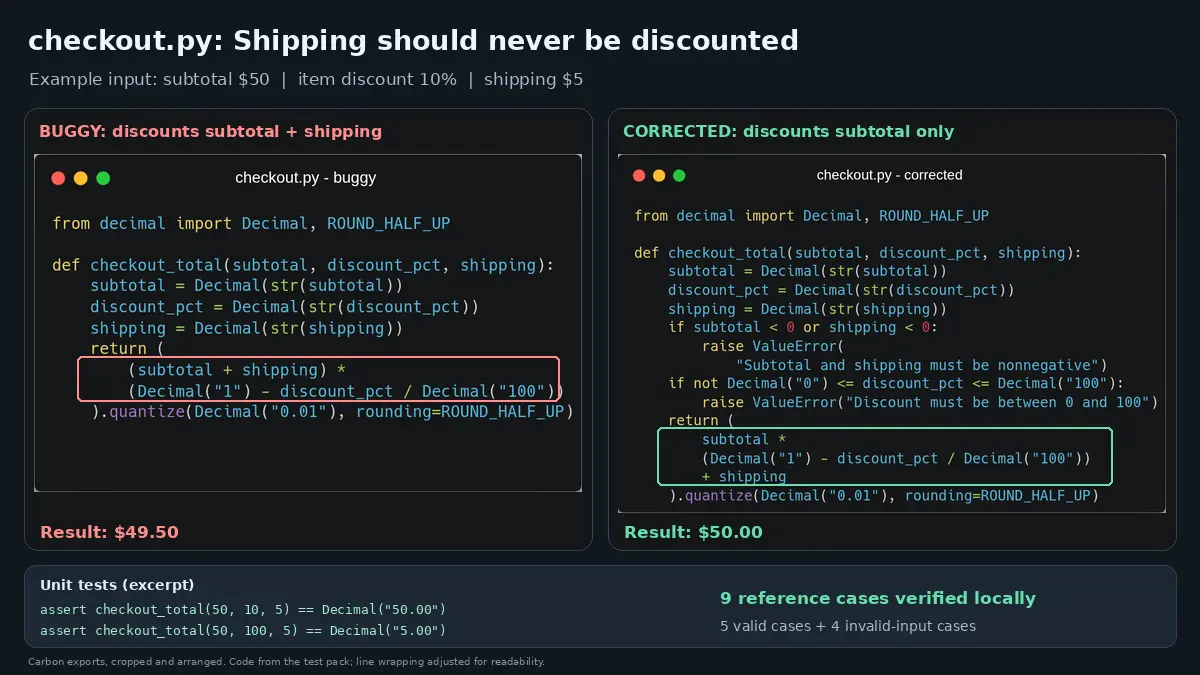
Ask each tool to fix the function while preserving its interface. Check a no-discount order, a 100% discount, an empty cart, rounding, and invalid inputs. The correct code should still charge shipping when the item discount is 100%.
Compare the patch and executable results. This exercise checks a small repair; it does not establish which tool handles a large production repository better.
Research, document summaries, and data analysis
Claude vs Gemini for research
Both Claude and Gemini can help research current information. Claude supports web search and retrieving web pages; Google’s Deep Research can investigate a topic using Google Search and other selected sources. See Claude’s web-search guide and Gemini’s Deep Research guide.
For a broad topic, Gemini’s editable research plan is a useful reason to shortlist it. You can refine the scope before the report is generated. For close reading, give either assistant the exact primary sources you want examined.
For a US marketing team’s subscription comparison, request official prices, billing periods, restrictions, and a supporting link for each fact. Separate promotions from regular prices. Open important sources yourself: a real citation can still fail to support the sentence beside it.
Claude vs Gemini for summarizing documents
Both support file upload and document analysis. Claude accepts common formats including PDFs, DOCX, and CSV; Gemini accepts documents and spreadsheets alongside media. Consult their Claude upload guide and Gemini upload guide for current restrictions.
A context window is the amount of information a model can work with together, measured in tokens. It is separate from the number of megabytes you can upload.
Google currently lists 32,000 tokens for free accounts, 128,000 for AI Plus, and one million for AI Pro and Ultra in its Gemini Apps limits guide. Anthropic lists one-million-token chat windows for several current models on paid plans, including Sonnet 5.5 and Opus 5.5, in its paid-plan context guide.
So I would not choose an AI assistant for long documents using an old “Gemini has five times more context” claim. Compare the actual plan, model, and mode available to you.
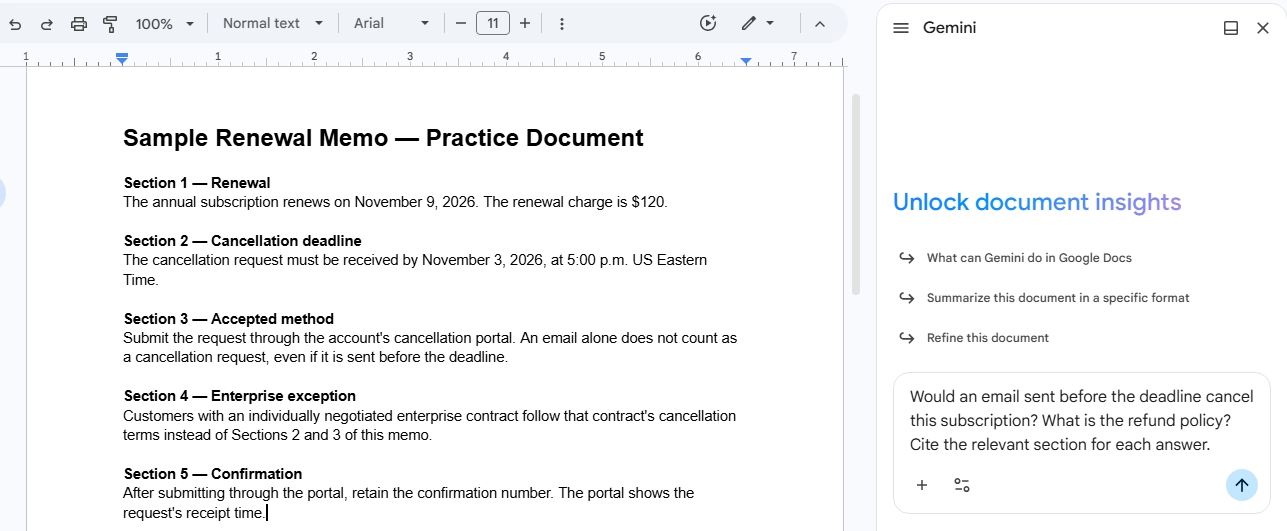
The document exercise uses a fictional renewal memo with a November 3 deadline, a requirement to cancel through a portal, and an exception for individually negotiated enterprise contracts.
Ask: “Would an email sent before the deadline cancel this subscription? What is the refund policy? Cite the relevant section for each answer.”
The reference answers are no, an email does not meet the portal requirement, and the memo does not state a refund policy. That second answer tests whether the assistant can leave a gap unfilled. Check the exception too; a readable summary can still miss it.
Claude vs Gemini for data analysis
Claude can use code execution to analyze uploaded data and create downloadable files. Gemini can create and customize charts from uploaded spreadsheets. Both capabilities are documented in their Claude file-creation guide and Gemini file-analysis guide.
The pack’s nine-row sales CSV contains an exact duplicate, a refunded order, a pending order, and a paid order with a missing amount. The instructions define revenue as unique paid orders with a known amount.
The checked reference total is $125, with five eligible orders. Simply adding every supplied amount produces $205. The $80 difference comes from the duplicate, refund, and pending order.
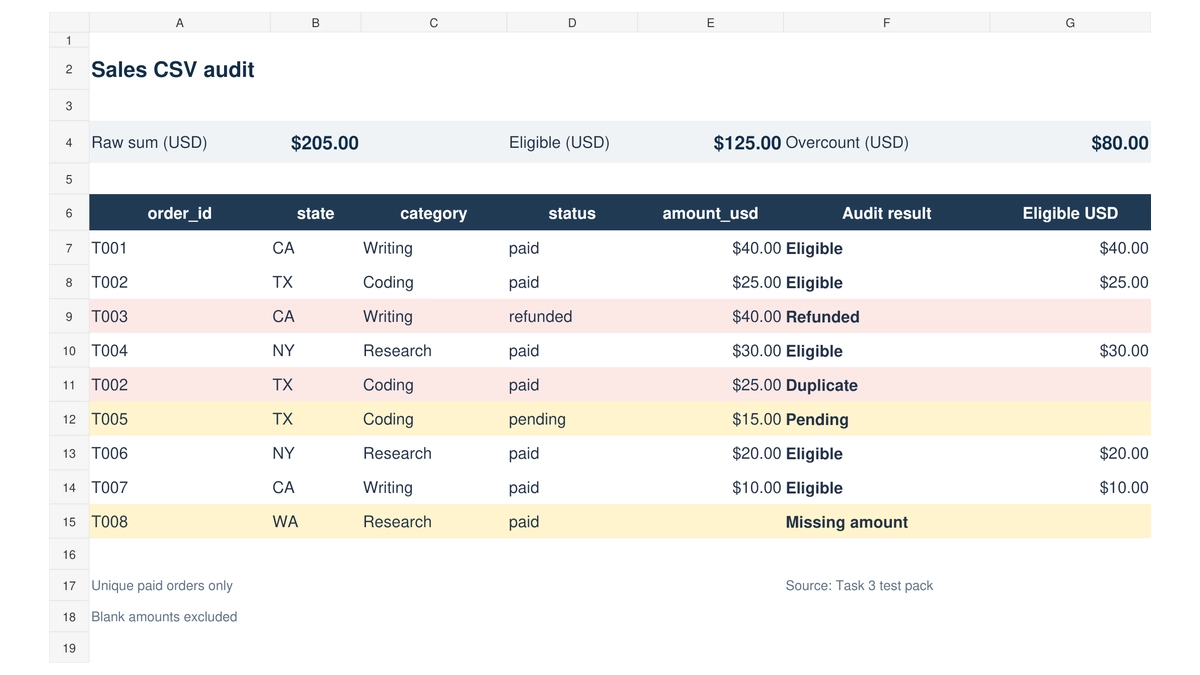
Require an exclusion log before a chart. The missing amount must be flagged rather than silently treated as a known zero. Here, the useful comparison is whether the assistant follows the stated rules and produces an auditable calculation.
Students, business, and everyday use
Claude vs Gemini for students
Gemini is worth trying for structured study support because Google offers Guided Learning, with tutoring and visual aids. Claude is another candidate for discussing a reading, reviewing an argument, or explaining a programming concept.
For either tool, use a prompt such as: “Ask me one question at a time. Wait for my answer, explain my mistake, then give me a similar problem.”
For US students, check whether your school account already includes approved AI access before paying personally. Follow your course’s rules, and verify references against the actual paper or textbook.
Claude vs Gemini for business
Google Workspace integration gives Gemini a clear reason to enter a Google-based team’s shortlist. Its Connected Apps can help with tasks such as summarizing Gmail and creating calendar events, subject to access and permissions.
Claude now has a relevant alternative. Anthropic announced a Google Docs, Sheets, and Slides add-on in public beta for paid plans on October 6, 2026, alongside connectors for working with those files.
Compare the actual actions your team needs, the permissions involved, and how well the integration works in your account.
A personal subscription also differs from an organization-managed service. For shared business files, check administrative controls and your company’s approved data-use terms before choosing seats.
Everyday use, mobile apps, and creative work
Both have mobile options. Gemini deserves a close look for Android-connected tasks; its supported integrations include phone, messaging, and device assistance. Availability depends on the device and account. Claude’s pricing page includes mobile chat access.
For image generation, Gemini is the clearer fit: Google documents creating and editing images directly in Gemini Apps. Claude’s official guidance says it does not generate photos or illustrations in the same way, although it can analyze images and build code-based visuals. See Gemini image generation and Claude image capabilities.
Gemini also documents audio and video uploads. That matters if your question starts with a recording rather than a written transcript. Check the permitted duration and file size for your plan.
Accuracy, privacy, and a practical way to choose
Which is more accurate, Claude or Gemini?
There is no defensible single winner across every model, subject, and task in this guide. Both can produce AI hallucinations: convincing claims that are wrong or unsupported. Google’s privacy and product guidance explicitly notes that Gemini can produce inaccurate information.
For important answers, request sources, check dates, and verify names, numbers, and quoted passages, For calculations, ask for the formula or runnable code and For document answers, require a location you can inspect.
Using both assistants can expose disagreements, but agreement between them is not independent proof. They may repeat the same widely circulated mistake.
Privacy and data use deserve a separate decision
Anthropic’s consumer guidance says chats and coding sessions may be used for improvement when you allow it, with additional provisions for feedback and safety review.
Google’s Privacy Hub explains that Keep Activity affects storage and model improvement. Turning it off changes future data use, but temporary retention and safety processing remain. Some connected features also depend on activity settings.
Check these controls before uploading client information. Remove unnecessary identifying details, and use your employer’s approved account for work that requires organizational protection. Paying for an individual Pro plan does not, by itself, settle the privacy question.
My comparison worksheet: four checkable tasks
The ToolsWorldAI test pack supplies identical inputs and prompts for writing, document questions, data analysis, and a small coding repair. It includes reference answers and a blank results table. Choose the tasks closest to your work.
Start a fresh chat for each assistant. For coding tools, use separate copies of the same starting files. Record the date, product, plan, visible model, thinking settings, and tools enabled. Keep both complete responses, including follow-up corrections. Repeat a surprising result once.
Use this scoring rule for each task:
| Criterion | 0 points | 1 point | 2 points |
|---|---|---|---|
| Correctness | Important error | Minor error | Meets the checked facts or tests |
| Instructions | Main rule ignored | Small deviation | All requirements followed |
| Completeness | Key answer missing | Partial coverage | Requested work completed |
| Traceability | Unsupported assertion | Partial evidence | Inspectable evidence or calculation |
| Usability | Major rework | Some cleanup | Ready after normal review |
Record elapsed response time and cleanup minutes separately. A fast answer with a wrong price or total remains a failed result. These worksheet scores describe your recorded tasks, not an industry benchmark.
If one assistant saves 15 minutes on a task you do four times a week, that is roughly four hours a month. Compare that practical value with the subscription cost, then pay for the difference you can observe.
Frequently asked questions
Is Claude better than Gemini?
I would start with Claude for focused editing and repository-based coding, and Gemini for Google-centered productivity and image generation. Your plan, model, and actual tasks determine which is better for you.
Is Gemini better than Claude for coding?
There is no universal winner. Compare Gemini CLI and Claude Code on the same project, or compare their chats on the same programming question. Check working behavior, explanation quality, and test results before choosing.
Is Gemini free to use, and is Claude free too?
Yes, both offer free access with limits. Google’s current guide lists free Gemini chats as Auto or Flash-Lite, with conditional routing under Auto. Claude also offers a free plan. Paid subscriptions expand access and capabilities.
Can Claude search the web?
Yes. Claude supports web search for current information and can retrieve web pages. Availability and controls can depend on the model or organization settings. Review the linked sources rather than assuming every sourced answer is correct.
Can I use Claude and Gemini together?
Yes. You can use one for drafting and the other to challenge assumptions or suggest missing questions. Keep checking original sources, and remember that using two services also shares your inputs with two providers.
My final recommendation
Choose Claude first if your main work is sustained editing or development and its tools match that routine. Choose Gemini first if Google app features, storage, image generation, or media uploads will earn their place in your week.
Start free, identify the limitation that matters, and upgrade one assistant for a month before making a longer commitment.
Download the ToolsWorldAI comparison test pack, run the tasks closest to your work, and keep the outputs. If writing is your main use case, read our related guide to choosing AI writing tools and apply its advice to a draft of your own.