What Is Stable Diffusion? A Beginner-Friendly Guide to How It Works

If you have spent any time exploring AI image generators, you have probably come across the name Stable Diffusion.
At first, I found the name slightly confusing. It sounds more like a scientific process than a tool for creating artwork. But the basic idea is much simpler: you describe an image you want, and an AI model builds a new image based on that description.
What makes Stable Diffusion different from many other AI image generators is what happens behind the scenes. Instead of being limited to one website or app, Stable Diffusion models can be downloaded, customized, fine-tuned and, with suitable hardware, run on your own computer.
That flexibility is a big reason Stable Diffusion became so important in the generative AI world.
Stable Diffusion is a family of generative AI image models that can create and modify images from text prompts and other visual inputs. It is especially popular because its model weights are available for self-hosting, giving users much more control over how and where the AI runs.
As of September 2026, Stability AI describes Stable Diffusion 3.5 as its most powerful Stable Diffusion image-model family. It includes Large, Large Turbo and Medium versions aimed at different balances of image quality, speed and hardware requirements.
In this guide, I’ll explain what Stable Diffusion actually is, how it turns words into images, who created it, what you can use it for and how it compares with tools such as Midjourney and DALL·E.
How Does Stable Diffusion Work?
Stable Diffusion works through a process called diffusion, where an AI model gradually removes random visual noise to create an image that matches a text prompt. Much of this process happens inside a compressed representation called latent space, which makes image generation more computationally efficient.
You don’t need to understand machine learning to use Stable Diffusion, but knowing the basic idea makes the technology much less mysterious.
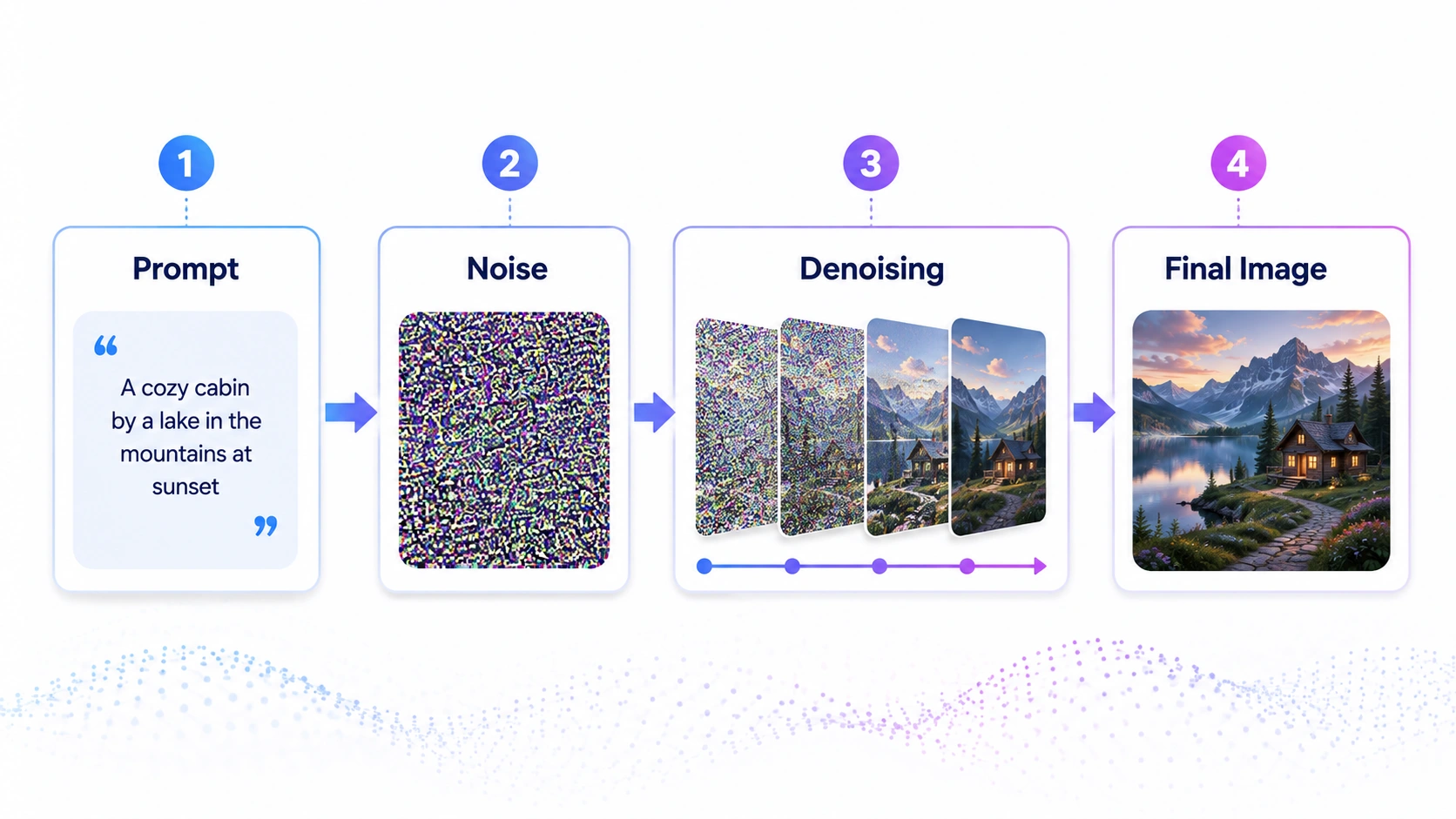
The easiest way I think about it is to imagine an old television showing random static. At first, there is no recognizable picture. Then, step by step, shapes begin to appear. A rough outline becomes a mountain, then a lake, trees, lighting and smaller details.
That isn’t a literal frame-by-frame description of everything happening inside the model, but it is a useful way to understand the denoising process.
Step 1: You describe the image
Suppose you enter this prompt:
“A small wooden cabin beside a mountain lake at sunrise, realistic photography, soft mist, warm golden light.”
Stable Diffusion first has to interpret concepts such as wooden cabin, mountain lake, sunrise, photography and warm light.
The text is converted into numerical representations that the model can use while generating the image.
Step 2: Generation begins with noise
Instead of starting with a blank white canvas and drawing objects one by one, a typical Stable Diffusion text-to-image generation begins with random noise.
At this stage, the image looks nothing like the cabin you requested.
Step 3: The model gradually removes the noise
Over multiple sampling steps, the model predicts how that noise should change based on your prompt.
The random pattern slowly develops structure. Large shapes appear first, followed by composition, textures, lighting and finer visual details.
This gradual denoising process is where the term diffusion comes from.
Step 4: Much of the work happens in latent space
The especially important idea behind Stable Diffusion is latent diffusion.
Rather than repeatedly processing every full-resolution pixel, the model can perform much of its work within a smaller, compressed mathematical representation known as latent space.
A simple analogy is editing a compact blueprint of an image before converting that blueprint into the final picture.
This approach helped make high-quality diffusion-based image generation considerably more practical on available computing hardware.
Once the denoising process is complete, the resulting latent representation is decoded into the final image you see.
Newer Stable Diffusion generations have evolved beyond the exact architecture used by the original model. For example, Stable Diffusion 3 introduced a Multimodal Diffusion Transformer, or MMDiT, architecture designed to improve the way text and visual information are processed together.
You don’t need to remember those architecture names to use the tool. The important takeaway is that Stable Diffusion isn’t simply searching a database and finding an existing picture. It is using learned visual patterns to construct a new output based on your instructions.
Who Created Stable Diffusion? A Brief History
One detail I often see oversimplified online is the claim that Stable Diffusion was simply “created by Stability AI.”
The real story involves several groups.
The underlying Latent Diffusion Model research was developed by Robin Rombach, Andreas Blattmann, Dominik Lorenz, Patrick Esser and Björn Ommer. Their paper, High-Resolution Image Synthesis With Latent Diffusion Models, appeared at CVPR in 2022.
The original Stable Diffusion release grew from that work through collaboration involving the CompVis research group, Stability AI and Runway, with support from organizations and communities including LAION. Stability AI’s own original announcement specifically credited Patrick Esser and Robin Rombach with leading the development based on the earlier latent-diffusion research.
Stable Diffusion was publicly released in August 2022, and the availability of its model weights helped developers begin building interfaces, extensions, fine-tunes and specialized workflows around it remarkably quickly.
Major generations followed, including:
- Stable Diffusion 1.x in 2022
- Stable Diffusion 2.x later in 2022
- Stable Diffusion XL, commonly called SDXL, in 2023
- Stable Diffusion 3 in 2024
- Stable Diffusion 3.5 later in 2024
As of September 2026, Stability AI continues to list the Stable Diffusion 3.5 family among its current core image models.
For me, Stable Diffusion’s biggest historical contribution isn’t simply that it created good AI pictures. It helped turn AI image generation into something people could build around, rather than something they could access only through a company’s website.
What Can You Use Stable Diffusion For?
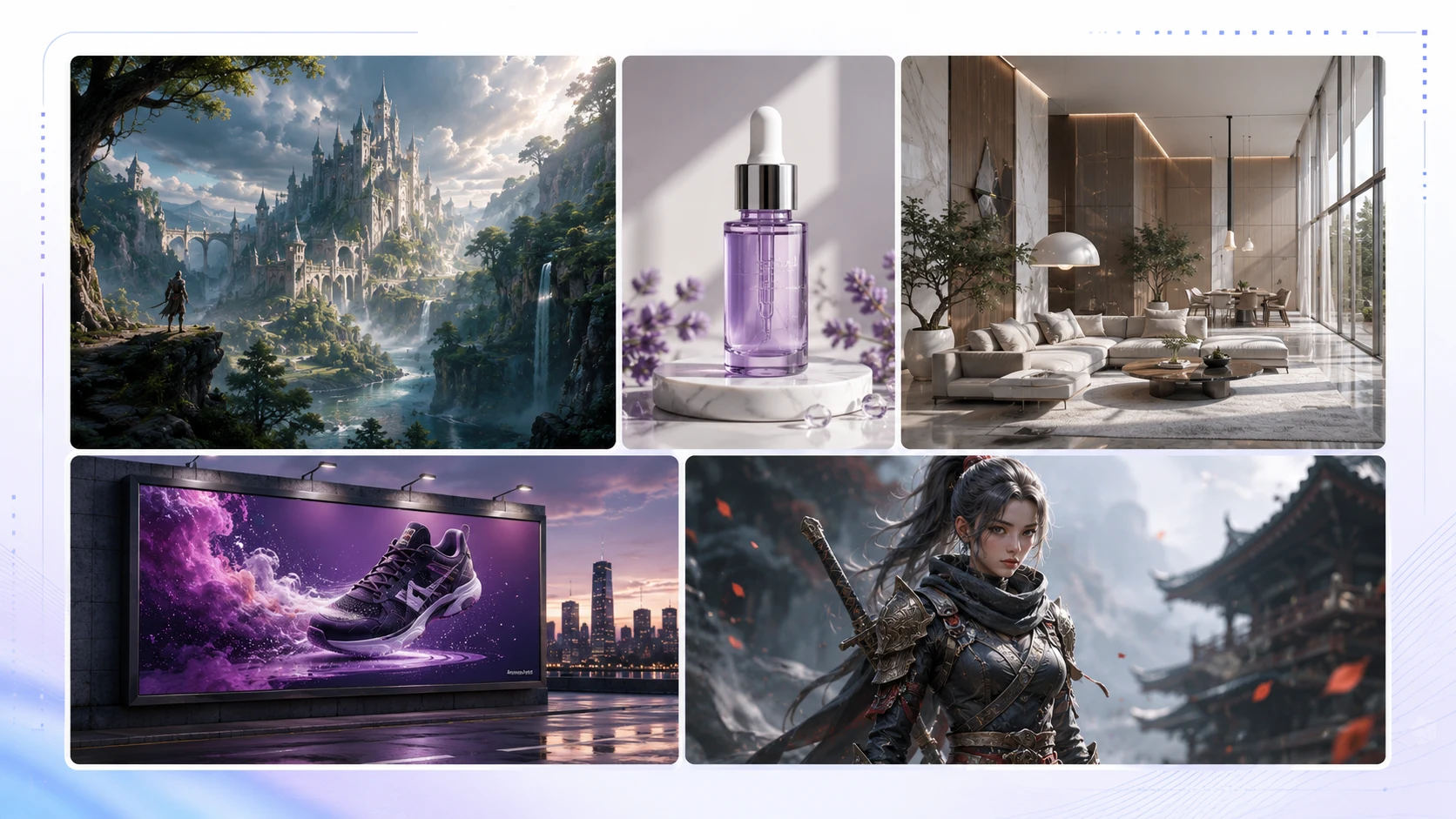
Stable Diffusion can do much more than generate random AI artwork.
Here are some of the use cases I think make the technology easiest to understand.
Creating original images from text
Text-to-image generation is the obvious starting point.
You could ask for:
- a realistic product scene
- fantasy concept art
- an illustrated children’s-book setting
- a futuristic city
- website artwork
- social-media visuals
- character concepts
- interior design inspiration
For example, instead of searching stock-photo libraries for “a futuristic home office overlooking New York at night,” you can generate different interpretations of the concept.
Turning one image into another
Stable Diffusion workflows can also use an existing image as input.
This makes it possible to preserve parts of a composition while changing its style, atmosphere or visual details.
A rough sketch, for example, can become the starting point for a more detailed illustration.
Inpainting and selective editing
Inpainting means changing a specific part of an image rather than regenerating everything.
Imagine you’ve created a product mockup and like everything except the background. You could mask that area and generate a replacement while keeping more of the original image intact.
Building consistent creative workflows
Stable Diffusion has developed a large ecosystem around fine-tuning, LoRAs, ControlNets and other control methods.
That matters when basic prompting isn’t enough.
A game designer may want multiple images following the same visual direction. A product team might need more control over composition. An illustrator may want to adapt a model toward a particular type of artwork.
This is the area where Stable Diffusion becomes more interesting to me than a simple “type a prompt and get an image” website.
You gain more control, but that control comes with a learning curve.
Marketing and business content
Businesses can use AI-generated imagery for concepts such as ad mockups, social posts, storyboards, presentation visuals and early creative exploration.
There is an important distinction for U.S. creators, though: having permission under a model’s license to use an output commercially is not the same thing as automatically receiving copyright protection for that output.
The U.S. Copyright Office has said that purely AI-generated material is not protected by copyright, while human-created expression, creative modifications and certain human arrangements can still qualify. Prompting alone does not automatically establish sufficient human authorship.
So if you’re using Stable Diffusion professionally in the United States, I would treat licensing, copyright and originality as separate questions rather than assuming “commercial use allowed” answers all three.
Stable Diffusion vs Midjourney vs DALL-E
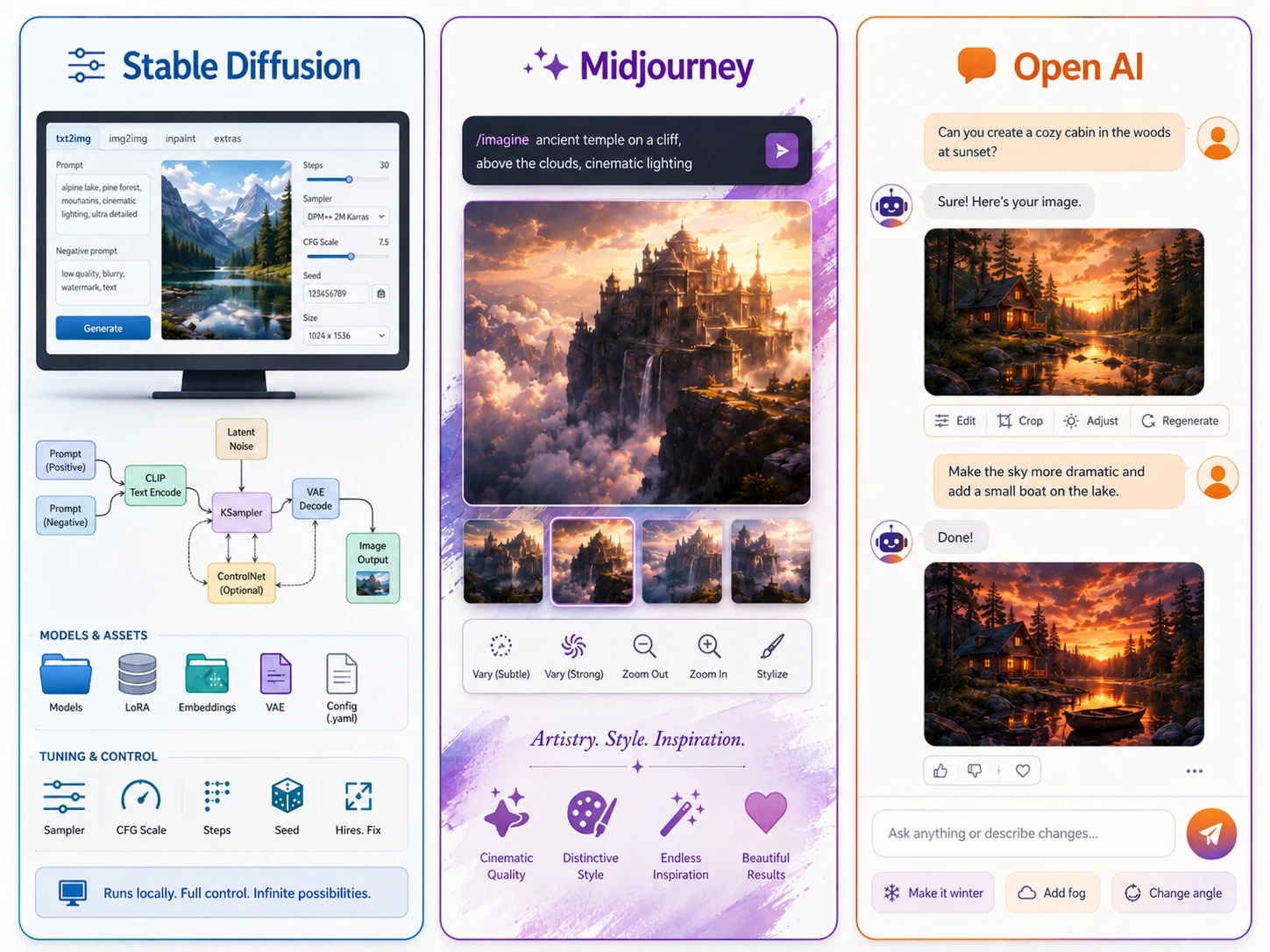
Choosing between AI image generators becomes much easier when you stop asking which one is “best” and instead ask which one fits your workflow.
Here’s the practical difference.
| Feature | Stable Diffusion | Midjourney | DALL·E / OpenAI Images |
|---|---|---|---|
| Best suited for | Control and customization | Polished creative imagery and simple generation | Conversational generation and editing |
| Can run locally? | Yes, depending on model and hardware | No | No |
| Model customization | Extensive | Limited compared with Stable Diffusion | Limited compared with Stable Diffusion |
| Beginner friendliness | Moderate | High | High |
| Fine-tuning ecosystem | Strong | Not comparable to local SD ecosystem | More controlled platform |
| Web interface available | Through Stability/third parties and community tools | Yes | Yes |
| Technical setup required | Optional, but local use can be technical | Minimal | Minimal |
Stable Diffusion
I would lean toward Stable Diffusion when control matters more than convenience.
It is particularly appealing if you want to self-host models, experiment with custom workflows, use community tools or understand what is happening underneath your image-generation setup.
The trade-off is complexity. A locally installed Stable Diffusion workflow can involve model files, GPU memory, samplers, inference settings, nodes, extensions and other terminology a beginner has never seen before.
Midjourney
Midjourney generally removes more of that technical friction.
You provide creative instructions and let the service manage the underlying infrastructure.
It is especially attractive when you want visually impressive results quickly without maintaining your own models.
One correction worth knowing if you’ve read older comparisons: Midjourney is no longer a Discord-only experience. Its current subscription experience supports creating images both through Midjourney’s website and Discord, with some tools being web-exclusive.
DALL·E and OpenAI Images
DALL·E helped popularize text-to-image generation, particularly DALL·E 2 and DALL·E 3.
But a 2026 article needs an important update: DALL·E is now a legacy OpenAI image-generation technology rather than the company’s primary current image experience.
OpenAI retired the official DALL·E GPT from ChatGPT on August 30, 2026, and DALL·E 3 has been deprecated in the API in favor of newer GPT Image models. ChatGPT’s current Images experience uses newer image-generation systems.
So when comparing products today, I’d think of the real decision as:
Stable Diffusion vs Midjourney vs ChatGPT/OpenAI Images, with DALL·E included mainly because so many people still search for it by name.
If I wanted deep customization, I’d choose Stable Diffusion.
If I wanted a streamlined artistic workflow, I’d look closely at Midjourney.
If I wanted to generate and edit images conversationally while already working inside ChatGPT, OpenAI’s current Images experience would be the more natural comparison.
Is Stable Diffusion Free and Open Source?
This question deserves more nuance than a simple yes.
Is Stable Diffusion free?
For many users, yes.
Stability AI’s Community License allows individuals, researchers, creators and qualifying organizations to use covered core models without paying Stability AI licensing fees.
For commercial use, the current threshold is based on annual revenue. Businesses and creators with less than $1 million in annual revenue can generally use covered Core Models under the Community License without a paid Enterprise License. Organizations exceeding that threshold that use the models commercially need to look at Stability AI’s Enterprise licensing terms.
That doesn’t mean using Stable Diffusion always costs nothing.
You may still pay for:
- cloud GPU time
- a hosted Stable Diffusion service
- API usage
- third-party applications
- suitable computer hardware
- commercial tools built around the models
Running a model on hardware you already own can remove per-image platform fees, but electricity and hardware are still real costs.
Is Stable Diffusion open source?
You’ll often hear Stable Diffusion described casually as open source, including in Stability AI’s own broader messaging.
I think open-weight or open-model ecosystem is often more precise when discussing current releases.
The current Stable Diffusion 3.5 weights can be downloaded and self-hosted, and users have substantial freedom to customize them. But they are distributed under Stability AI’s Community License rather than an unrestricted traditional software open-source license. That license includes conditions and commercial thresholds.
That distinction probably won’t matter to someone making personal artwork at home.
It matters much more if you’re building a commercial product around the model.
How to Get Started With Stable Diffusion
My Stable Diffusion test
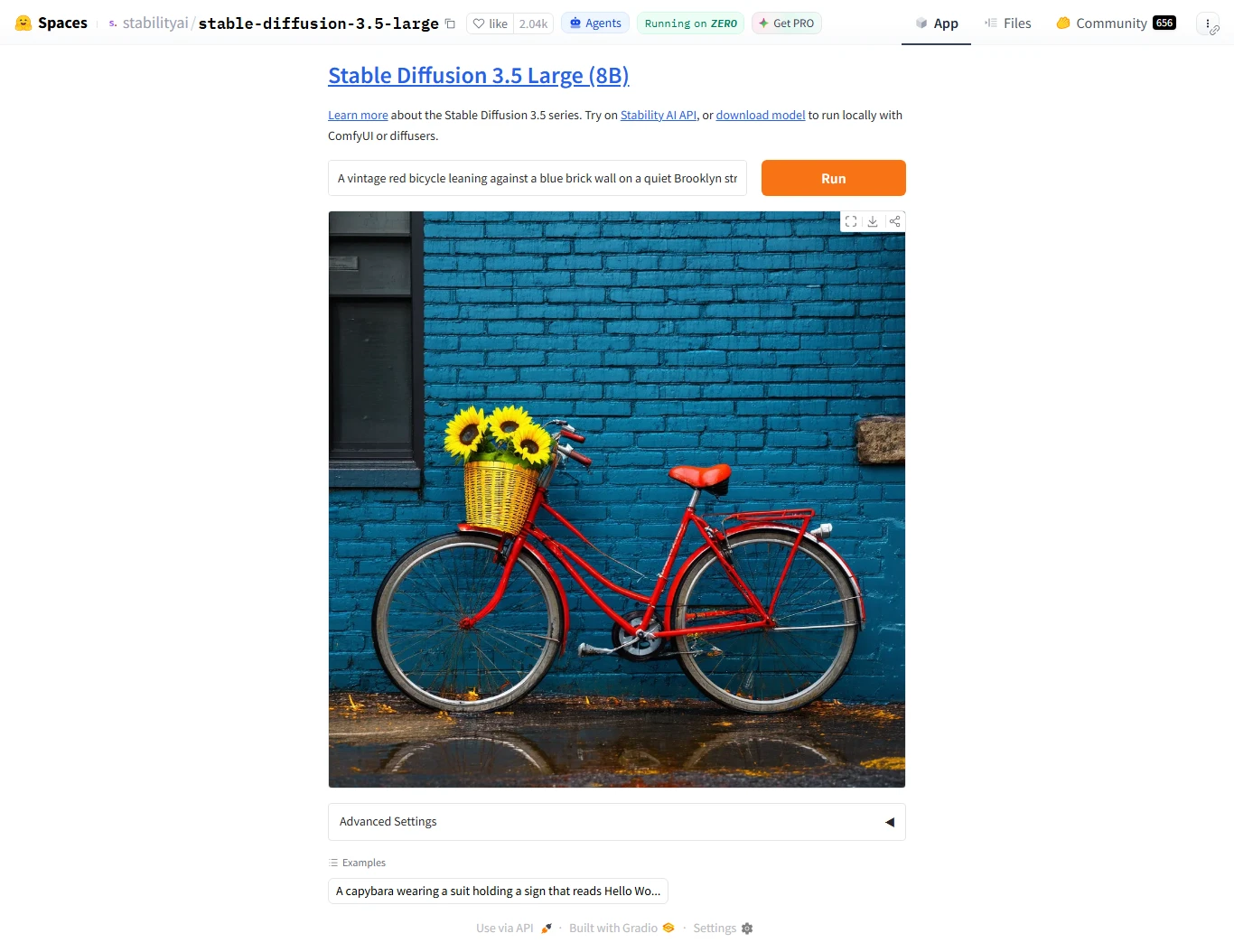
The easiest way to begin depends on how technical you want to get.
I would divide the options into two paths.
Option 1: Use a hosted Stable Diffusion service
This is the easiest route for a beginner.
A hosted service handles the model and GPU infrastructure for you. You enter a prompt, choose your settings and generate an image through a web interface or API.
This is where I’d start if your goal is simply to understand what Stable Diffusion can do.
You can focus on prompting before worrying about model files and graphics-card memory.
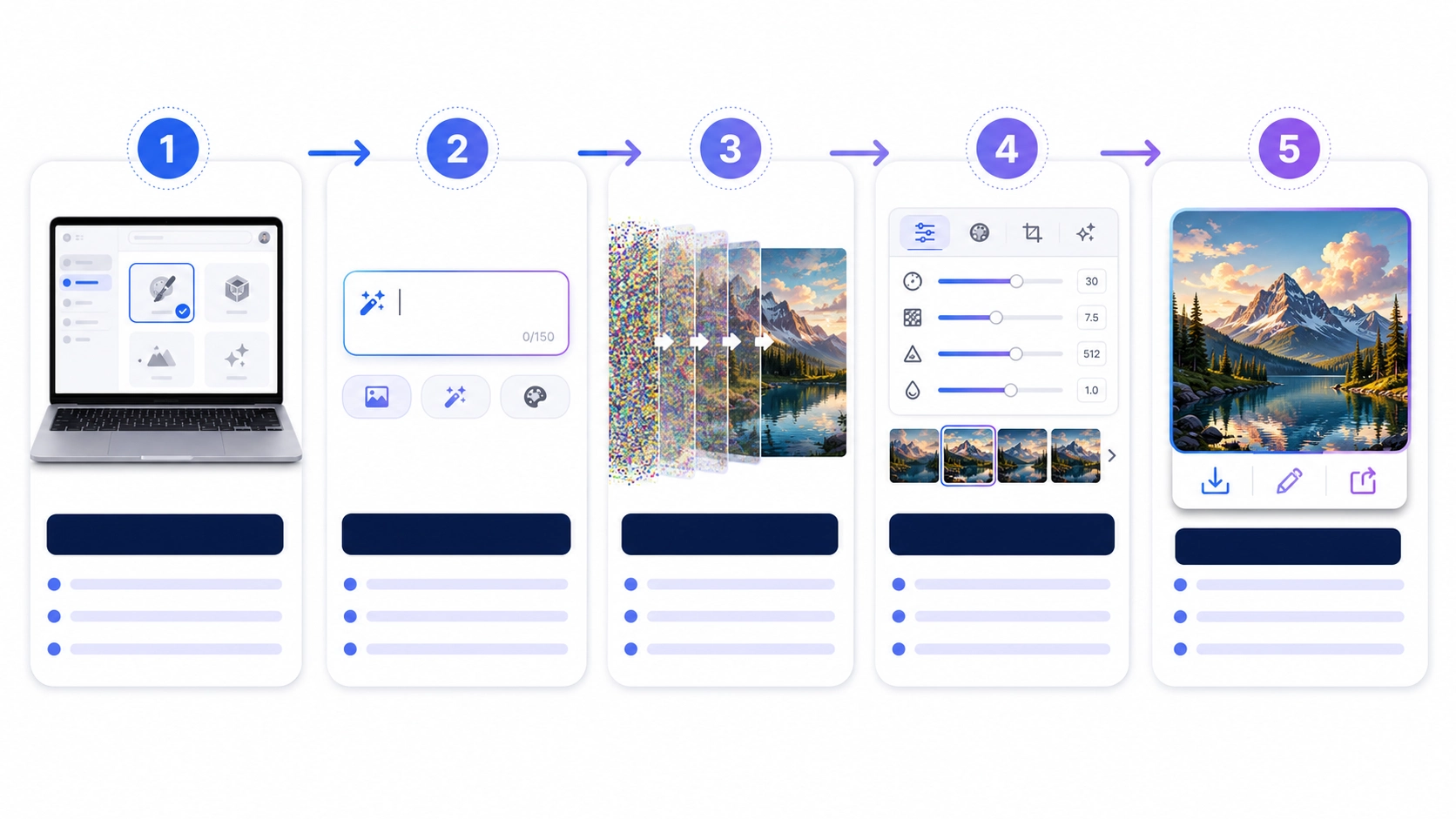
Option 2: Run Stable Diffusion locally
Local installation is where you gain much more control.
Popular community interfaces and workflow tools can provide a graphical environment for managing Stable Diffusion models instead of forcing you to work directly with Python code.
Two names you’ll frequently encounter are ComfyUI and AUTOMATIC1111’s Stable Diffusion WebUI.
ComfyUI is particularly popular for node-based workflows, where individual stages of generation are connected visually. That flexibility is powerful, although the interface can look intimidating the first time you open it.
The exact hardware requirements depend heavily on the model, resolution, optimizations and interface you’re using. Stable Diffusion 3.5 Medium is specifically positioned by Stability AI as a version designed to work on consumer hardware, while Large requires more resources.
Stability AI has also worked on optimized SD 3.5 versions for NVIDIA RTX hardware. In published TensorRT tests, memory requirements for SD 3.5 Large were reduced substantially compared with the base PyTorch implementation.
My suggested beginner workflow
If I were learning Stable Diffusion from zero today, I wouldn’t immediately install ten models and twenty extensions.
I would:
- Try a hosted version first to understand prompts and generation.
- Generate the same concept several times and see how prompt wording changes the result.
- Experiment with image-to-image or editing.
- Move to local Stable Diffusion only when I have a reason for the extra control.
- Learn advanced tools such as LoRAs, ControlNet or node-based workflows one at a time.
That approach makes the learning curve much less frustrating.
Frequently Asked Questions About Stable Diffusion
What is Stable Diffusion in simple terms?
Stable Diffusion is an AI image-generation model that can create images based on written instructions. You describe what you want, and the model gradually converts random noise into a visual that matches your prompt. It can also be used in workflows for editing and transforming existing images.
Is Stable Diffusion completely free?
Stable Diffusion can be free to self-host for many individual and small-business users under Stability AI’s applicable license, but that doesn’t mean every way of using it is free. Hosted websites, APIs, cloud GPUs and third-party apps may charge for access. Current commercial licensing also changes for organizations above Stability AI’s revenue threshold.
Can Stable Diffusion run on my computer?
Yes. One of Stable Diffusion’s biggest advantages is that compatible models can be run locally. Whether your computer can run a particular version comfortably depends on factors such as your GPU, available VRAM, model size, resolution and optimization method.
Is Stable Diffusion better than Midjourney?
Neither is better for everyone. Stable Diffusion gives you more control, customization and self-hosting possibilities. Midjourney provides a more managed experience and is easier for many people who simply want to generate polished creative images without dealing with local model setup.
Can I use Stable Diffusion images commercially?
Many users can use outputs commercially under Stability AI’s current licensing terms, but you should check the license covering the exact model you’re using. If you’re in the United States, also remember that permission to use an AI-generated image commercially and eligibility for U.S. copyright protection are separate issues.
Final Thoughts: Is Stable Diffusion Worth Learning?
Stable Diffusion matters because it gives creators something many AI image generators don’t: choice over how deeply they want to control the technology.
You can use it through a hosted service and keep things simple, or you can go much deeper—running models yourself, changing workflows, experimenting with fine-tunes and building image-generation systems around your own needs.
That freedom is also its biggest drawback.
If you want to type one sentence and get an attractive image with almost no setup, Stable Diffusion may feel unnecessarily complicated compared with tools such as Midjourney or ChatGPT Images.
But if you enjoy experimenting, want local control or plan to build more customized AI image workflows, Stable Diffusion is still one of the most important image-generation ecosystems to understand.
For beginners, my advice is simple: don’t start with the complicated part. Generate a few images first, learn how prompts affect the output, and only move into models, LoRAs and advanced workflows when you actually need them.