7 Best AI Tools for Students in 2026: Free Picks & Paid Upgrades
Start with one problem you need to solve, then add tools only when a free plan stops being enough. Image created with AI.
By M. Zaid Imran | ToolsWorldAI Pricing and features checked: October 15, 2026. Prices below are in USD; taxes and checkout offers may vary.
You have a chapter to read, an assignment due tomorrow, and a study app offering to turn everything into a summary. The summary looks useful. But could you explain the topic if your professor asked you about it?
That is the question I would use to choose an AI study tool.
My starting recommendation is ChatGPT for guided explanations and Gemini Notebook, formerly NotebookLM, for studying your course materials. Add a specialist only when you have a specific need, such as checking calculus, practicing vocabulary, or finding research sources.
This guide compares seven of the best AI tools for students by what they help you do, what their free plans provide, and when paying makes sense. You will also find prompts, realistic study examples, and a simple way to decide whether a subscription earns its place in your budget.
1. Best AI tools for students at a glance
Here is my shortlist for a US student choosing between free and paid options. These are task-based recommendations based on documented features and pricing, rather than a scored hands-on benchmark.
Tool
My recommended use
Free option
Paid option to consider
Main drawback
ChatGPT
Understanding concepts and guided practice
Study mode; tool limits apply
Plus: $20/month
Can give incorrect explanations
Gemini Notebook, formerly NotebookLM
Studying assigned readings and notes
Standard: 100 notebooks, 50 sources per notebook
Higher limits through Google AI plans; Pro is $19.99/month
Incomplete sources can produce incomplete coverage
Claude
Feedback on essays and arguments
Free plan with usage limits
Pro: $20 monthly or $200 annually
Fluent feedback still needs judgment
Perplexity
Finding sources and exploring research questions
Basic search; limited advanced features
Education Pro: $10/month with verification; standard Pro: $20/month
A citation may not support the surrounding claim
Quizlet
Flashcards and exam practice
Basic access and some AI features
Plus: $35.99/year; Plus Unlimited: $44.99/year on the checked offer
An annual price divided by twelve is not a monthly payment option. For example, the listed Wolfram student plan charges $60 for the year. Check the total due, renewal date, and cancellation terms before subscribing.
How I would choose between these tools
I would look for three things: whether the tool fits the assignment, whether its answers can be checked, and whether its free allowance covers a normal week.
For a history paper, access to evidence matters more than image generation. For algebra, an explanation you can reproduce matters more than a polished paragraph. For exam preparation, being asked a difficult question is often more useful than receiving another page of notes.
The best choice can change from one course to another. You do not need a subscription to every category.
2. AI study tools for explanations and writing feedback
ChatGPT: my first choice for general study support
I would start with ChatGPT when you understand part of a topic but cannot connect the steps. It suits questions such as “Why does this formula apply here?” or “Where did my reasoning go wrong?”
ChatGPT study mode is available across plans. It can guide you with questions, break down concepts, and check understanding. Free users also have access to tools such as file uploads, although separate limits apply. Plus costs $20 per month and provides expanded access.
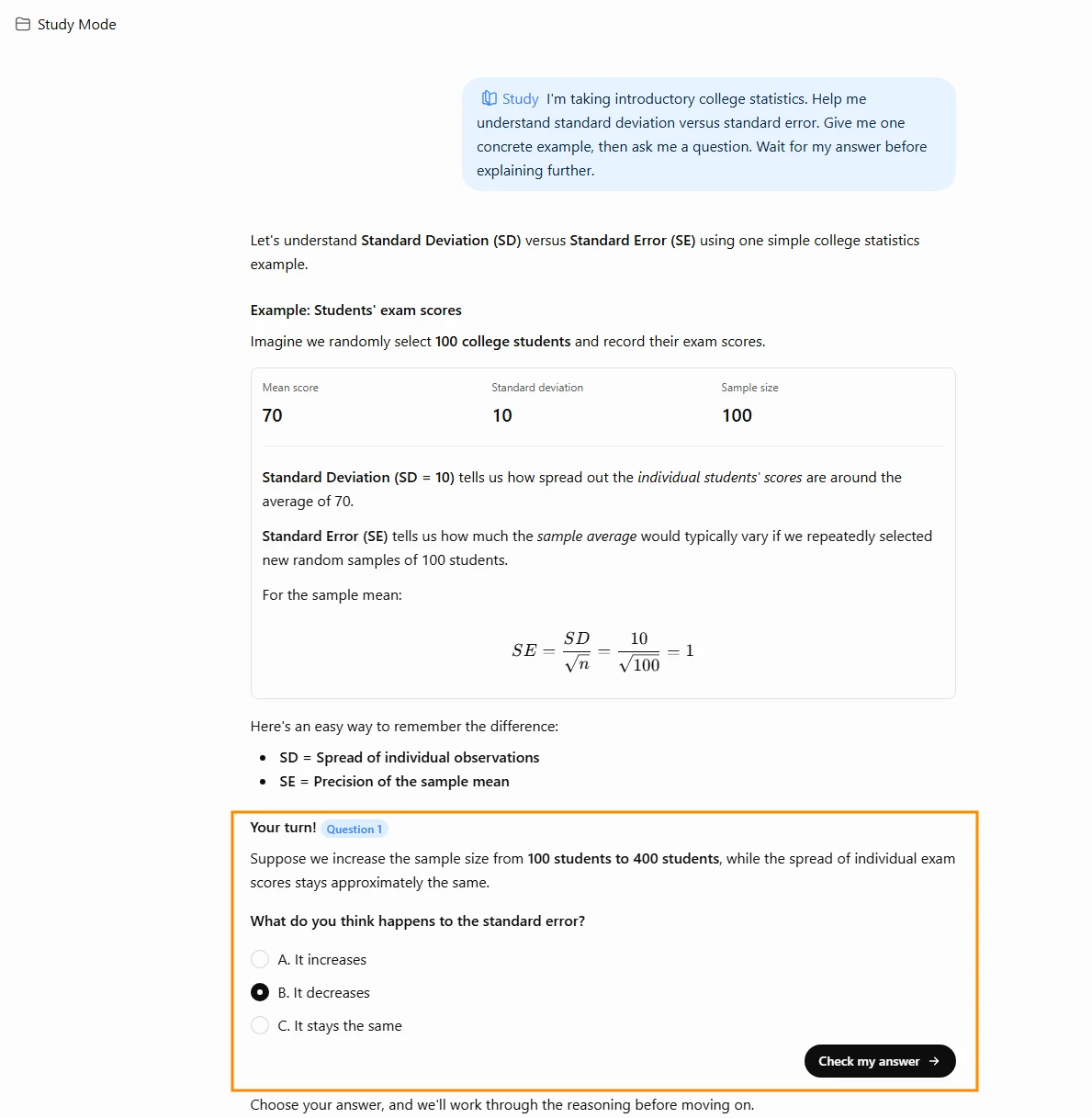
Imagine you are studying introductory statistics and keep mixing up standard deviation and standard error. Asking for both definitions may give you something to memorize. A better prompt asks you to work with the difference:
“I’m taking introductory college statistics. Help me understand standard deviation versus standard error. Give me one concrete example, then ask me a question. Wait for my answer before explaining further.”
ChatGPT study mode asks you a question before explaining further. Screenshot taken October 2026.
Afterward, close the chat and explain the distinction in your own words. If you cannot, ask for a different example and try again.
For programming, paste a small section of your own code and describe the expected result. Ask for the first logical error and a hint before requesting a complete correction. Then run the code yourself.
When I would pay: when upload or other tool limits repeatedly interrupt actual coursework. Start free; a premium plan is unnecessary if your questions already fit within its allowances.
Watch out for: confident errors and answers that use methods your class has not covered. Include the course level and allowed approach in your prompt.
Claude: my shortlist pick for essay feedback
For writing-heavy classes, I would compare Claude with ChatGPT using the same paragraph and rubric. The useful question is which feedback helps you revise with a clear reason.
Claude offers Free and Pro plans. Pro provides more usage and costs $20 when billed monthly or $200 paid annually. Paying for more access does not establish that its feedback is correct.
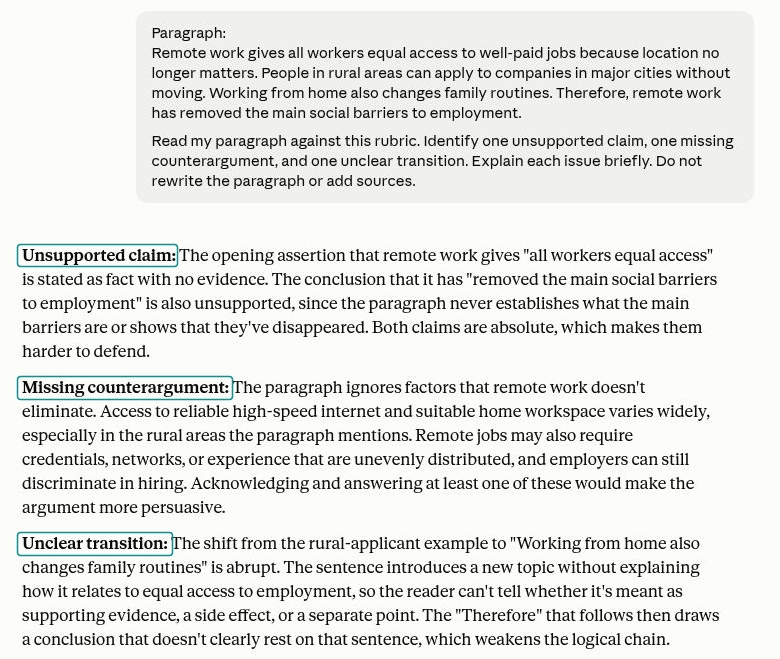
Suppose your sociology essay argues that remote work improves job access. Ask for criticism of the argument before asking for sentence edits:
“Read my paragraph against this rubric. Identify one unsupported claim, one missing counterargument, and one unclear transition. Explain each issue briefly. Do not rewrite the paragraph or add sources.”
Asking for criticism first, not a rewrite, keeps the argument in your own voice. Screenshot taken October 2026.
That gives you a manageable revision task. You can decide whether the criticism fits your evidence and make the change yourself.
I would keep a copy of the original paragraph beside the revision. If the new version sounds more formal but says less, reject the change. The goal is a clearer argument in your voice.
When I would pay: when you consistently prefer its feedback and reach the free limits during substantial reading or writing assignments.
Watch out for: invented references, overconfident interpretations, and suggestions that flatten a deliberate writing style. Supply the relevant passage instead of assuming the tool knows your assigned edition.
3. Best AI tools for course readings and research
Gemini Notebook, formerly NotebookLM: my pick for studying your sources
Its appeal for students is straightforward: you bring the material you need to study. Google documents source-based questions with citations, Audio Overviews, and other study formats. The Standard plan currently allows 100 notebooks with up to 50 sources each.
For a biology midterm, I would create a notebook for the specific exam unit and add permitted lecture slides, my notes, and assigned readings. Keeping the scope narrow makes it easier to spot missing material.
Try this prompt:
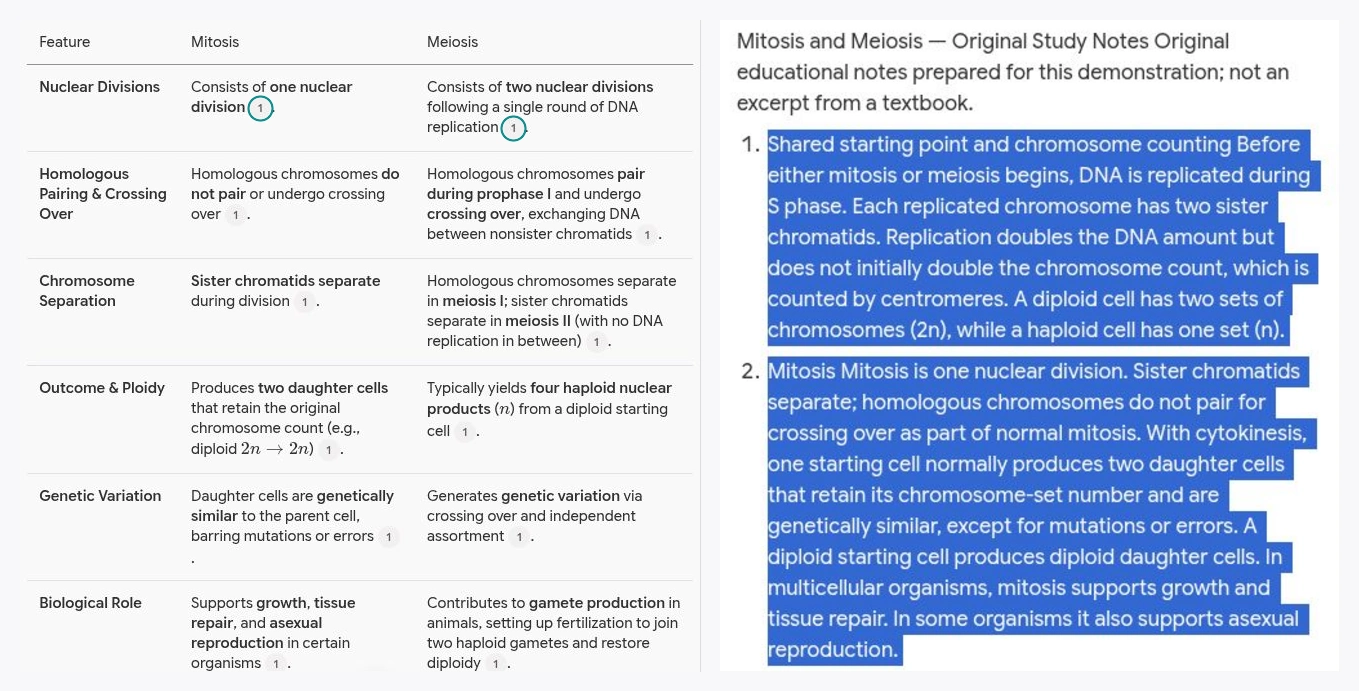
“Using only these sources, compare mitosis and meiosis. Cite the supporting passages. Then ask five application questions without showing the answers. Flag anything my sources do not explain.”
Open the citations and check the original passages, particularly when a summary simplifies a definition. If your instructor uses specific terminology, make sure the study questions preserve it.
Each numbered citation points back to your source notes. Open them and check the original wording. Source passage highlighted for emphasis. Screenshot taken October 2026.
An Audio Overview can help you revisit material during a commute. Follow it with a short written recall exercise so you can see what you actually remember.
When I would pay: when the free source or generation limits are a recurring obstacle. Higher allowances come through qualifying Google plans, including Google AI Pro at $19.99 per month; check school access and student offers first.
Watch out for: missing readings, poor scans, and source passages taken out of context. A tool working from your documents still needs your review.
Perplexity: my pick for finding a research starting point
Perplexity is useful when you need to locate material beyond your course notes. Its search answers include links to sources, making it a starting point for investigating a topic.
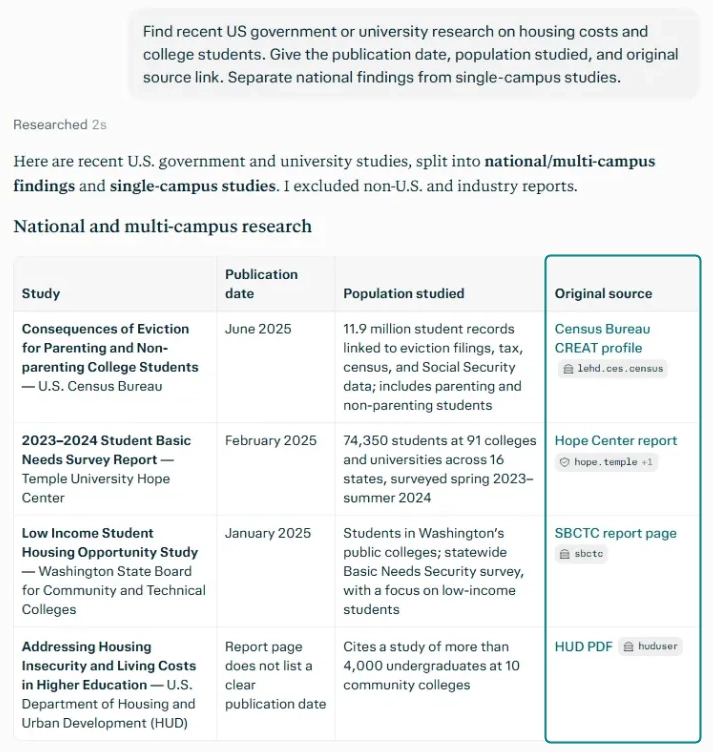
For example, a US economics assignment might ask how housing costs affect students. I would narrow the search before asking for an explanation:
“Find recent US government or university research on housing costs and college students. Give the publication date, population studied, and original source link. Separate national findings from single-campus studies.”
Perplexity links its sources. Open each one and check the evidence before citing it. Screenshot taken October 2026.
Then open the sources. Check whether each finding concerns undergraduates, graduate students, or the general population. A statistic can be accurate and still be wrong for your argument.
Use your university library to find full papers when necessary. Record the author, title, publication details, and page number from the original document. Cite that source in your assignment rather than copying an automatically generated bibliography without checking it.
Perplexity’s free plan includes basic searches with limited advanced access. Standard Pro is $20 per month, while Education Pro is listed at $10 per month with SheerID verification.
When I would pay: when research is a frequent part of your coursework and advanced access solves a repeated limitation. Verify education eligibility before buying standard Pro.
Watch out for: citations that are relevant to the topic but do not support the exact sentence. Always read the evidence around the quoted finding.
4. Specialist AI tools for revision, math, and proofreading
Quizlet: my pick for flashcards and practice questions
Quizlet fits subjects where you need repeated practice with terms, distinctions, and short explanations. Its AI study tools can turn notes into flashcards, study guides, and practice tests.
For an anatomy class, I would build a small set around one system, review every generated answer, and remove cards that bundle several facts into one question.
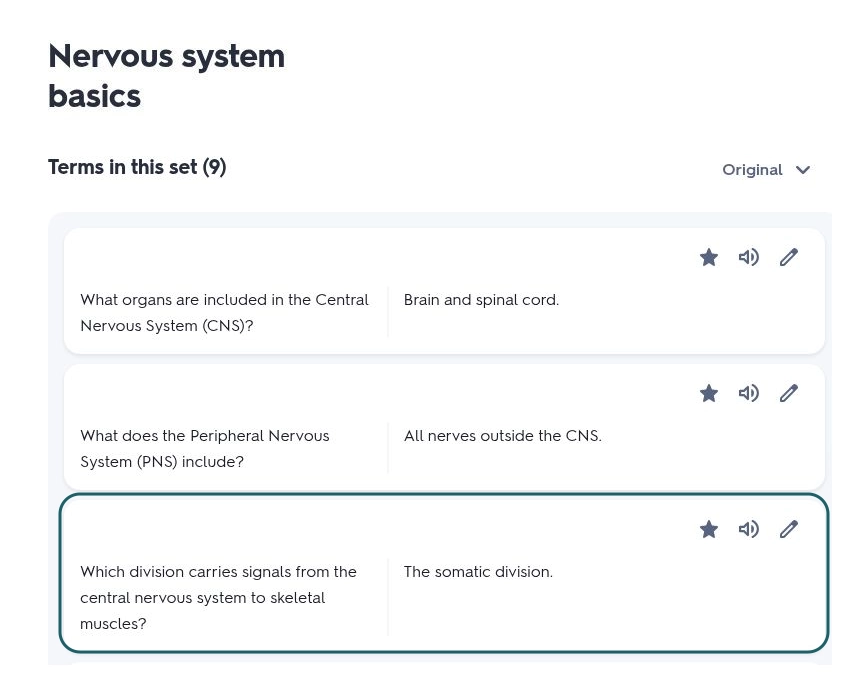
“Explain the nervous system” is too broad for a useful flashcard. “Which division carries signals from the central nervous system to skeletal muscles?” gives you a specific idea to retrieve.
Specific questions make better flashcards than broad prompts like “explain the nervous system.” Screenshot taken October 2026.
Add application questions alongside definitions. For example, ask how a described symptom relates to a structure covered in class, then verify the answer against your textbook.
Quizlet allows free access to some features. On the checked US offer, Plus costs $35.99 annually and Plus Unlimited costs $44.99 annually. The lower tier has allowances for Learn rounds and practice tests; do not assume every paid plan includes unlimited practice.
When I would pay: when you already use it regularly and the specific practice allowance is holding you back.
Watch out for: errors in generated cards and other students’ public sets. A familiar answer can feel correct even when its wording is incomplete.
Wolfram|Alpha: my pick for checking quantitative work
Wolfram|Alpha is a computational tool, so its role here differs from a conversational tutor. I would use it to check calculations and mathematical results, then work through the reasoning independently.
Its free Basic plan does not include step-by-step solutions. Student Pro includes them and is listed at $60 billed annually, equivalent to $5 per month.
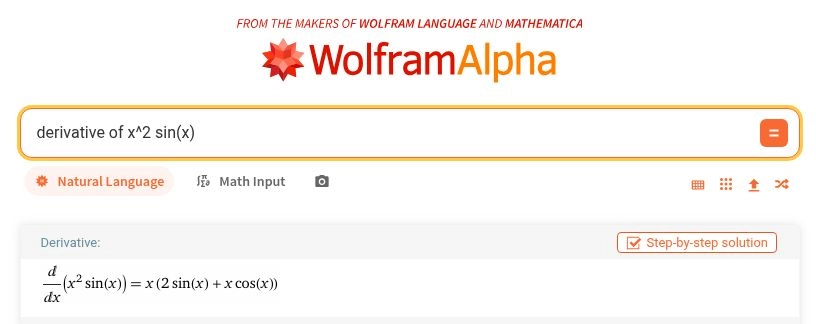
Suppose your calculus problem asks for the derivative of x² sin(x). Work it out on paper first, enter the expression carefully, and compare your result. If they differ, check whether you applied the product rule to both factors.
Work the problem on paper first, then use Wolfram|Alpha to check your answer. Screenshot taken October 2026.
Before trusting any output, confirm that the tool interpreted your input correctly. Parentheses, units, variable assumptions, and degrees versus radians can change the problem.
When I would pay: when step-by-step explanations support several quantitative classes and you regularly need to inspect where your method diverges.
Watch out for: copying a correct result without understanding the method. Practice a similar problem afterward without assistance.
Grammarly: my pick for the final proofreading pass
I would bring Grammarly in after the argument and evidence are settled. It is useful for checking the writing you have already done, especially when you are too familiar with a draft to notice small mistakes.
Grammarly Free includes spelling and grammar help, tone feedback, and 100 AI prompts per month. Pro adds features such as full-sentence rewrites; its listed price is $30 monthly or $12 per month billed annually, totaling $144.
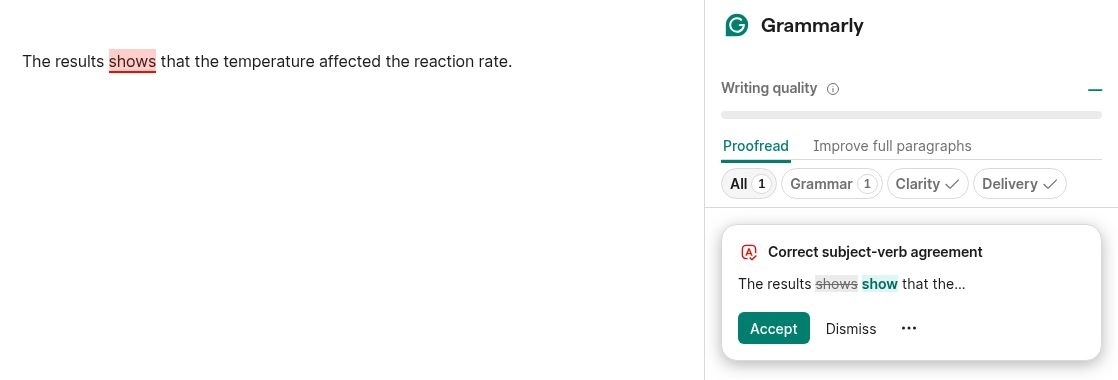
Grammarly Free flags grammar errors like this one. Read each suggestion in context before you accept it. Screenshot taken October 2026.
Read suggestions in context. In a lab report, “the results suggest” and “the results prove” communicate different levels of certainty. A smoother sentence is not automatically a more accurate sentence.
My preferred approach is to review one paragraph at a time and accept only changes I can explain. Keep technical terms that match your discipline, even if a simpler alternative is suggested.
When I would pay: when you write frequently and find the advanced suggestions useful across several assignments. Check whether your university already provides access.
Watch out for: changes to meaning, unnecessary formality, and generative rewrites your instructor has not permitted.
5. How I would build a useful free AI study setup
Start with a small toolkit
For most students, I would begin with one general assistant and one tool for course sources. Add free Grammarly for proofreading or basic Wolfram|Alpha for occasional calculation checks when needed.
Free AI apps can cover a substantial amount of study support, but “free” may mean a limited plan rather than unrestricted access. Many free AI programs also run online; downloading an app does not mean it works offline or keeps files entirely on your device.
Before buying anything, check your university’s IT portal and library software page. You may already have institution-provided access with different features and settings.
Use a repeatable study session
A 30-minute routine that keeps you doing the thinking while AI supports the gaps. Illustration created with AI.
Here is a 30-minute routine I would try with one difficult topic:
Five minutes: write what you understand without looking at your notes.
Ten minutes: ask for help with the specific gap, supplying the relevant course material.
Ten minutes: answer fresh questions or solve a similar problem without assistance.
Five minutes: verify mistakes against your sources and record what needs another review.
Keep a simple error log: the question, your mistake, the corrected explanation, and the supporting page or lecture slide. Bring unresolved questions to office hours.
For a subscription decision, track one week of interruptions. Which limit did you hit? How often? Could the same task be completed with your existing access? Upgrade only when you can name the problem the paid plan solves.
Keep your coursework yours
Read the syllabus and assignment instructions before using AI. If permission is unclear, ask whether explanations, proofreading, brainstorming, or generated text are allowed for that task.
Keep your notes and drafts, and disclose assistance when required. Avoid uploading classmates’ personal information, restricted research, or materials you do not have permission to share.
My final check would be simple: can I explain every claim, calculation, and code block I am submitting? If an answer falls apart under a follow-up question, it needs more work.
6. Frequently asked questions
What is the best AI for students overall?
ChatGPT is my starting recommendation for broad study support because it combines explanations, guided practice, and help across subjects. For studying assigned documents, I would choose Gemini Notebook. The best option depends on your coursework and the features you actually use.
What are the best free AI tools for students?
Start with ChatGPT Free for explanations and Gemini Notebook Standard for course sources. Grammarly Free can support proofreading, while Perplexity offers basic research search. Each has limitations, so check the feature you need before relying on it for a deadline.
Is paying for an AI study tool worth it?
It can be worthwhile when a specific free-plan limit repeatedly interrupts useful work. Try the free version on real coursework first, check university access, and compare the total billing cost. Paying for several overlapping assistants is rarely the best starting point.
Can I use AI for college assignments?
Check the rules for the particular course and assignment. Ask your instructor if they are unclear, and follow any disclosure requirements. Even when assistance is permitted, verify the output and make sure the submitted work reflects your understanding.
Which AI tool is best for math homework?
I would choose Wolfram|Alpha to check calculations and supported step-by-step solutions, and use a conversational tutor for follow-up explanations. Try the problem yourself first, check the input interpretation, and practice another example without help.
7. My recommendation: choose one problem to solve first
The best AI tools for students earn their place by helping you understand, practice, or check something specific. Start with free access, add a specialist only when needed, and pay when a clear limitation justifies the cost.
Choose one difficult topic from this week’s coursework and try the study routine above. Then close the tool and explain what you learned. For help getting started, read the ToolsWorldAI beginner’s guide to ChatGPT and adapt one prompt to your next study session.