Best AI Image Generators in 2026: 7 Tools Compared for Real-World Use
By M. Zaid Imran, ToolsWorldAI
Test records: October 21–22, 2026 · Editorial and source review: October 24, 2026.
ChatGPT Images and Gemini are practical starting points for everyday blog graphics, short promotional text, and simple image edits. Both reproduced my four-line poster accurately and recolored the mug in my editing test. The choice becomes more specific when you need exact object counts, clear space for advertising copy, editable vectors, or particular publishing rights.
For this guide to the best AI image generators, I tested ChatGPT Images with ChatGPT Plus and Gemini with Google AI Pro across five shared task briefs: portraits, poster text, editorial illustrations, product photography, and one mug recoloring. Leonardo AI and Adobe Firefly received two tests each. Ideogram, Recraft, and Midjourney receive research-only coverage; I could not verify the attribution of the images recorded as Ideogram results.
The comparisons below distinguish observed results from documented features, with recommendations limited to the evidence available.
Quick Verdict
- For layouts with exact instructions: I would try ChatGPT Images first based on these examples. Its editorial illustration contained the requested three lines, and its product image kept the right third clear for copy.
- For a short English poster: ChatGPT, Gemini, and Leonardo’s result labeled GPT Image 2 reproduced all four requested text entries correctly.
- For free experimentation: Leonardo is worth exploring. Its confirmed Free-plan poster had accurate wording, but its product image showed a whole lemon and one half instead of two halves. Auto selected different models for the two tasks.
These findings describe the reviewed outputs. They do not establish an overall winner or a repeated success rate. Free access and commercial-use permission are separate checks; review the commercial-use terms before publishing an output.
AI Image Generator Comparison: Prices, Access, and Evidence
| Tool | Evidence in this review | Reason to consider it | Free access and US monthly pricing | Main limitation |
|---|---|---|---|---|
| ChatGPT Images | First-hand tested: five tasks on Plus | Blog illustrations, short poster text, and simple edits | Free access; Plus $20/month. (ChatGPT Plus pricing and billing; ChatGPT image availability) | Image model and exact editing preservation unverified. |
| Gemini | First-hand tested: five tasks with Google AI Pro | Short poster text and simple image edits | Free access; Google AI Pro $19.99/month. (Google’s US AI plans) | Test image model unverified; portrait framing and illustration line counts missed instructions. |
| Leonardo AI | Free-tier tested: two tasks | Exploring image generation without a subscription | Free: 150 Fast Tokens daily; Essential $12/month. (Leonardo pricing and limits) | Auto used different models; the bottle result had the wrong lemon configuration. |
| Adobe Firefly | First-hand tested: two tasks; tier/model unverified | Product-concept images to explore | Limited free daily generations; Standard $9.99/month. (Adobe Firefly plans and model caveats) | The poster contained text errors and an incorrect price. |
| Ideogram | Research-only; test attribution unverified | Documented poster and style controls | Free: 30 credits weekly with Google, Apple, or Microsoft sign-in; Plus $20/month. | Free generations are public. (Ideogram plans and credits; Ideogram model documentation) |
| Recraft | Research-only | Documented editable SVG generation | Free for personal use; Basic $12/month. | Free-generated assets are not licensed for commercial use. (Recraft paid plans; Recraft commercial rights; Recraft vector models) |
| Midjourney | Research-only | Documented style-reference controls | Basic $10/month. | No current website or Discord free trial; performance untested here. (Midjourney plans; Midjourney trial availability; Midjourney Style Reference) |
US web prices checked October 24, 2026. Paid rates shown use monthly billing. Some plans offer annual billing; where available, the monthly equivalent requires a yearly commitment. Taxes may apply. Credits and tokens are not fixed image counts.
How We Tested and Researched These Tools
I evaluated the supplied image exports against their recorded prompts, using the accompanying screenshots to check visible instructions and settings. The records and captures are dated October 21–22, 2026; those dates do not independently authenticate when the images were generated.
Our Test Prompts, Settings, and Evaluation Criteria
The main hands-on comparison is ChatGPT Images vs. Gemini, using ChatGPT Plus and Google AI Pro. Leonardo’s screenshots confirm a Free plan; Firefly’s exact account tier remains unverified.
| Tasks | Tools with completed, attributable tests |
|---|---|
| Portrait, editorial illustration, and mug recoloring | ChatGPT Images and Gemini |
| Poster text and product photography | ChatGPT Images, Gemini, Leonardo AI, and Adobe Firefly |
The shared recorded prompts specified checkable requirements, including four exact poster lines, two lemon halves, three lines beside three bullet dots, and an empty right third for advertising copy. Text checks included capitalization, punctuation, and the ticket price.
These are the exact recorded task briefs, with document line wrapping normalized. They document the intended instructions; they do not establish the complete submission or execution history of every run.
<details> <summary>Recorded photorealistic portrait prompt</summary>
Create a photorealistic image in landscape 4:3 format. Show one adult with short dark hair wearing a plain navy cotton sweater, seated at a light wooden desk beside a window on the viewer's left. Show the person from the waist up. Both hands must be visible, naturally holding one plain white ceramic mug. Place exactly one closed red notebook on the desk to the viewer's right of the person. Use soft daylight from the left, with believable shadows. Show natural skin texture, fabric texture, and realistic ceramic reflections. The scene should look like an ordinary candid photograph. Include no readable text, logos, other people, or additional desk objects.</details> <details> <summary>Recorded promotional poster prompt</summary>
Create a square 1:1 promotional poster with a warm cream background, dark navy lettering, and a simple teal border. Include exactly these four lines of text, once each, in this order, without quotation marks:
FRESH IDEAS
Design Workshop
Saturday, 10 AM
Tickets: $25
Make FRESH IDEAS the largest line. Keep the other three lines clearly readable. Center the text, keep every letter fully inside the frame, and leave a clear margin between the lettering and the border. Include no other words, letters, numbers, logos, or illustrations.
</details> <details> <summary>Recorded editorial illustration prompt</summary>
Create a flat editorial illustration for a technology article about checking AI-generated work. Use a landscape 16:9 composition with a warm cream background. In the left two-thirds, show exactly one open laptop and one separate sheet of paper to the laptop's left. On the paper, show exactly three dark navy circular bullet dots, each beside one short abstract horizontal line. Place one small magnifying glass over the lower-right corner of the paper without covering the bullet dots. Keep the right third completely free of objects for a headline. Use crisp shapes, subtle paper texture, muted teal, dark navy, warm cream, and one small amber accent. Make the objects recognizable at thumbnail size. Include no readable words, letters, numbers, logos, ratings, robots, or human figures.</details> <details> <summary>Recorded product photograph prompt</summary>
Create a photorealistic product photograph in a horizontal 4:3 aspect ratio. Show exactly one unbranded, matte sage-green reusable water bottle with a closed cylindrical cap, standing upright on a cream-colored tabletop. Place the bottle in the left third of the image. Place exactly two lemon halves immediately to its left and one neatly folded white linen napkin immediately to its right. Use a plain, pale-gray background. Soft window light should come from the upper left, creating natural shadows toward the lower right. Keep the right third of the image empty for advertising copy. Show realistic materials and believable proportions. Include no words, logos, people, or additional objects.</details> <details> <summary>Recorded mug recoloring prompt</summary>
Edit the attached photograph. Change only the outside surface of the mug, including its handle, to matte coral red. Keep the mug's shape, size, position, handle geometry, and any visible contents unchanged. Keep the notebook, tabletop, background, camera angle, framing, lighting direction, and all other objects unchanged. Preserve the original aspect ratio. Do not add or remove anything. Return the edited image.</details>
Each observable requirement received 2 for fully satisfied, 1 for partially satisfied, 0 for not satisfied, or N/A when it could not be reliably evaluated. Visual appeal—such as lighting, texture, and composition—was assessed separately. Format checks used the exported pixel dimensions, with a 1% tolerance for the requested width-to-height ratio. Scores were not combined into product totals.
Selected recorded requirement checks
| Observable requirement | ChatGPT | Gemini | Leonardo Free | Firefly* |
|---|---|---|---|---|
| Exact poster entry: Tickets: $25 | 2 | 2 | 2 | 0 |
| Square poster export | 2 | 2 | 2 | 0 |
| Product image contains exactly two lemon halves | 2 | 2 | 1 | 2 |
| Product image leaves the entire right third empty | 2 | 1 | 1 | 1 |
| Illustration has one line per dot, three lines total | 2 | 0 | — | — |
| Portrait follows the recorded waist-up framing | 2 | 1 | — | — |
| Mug exterior becomes coral red | 2 | 2 | — | — |
| Exact mug size and position are preserved | N/A | N/A | — | — |
Firefly’s account tier and image model were not verified. A dash means that task was not performed; N/A means the evidence cannot support a reliable judgment. These are individual requirement checks from the existing evidence reviews, not overall product scores. The images and explanations below show the relevant differences.
The Leonardo poster and bottle screenshots show Auto Image with the Dynamic preset. Their result labels identify GPT Image 2 and Lucid Origin, respectively. The bottle screenshot also shows 1:1 selected despite the 4:3 prompt. I treat that as a configuration mismatch. Model and quality settings were not equalized across the comparison.
Attempts, Revisions, and Testing Limitations
Each tool/task comparison uses one reviewed export. The supplemental portrait screenshots show matching visible instructions in both apps. Complete retry and selection histories are unavailable, and some other screenshots show collapsed prompts. First-attempt success and exact submitted-prompt identity therefore cannot be established for every run.
The image models behind the ChatGPT, Gemini, and Firefly results remain unverified. Generation times, recurring-character consistency, and repeated editing sequences were not measured. Preservation of unrelated details in the mug edits remains unverified because the exact image uploaded to both apps has not been confirmed. Export dimensions describe the supplied files, not a model’s native resolution or every available output size.
Research-only profiles use official documentation; I did not personally test those paid versions.
Image disclosure: The displayed images are AI-generated test outputs prepared by M. Zaid Imran for ToolsWorldAI using the products and plans identified in each caption. They are shown without editorial cropping or retouching. Material descriptions refer to visible appearance, not proof of physical objects or fiber content.
<a id=”chatgpt-images”></a>
ChatGPT Images With ChatGPT Plus
I used ChatGPT Plus for four image-generation tasks and one written mug-recoloring request, reviewing one export per task. The screenshots do not identify the image-generation model.
For the app’s broader features, see our ChatGPT review.
ChatGPT Results: Image Quality, Text, and Prompt Following
- Photorealism: The portrait screenshot and export show the full head, both hands around one white mug, and the closed red notebook on the viewer’s right. Skin, fabric, and ceramic highlights look photographic. The notebook reaches the frame edge, leaving little room for further cropping.

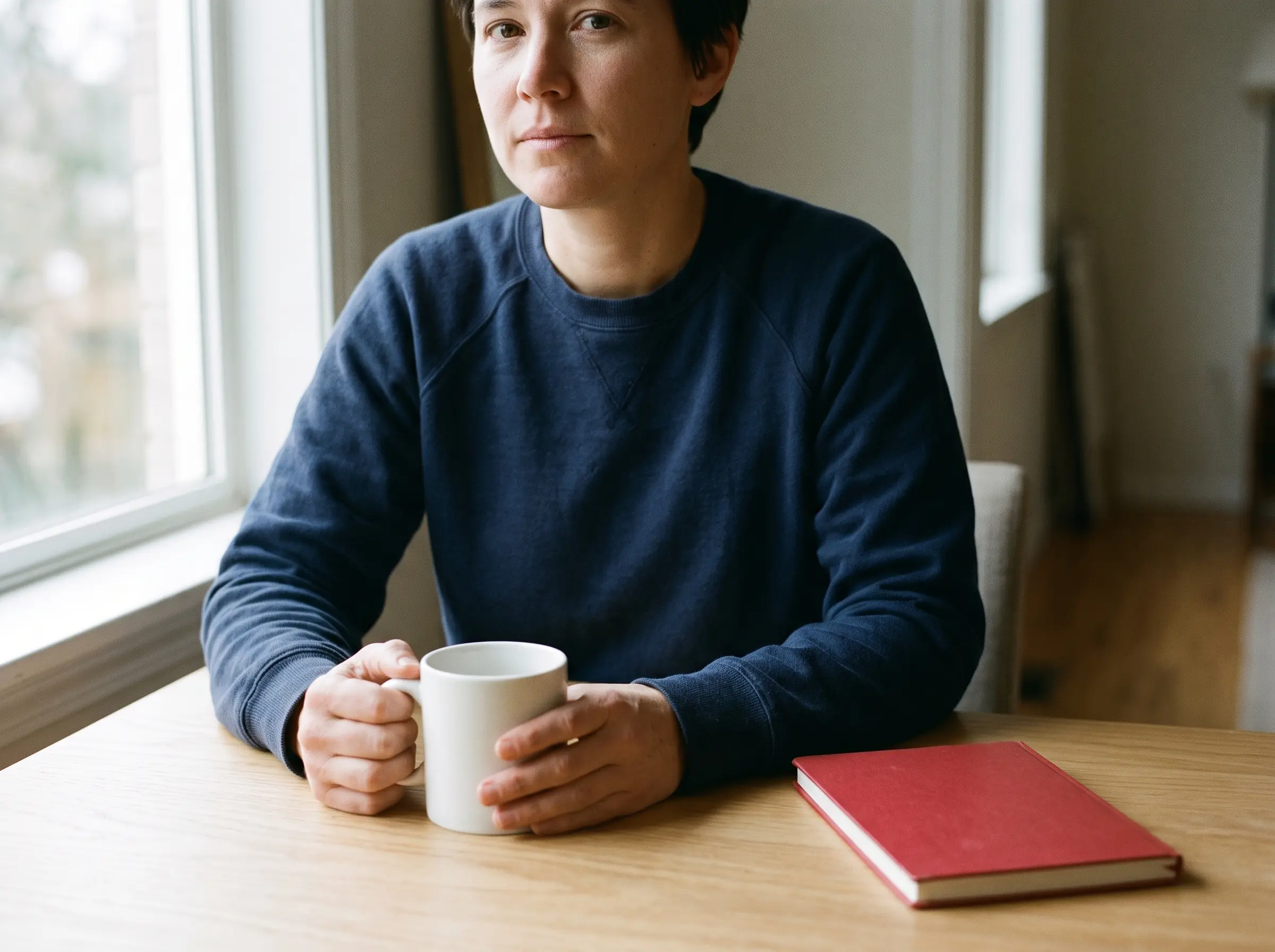
Portrait test: ChatGPT’s supplied export includes the full head; Gemini’s crops the top. Both show hands holding a white mug and a red notebook. The framing difference is in the source files, not an editorial crop.
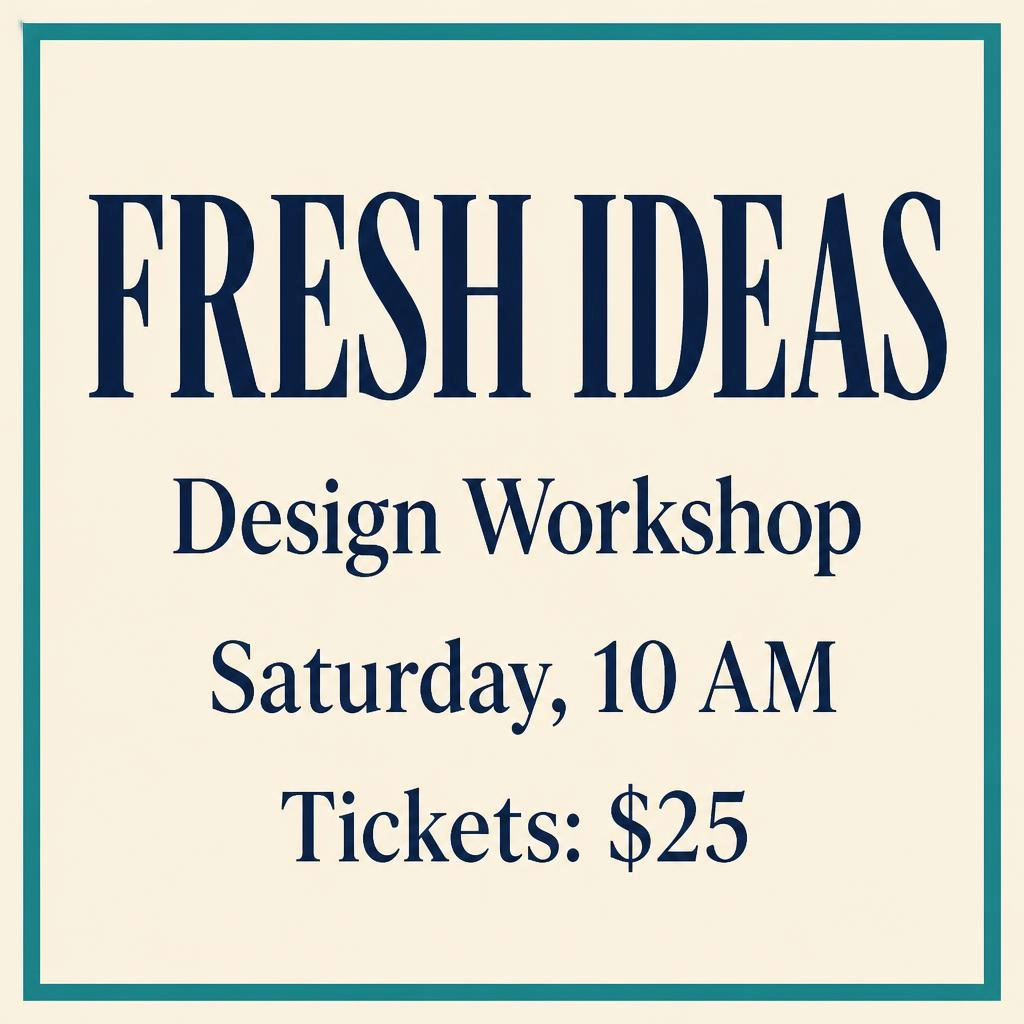
- Text rendering: The workshop poster preserved all four entries, including “Saturday, 10 AM” and “Tickets: $25.” The headline is largest, and the bold sans-serif lettering stays inside the teal border with clear margins. This was one short English poster; longer copy and other languages were not tested.
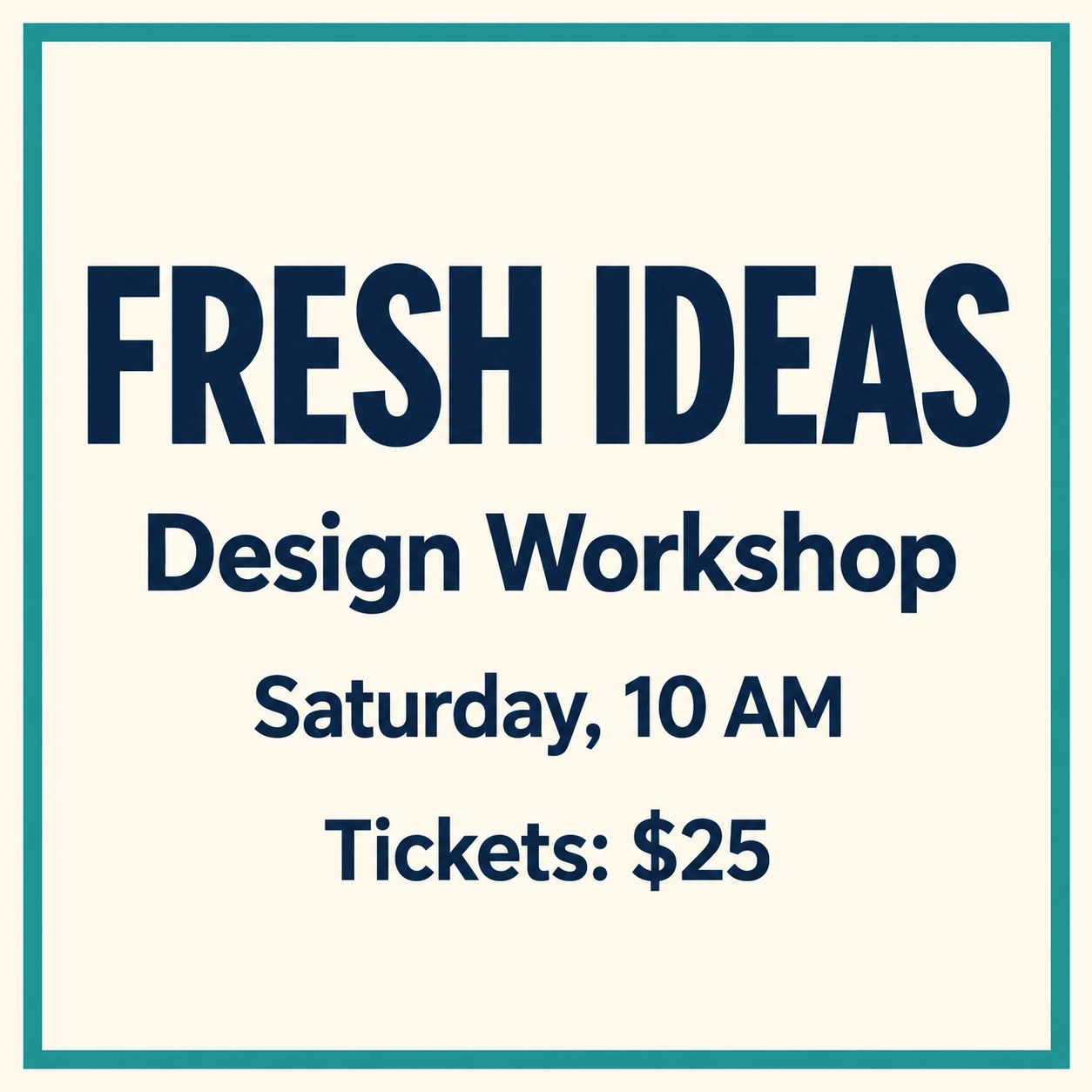
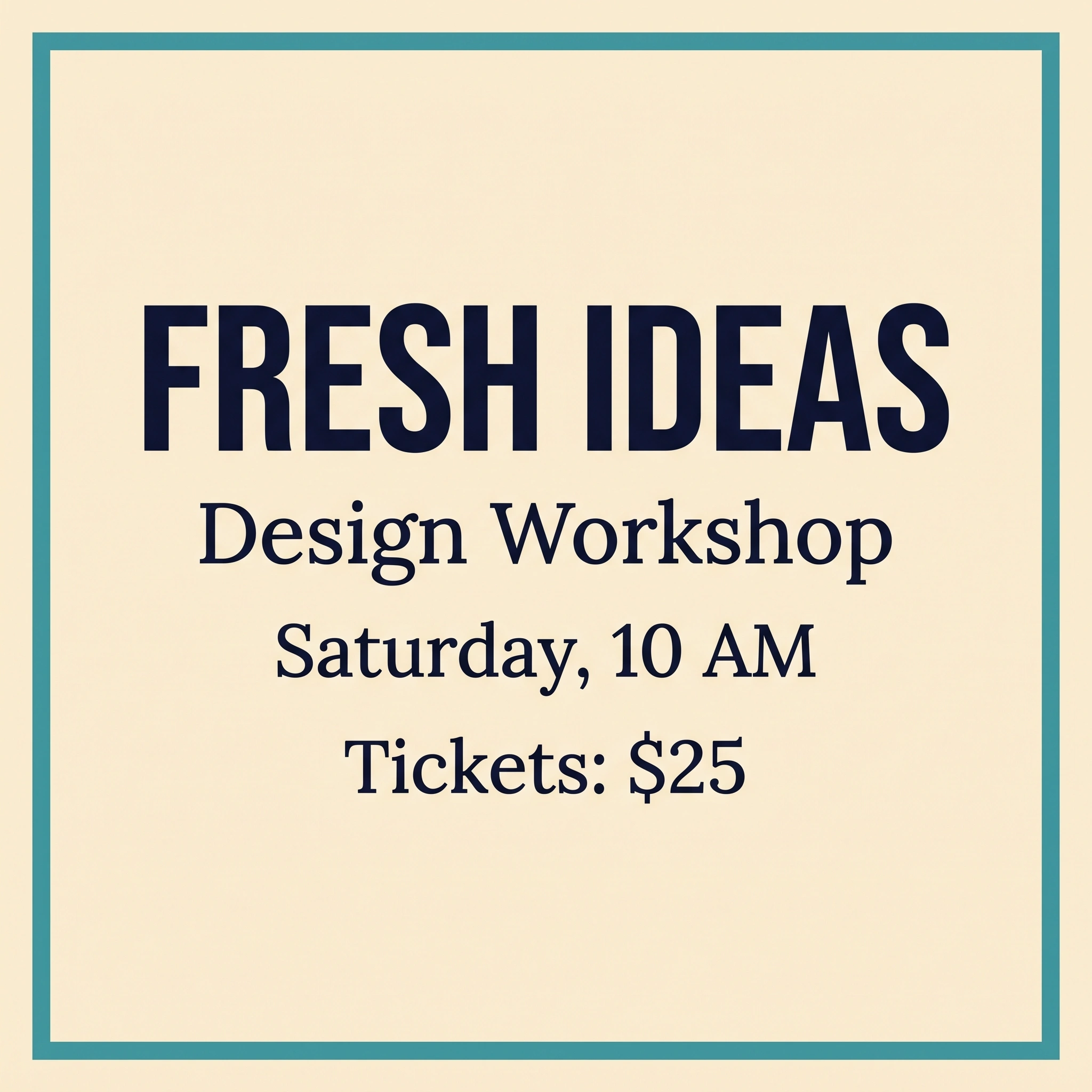
Both reviewed posters reproduce FRESH IDEAS / Design Workshop / Saturday, 10 AM / Tickets: $25. Their type treatments differ. These individual outputs do not establish a repeated success rate.
- Editorial illustration: The illustration prompt-and-result screenshot shows the laptop, paper, and magnifier in the requested arrangement. There are three bullet dots with one line beside each, and the magnifier leaves the dots uncovered. Muted colors and paper-like texture give it a cohesive editorial appearance. The export is a PNG; editable vector output was not tested. See the paired illustration outputs.
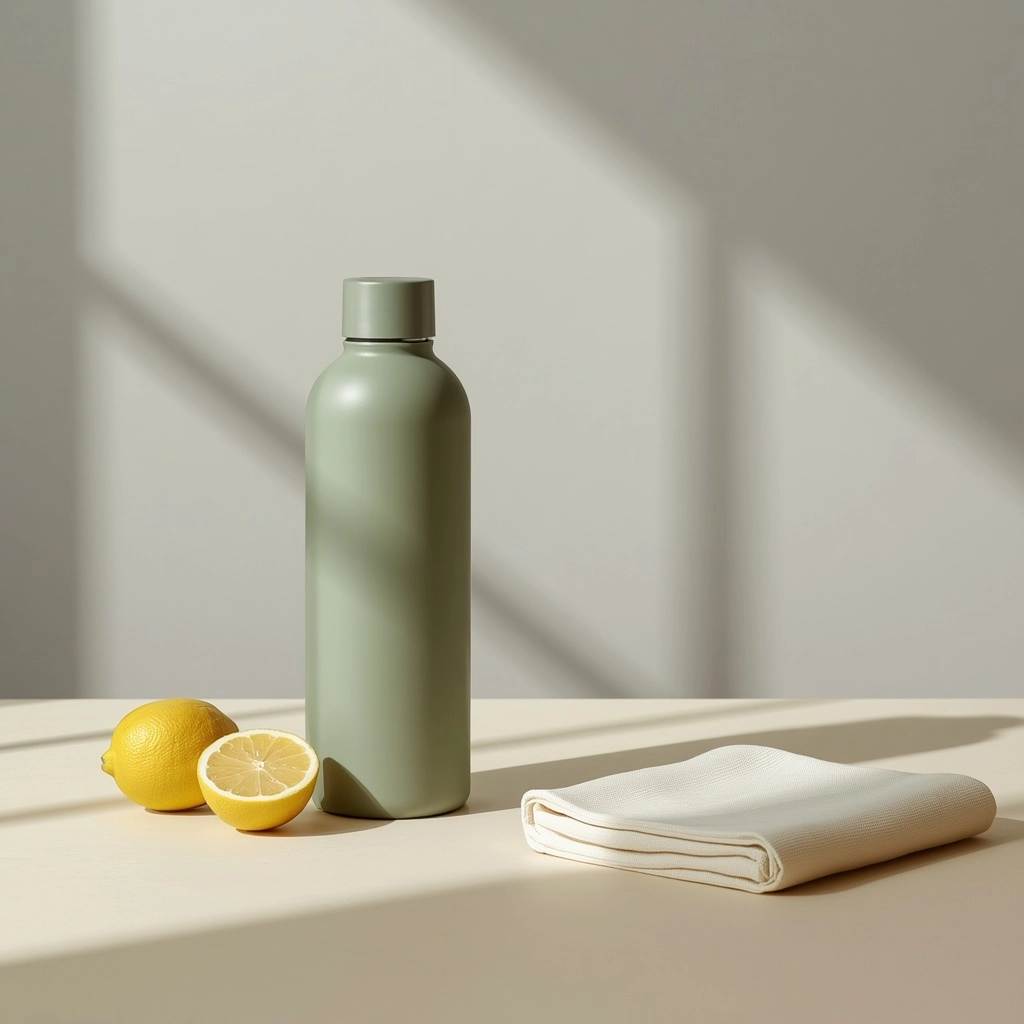
- Product photography: The bottle image contains the requested bottle, two lemon halves, and folded napkin, with the right third clear of objects. The product screenshot also shows window-frame shadow bands across the gray background. Those add depth, although I treated the background as only a partial match for the request for a plain backdrop. See the paired product outputs.
I would use this workflow for blog illustrations and product concepts where specific composition requirements matter. The bottle test did not use a real product reference, so it does not establish accurate reproduction of a particular item. Generated wording still needs proofreading before publication.
One Editing Test: Mug Recoloring and Preservation
I asked ChatGPT to change only the mug’s exterior and handle to matte coral red while preserving its shape, the notebook, tabletop, lighting, and framing.
The editing screenshot shows a coral exterior and handle with a matte-looking finish. The interior is cream-colored and speckled, and the blue notebook remains visible. The color change looks convincing.
Compared with the apparent source reference, small differences in tabletop/notebook texture and framing are visible. However, the full-size reference has not been confirmed as the exact uploaded input, so those differences cannot establish which details the edit changed.
For color variants, I would compare the original and edited image at the same viewing scale, paying particular attention to areas that should remain unchanged. This example supports trying a simple recolor; it does not establish pixel-perfect preservation. The paired mug edits show the reviewed results.
Gemini Image Generation With Google AI Pro
I used Google AI Pro for the shared portrait, poster, illustration, product, and mug-editing tasks. The screenshots do not identify the image model or establish whether a Pro regeneration was used.
For features beyond image creation, see our Gemini review.
Gemini Results: Image Quality, Text, and Prompt Following
- Photorealism: The portrait screenshot and original export both crop the top of the subject’s head, partly missing the requested framing. Skin and sweater texture look convincing, and both hands hold the white mug plausibly. The camera-facing pose is a stylistic difference; the prompt did not specify gaze direction.
- Text rendering: The poster screenshot shows all four requested entries with correct capitalization, punctuation, and the $25 price. A large sans-serif headline sits above serif supporting text. The centered layout has generous margins and a clear hierarchy.
- Editorial illustration: The laptop, paper, and magnifier are recognizable, and the right third remains open. However, the paper has three dots with two lines per dot—six lines instead of three. The illustration screenshot makes that count error visible despite the otherwise clean composition.


ChatGPT’s paper has three bullet dots with three accompanying lines. Gemini’s has three dots with six lines. Both outputs include the laptop, paper, and magnifier.
- Product photography: The product screenshot shows an unobtrusive pale-gray background, coherent upper-left lighting, and plausible cloth and citrus textures. The bottle, two lemon halves, and folded napkin are present. The napkin extends slightly into the lower right third: much copy space remains, but the entire third is not empty.
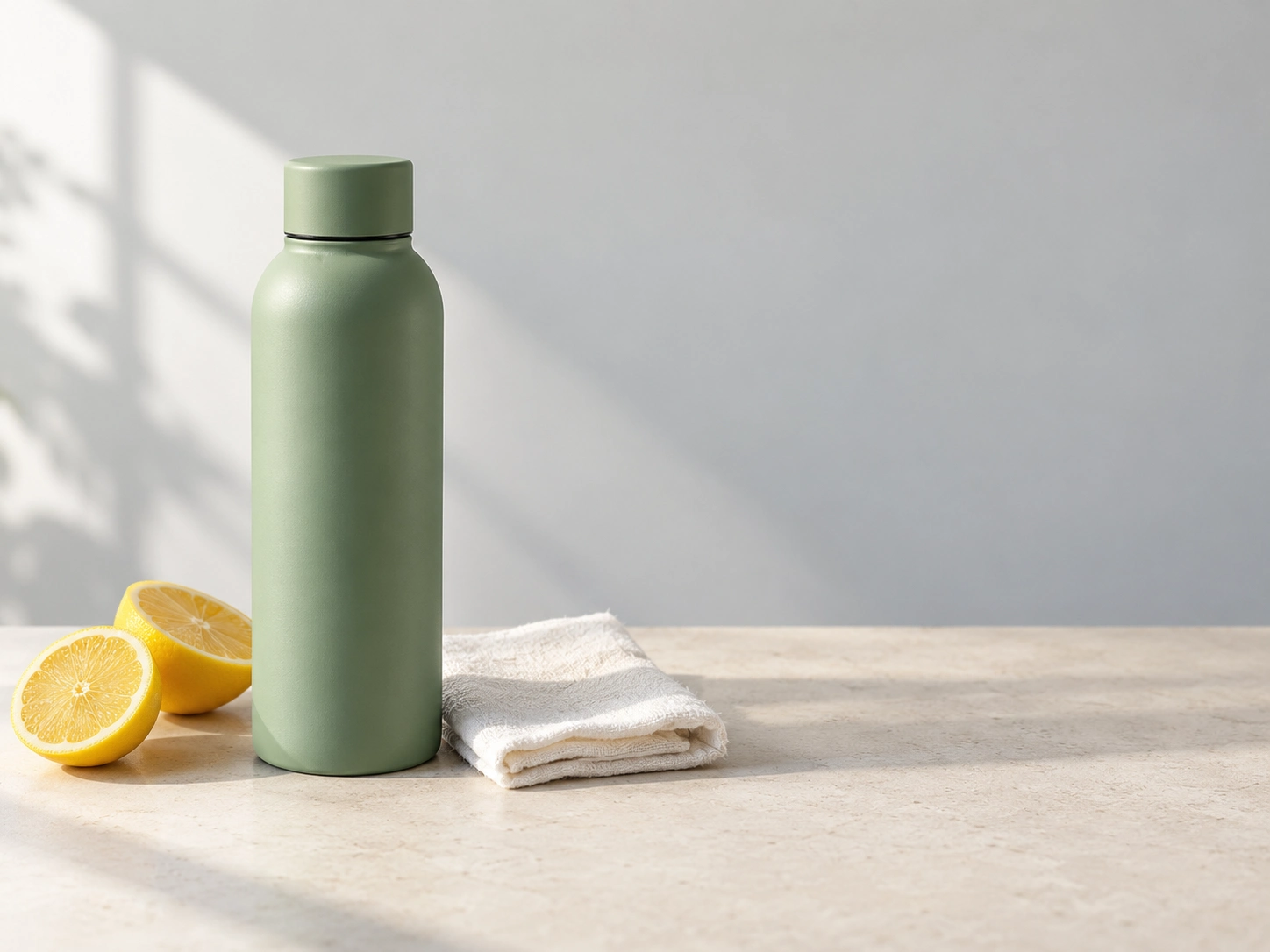
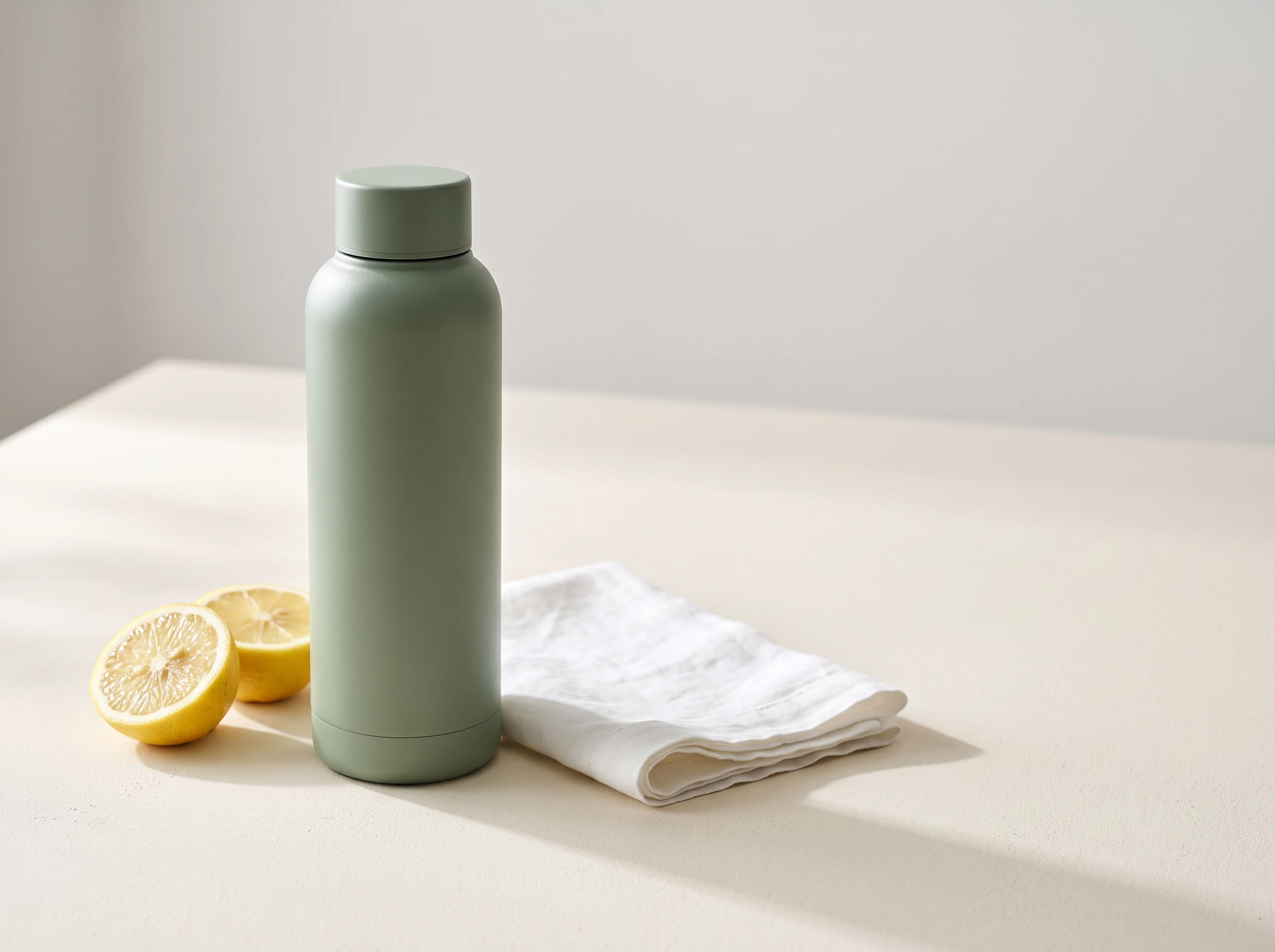
Both outputs show a bottle, two lemon halves, and folded white cloth. ChatGPT’s right third is clear of objects, with window-shadow bands in the background. Gemini’s napkin enters the lower right third.
I would consider Gemini for short posters and product concepts with a restrained background. For a precise advertising layout, I would check the framing, smaller graphic elements, and intended copy area before using the export.
Reference-Image Editing: Mug Recoloring and Preservation
The mug-editing brief requested a matte coral exterior and handle while preserving the rest of the scene.
The editing screenshot shows a coral mug body and handle, a cream interior with speckles, and the blue notebook still present. The softer coral finish looks convincing; no numerical color target was specified.
The supplied full-size reference appears to match the scene, but the exact image uploaded to both apps has not been confirmed. Preservation of unrelated details therefore remains unverified. This result does not establish an editing advantage or consistency through repeated edits.
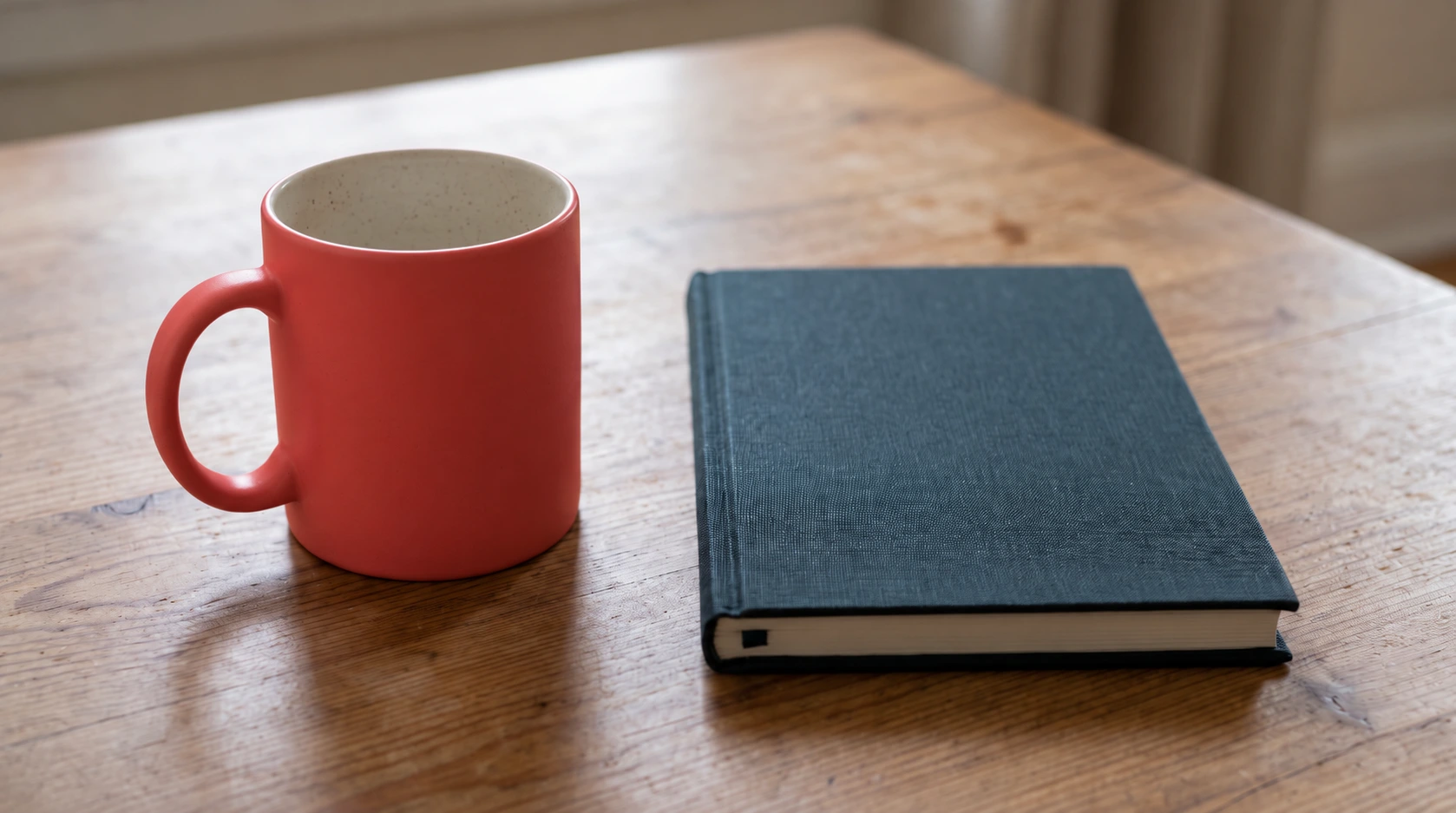
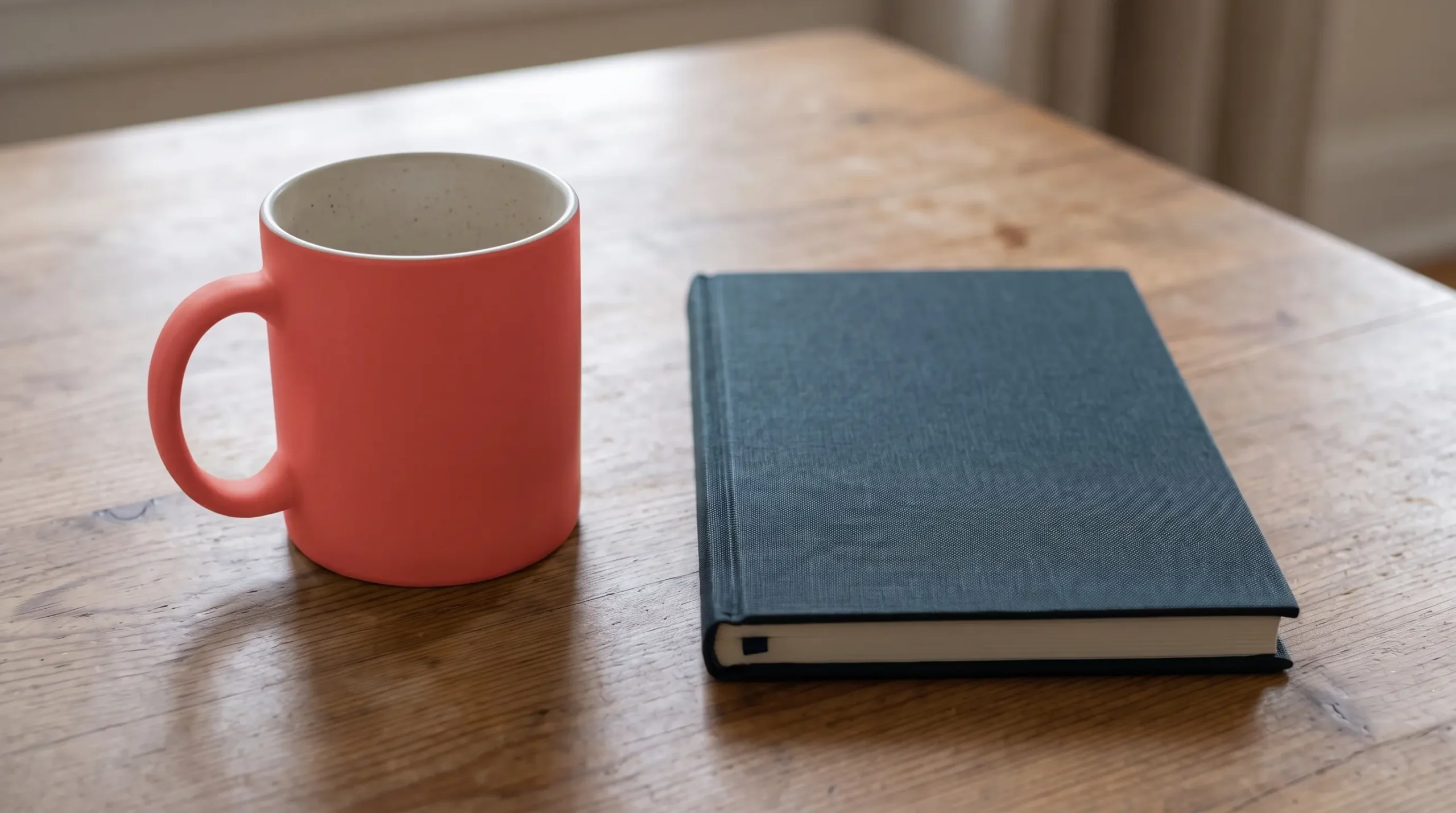
Both reviewed edits show a coral mug exterior and handle, a cream speckled interior, and a blue notebook. The exact shared uploaded input has not been confirmed, so these outputs do not establish which tool preserved the scene better.
For a simple concept recolor, I would inspect the handle shape, object positions, and background detail against the actual original before using the result.
<a id=”additional-tools”></a>
Additional AI Image Generators: Limited Tests and Free Access
Ideogram: Free Access and Public Outputs
Research-only. I did not personally test Ideogram’s paid version. The screenshots recorded as Ideogram results do not identify the platform, so I have excluded those exports from its performance assessment.
Official documentation describes reference-image editing, wide aspect ratios, and style and color controls, depending on the selected model. These features make it a candidate for further testing, but its performance on our prompts remains unverified. (Ideogram model documentation)
Free accounts receive 30 credits weekly with Google, Apple, or Microsoft sign-in; email-and-password accounts receive no free credits. Free generations are public. Plus costs $20 monthly, or $180 billed annually—equivalent to $15 per month, before tax. Credit costs vary by model and settings, so 30 credits does not mean 30 images. (Ideogram plans and credits)
Leonardo Free: Two Tasks and Automatic Model Selection
Free-tier tested: two tasks. I used Auto Image with the Dynamic preset. The poster screenshot labels its result GPT Image 2, Low; the bottle screenshot labels Lucid Origin, Fast. Both supplied exports were 1024×1024 JPEGs. These are the displayed result labels, not independently confirmed backend identities. Auto routing and free-plan access can change; the recorded poster result does not guarantee that a new Free-plan run will select the same model.
The poster reproduced all four entries accurately, including “Tickets: $25.” Its condensed serif headline and clear hierarchy made the design easy to scan.
The bottle image had detailed citrus and cloth textures, with directional lighting that added depth. It also showed one whole lemon and one half instead of two halves, prominent background shadows, and a napkin extending into the copy area.
The bottle screenshot shows 1:1 selected despite the 4:3 prompt. Its square export therefore reflects a configuration mismatch; it cannot establish the model’s ability to follow an aspect-ratio instruction.
I would use Leonardo for free concept exploration while checking the selected model, canvas, and props. Free generations are public, so account for that before submitting sensitive material. (Leonardo pricing and limits)
Adobe Firefly: Two Tasks With Limited Access
First-hand tested: two tasks; model and account tier unverified. I used the shared recorded poster and bottle briefs. The screenshots show remaining-use counters, which do not establish the original allowance.
The poster had bold lettering and strong contrast, but its event copy was inaccurate. The poster screenshot shows “Design Workelas,” a misspelled weekday, and “5$” instead of $25. The headline wrapped onto two lines, and the text was left-aligned rather than centered.
The bottle export showed the requested bottle, two lemon halves, and folded cloth, with plausible surfaces and a restrained background. The napkin still entered the right third reserved for copy.
Both supplied PNG exports measured 1152×896, or 9:7, missing their respective square and 4:3 targets. The evidence does not establish why.
Adobe currently offers limited free daily generations; I could not verify a universal numerical allowance. (Adobe Firefly plans and model caveats) The product result illustrates a concept to explore, while this reviewed poster requires corrected wording and ticket pricing. Neither result establishes the performance of a specific Adobe image model. Commercial permission for these particular exports remains unverified until their model and applicable feature terms are confirmed; the images are therefore not reproduced here.
Separately, Adobe documents Firefly Text to Vector with editable SVG downloads. I did not test that workflow. The PNGs reviewed above do not establish every format Firefly supports. (Adobe Text to Vector documentation)
Research-Only Alternatives: Recraft and Midjourney
I did not personally test either tool’s paid version. These profiles describe documented capabilities and access terms; neither receives a performance ranking.
Recraft: Vector Tools and Free-Plan Licensing
Recraft’s Vector model variants generate editable SVG files directly. That is relevant for icons and illustrations that need resizing or further vector editing. I have not assessed the quality or structure of its SVG outputs. (Recraft vector models)
Free-generated assets are public and are not licensed for commercial use. Recraft’s documentation grants commercial rights to images generated under a paid plan; it does not establish retroactive licensing of existing Free outputs after an upgrade. I am therefore not using Free-generated Recraft assets as illustrations in this monetized article. (Recraft commercial rights)
Basic costs $12 per month, or $120 billed annually, equivalent to $10 per month. It includes 1,000 credits per month. The documented vector workflow distinguishes Recraft from the raster-image exports reviewed here, but does not establish better illustration quality. (Recraft paid plans)
Midjourney: Creative Controls and Paid Access
Midjourney’s Style Reference uses an existing image to guide colors, medium, textures, and lighting. This is relevant to exploring a consistent visual theme; it does not demonstrate recurring-character accuracy in this review. (Midjourney Style Reference)
Basic costs $10 per month, or $96 billed annually, equivalent to $8 per month. It includes 200 minutes of Fast GPU time monthly and no Relax mode. GPU time is a computing allowance, not a guaranteed image count. (Midjourney plans)
There is no current website or Discord free trial. A separate limited niji · journey mobile-app trial is documented but was not tested here. (Midjourney trial availability)
Generations are public and remixable by default. Stealth mode is restricted to Pro and Mega; even then, images generated in public Discord channels remain visible to others. (Midjourney terms; Midjourney privacy controls)
AI Image Generator Pricing, Commercial Rights, and Privacy
The subscription price answers only part of the buying decision. Publishing rights, public visibility, and data settings also matter. The terms below come from official documentation; our image tests do not establish legal permission or confidentiality.
US Prices, Billing Terms, and Free-Plan Limits
The at-a-glance table lists ongoing US monthly web prices. ChatGPT Plus bills at $20 per month and has no annual billing option. API usage is billed separately. (ChatGPT Plus pricing and billing)
For plans offering annual discounts, the monthly equivalent represents a yearly commitment. Compare the full annual charge shown in the product profiles with the flexibility of monthly billing.
Free credits, daily tokens, and GPU minutes measure different things. Model and quality settings affect consumption, and “unlimited” access can exclude particular models. Leonardo, for example, excludes hosted models such as GPT Image from its Relaxed Generation allowance. (Leonardo pricing and limits)
Google AI Pro’s advertised 1,000 Google Flow Credits are a Flow allowance, not a Gemini-app image quota. I have not verified a fixed universal image allowance for ChatGPT or Gemini. (Google’s US AI plans)
Commercial Use, Copyright, and Public Galleries
When choosing an AI image generator for commercial use, check commercial permission, exclusivity, and copyright protection separately.
| Tool | Documented output rights | Important restriction |
|---|---|---|
| ChatGPT Images | As between you and OpenAI, it assigns any output rights it holds to you, to the extent permitted by law. | You remain responsible for input permissions and others’ rights. (OpenAI output terms) |
| Gemini | Google does not claim ownership of original generated content. | That statement does not establish copyright protection or clear third-party rights. (Google’s terms) |
| Ideogram | Commercial output use is permitted under its terms. | Free generations are public. (Ideogram output terms; Ideogram plans and credits) |
| Leonardo | Free users receive a nonexclusive, royalty-free commercial-use license; its terms assign Free-output ownership to Leonardo. | Free outputs are public, and its terms allow use of public content for model training. (Leonardo pricing and limits; Leonardo ownership and public-content terms) |
| Adobe Firefly | Adobe permits commercial use of Firefly-model outputs; explicit product restrictions can apply, including to beta features. | Partner-model conditions need separate checking. Commercial permission for the reviewed exports remains unverified because their model is unknown. (Adobe Firefly commercial-use FAQ; Adobe Firefly plans and model caveats) |
| Recraft | Paid-generated assets receive commercial rights; assets generated under the Free plan are not licensed for commercial use. | Free assets are public. (Recraft commercial rights) |
| Midjourney | Output ownership is subject to its terms and third-party rights. | A company with more than $1 million in annual revenue, or an employee of such a company, must use Pro or Mega to own assets under its terms. (Midjourney terms) |
Public-gallery visibility and provider training controls answer different privacy questions. In ChatGPT, turning off Improve the model for everyone opts new conversations out of training. If you submit feedback, such as a thumbs up or down, OpenAI may use the associated conversation for training despite that setting. (OpenAI data-use policy)
In Gemini, turning Keep Activity off excludes future chats from model improvement unless you submit feedback. Those chats remain associated with your account for 72 hours; processing to provide the service and protect users, including human review, can still occur. (Gemini privacy)
For US copyright, the Copyright Office says sufficient human-authored expression can qualify for protection, including creative arrangements or modifications. Prompts alone are insufficient. A provider’s ownership clause does not itself establish that an image qualifies. (US Copyright Office)
Which AI Image Generator Is Best for Your Use Case?
If you already subscribe to ChatGPT Plus or Google AI Pro, start with the app you have. Choose a brief that matches your work, then check the export against its requirements. Our examples support specific starting points, with different limits for each task.
If you’re choosing an assistant for more than images, our ChatGPT vs Gemini comparison covers the wider products.
| Your task | Where I would start | Evidence behind the choice | Main limitation |
|---|---|---|---|
| A short English promotional poster | ChatGPT Images, Gemini, or Leonardo’s tested GPT Image 2 workflow | The poster screenshots show all four requested entries reproduced accurately. | One reviewed poster per workflow; longer copy and other languages were not tested. |
| A blog illustration with exact element counts | ChatGPT Images on Plus | The illustration screenshot shows three dots with three lines and the requested object arrangement. | One raster illustration; editable vectors were not tested. |
| A product concept with a clear copy area | ChatGPT Images on Plus | The bottle export keeps the right third clear of objects. | Background shadow bands partly miss the plain-backdrop brief; real-product reproduction was not tested. |
| A simple mug recolor | ChatGPT Images or Gemini | Both editing screenshots show a coral exterior and handle. | Preservation of unrelated details remains unverified. |
| Exploring an additional free workflow | Leonardo Free | The screenshots confirm Free access and two completed tasks. | Auto selected different models, and the bottle image had the wrong lemon configuration. |
| An editable SVG asset | Recraft or Firefly, based on documentation | Both document editable vector workflows. | Neither vector workflow was tested. Check access and applicable rights; Recraft Free assets lack commercial-use permission. (Recraft vector models; Adobe Text to Vector) |
| Exploring a shared visual style | Midjourney, based on documentation | Style Reference provides controls for guiding an image’s look from a reference. | Research-only: I did not test the paid version or compare its results. (Midjourney Style Reference) |
| Keeping a recurring character consistent across scenes | No recommendation from these tests | No character-consistency sequence was supplied. | The evidence cannot establish identity retention across generations. |
Firefly’s reviewed product output met the main object-count requirements, but missed the requested aspect ratio and empty copy area. Its reviewed poster requires corrections to the wording and ticket price. Ideogram remains outside the hands-on recommendations because the platform attribution is unconfirmed.
Before using a result, inspect the full export for the requirement that matters most to your project: exact wording, object counts, framing, or unchanged details after an edit.