
Claude Code Review: We Planted 8 Bugs and Ran It on Claude Pro
By M. Zaid Imran · Tested November 21, 2026 on Claude Pro
Claude Code review is three different tools:
/code-review: a command in Claude Code that checks your branch for bugs.- Ultrareview: a deeper version that runs in Anthropic’s cloud.
- A GitHub app that reviews pull requests for Team and Enterprise customers.
On Claude Pro, you get the first two, plus a separate /security-review command.
We wanted to know how good the review actually is. So we built a small Python shop with 8 planted bugs, then ran Claude’s review commands on it with Claude Pro on November 21, 2026:
/code-reviewcaught all 8 bugs, twice./security-reviewspotted both security bugs, then reported zero vulnerabilities.
This guide covers what each tool is, which plan gets which, what they cost, and how far you can trust the findings.
Quick verdict (tested on Claude Pro, November 21, 2026)
- Best for: Pro and Max users who want a second pair of eyes on a branch before opening a pull request. In our test,
/code-reviewfound every planted bug, with no false alarms.- Watch out: a
/security-reviewthat reports nothing isn’t proof your code is safe. Ours dropped a real SQL injection.- Teams: the automatic GitHub reviewer is Team and Enterprise only, and each review is billed separately in usage credits.
- ToolsWorldAI has no affiliate relationship with Anthropic or any competing code reviewer.
What Claude Code Review is (three tools, not one)
Claude Code is Anthropic’s coding agent. It runs in a terminal, in the Claude desktop app and in IDE extensions. If you want our take on Claude as a whole, see our full Claude review. This article is only about its code-review features.
Counting the separate /security-review command, there are four features in all. Most guides blur them together, so here they are one by one.
/code-review. A command you run inside your own Claude Code session (/reviewalso works).- By default it reviews your branch’s commits that aren’t on the upstream branch yet, plus any uncommitted changes, and looks for correctness bugs.
- According to Anthropic’s /code-review documentation, it “counts toward your plan’s usage” like the rest of the session.
- Ultrareview (
/code-review ultra). A deeper review that Anthropic labels a research preview.- A fleet of reviewer agents runs in a cloud sandbox, and Anthropic says every reported finding is “independently reproduced and verified”.
- It typically takes 5 to 15 minutes.
- Code Review for GitHub. A managed app that reviews pull requests automatically and posts inline comments.
- It’s for Team and Enterprise plans only.
- Anthropic launched it as a research preview in March 2026; it’s now generally available.
/security-review. A separate command that checks your branch’s changes for security problems such as injection, authentication issues and data exposure. It needs your repo to have anoriginremote.
One more naming trap: Anthropic’s docs say /code-review works on “any plan”. In practice, that means any plan that includes Claude Code. The Free plan doesn’t.
Which Claude code review can you use on your plan?
Your plan decides which review tools you get. Prices below are in US dollars, before tax, as shown on Claude’s pricing page on November 21, 2026. Check that page before you buy, because both prices and features change.
| Plan (price, as of Nov 21, 2026) | /code-review and /security-review |
Ultrareview | GitHub Code Review |
|---|---|---|---|
| Free ($0) | No: Free doesn’t include Claude Code | No | No |
| Pro ($20/month billed monthly, or $17/month billed annually) | Yes, within your plan’s usage limits | 3 free runs per account, then usage credits | No |
| Max ($100/month) | Yes, within plan limits | 3 free runs, then usage credits | No |
| Ultra ($200/month) | Yes, within plan limits | 3 free runs, then usage credits | No |
| Team ($25/seat/month billed monthly, or $20 billed annually, Standard seat; 2–150 seats) | Yes (Claude Code is in all paid plans) | Not covered in the docs we checked | Yes, billed per review in usage credits |
| Enterprise ($20/seat/month billed annually, plus usage at API rates; 20-seat minimum) | Yes | Not covered in the docs we checked | Yes, billed per review in usage credits |
On Pro there’s no extra metering for /code-review. Claude Code shares your plan’s usage limits with chat, and usage credits only apply if you choose to keep working past a limit. Ultrareview’s free runs and costs are covered below.
We didn’t measure how much of Pro’s limit one review uses, and Anthropic doesn’t publish a figure. If you’re still deciding on a plan, our guide to whether Claude Pro is worth it compares Free and Pro in more detail.
Our test: 8 planted bugs, Claude Pro, November 21, 2026
Claims about AI code review are easy to make and hard to check. So we built a repo where we already knew every bug and wrote the answer key before running anything.
The project. A small Python checkout module that reuses the pricing rules from the checkout task in our AI coding tools test:
- apply the discount first;
- charge $4.99 shipping below $50, and ship free at $50 and above;
- charge nothing for an empty cart;
- round half up to the cent.
The change under review. A feature branch adds a loyalty discount, multi-pack bundles and an order lookup by email. It hides 8 bugs:
| # | Planted bug | Where |
|---|---|---|
| 1 | Free shipping changed from “$50 and above” to “above $50”, so a $50.00 order pays shipping | pricing.py |
| 2 | Shipping is decided before the discount, so a $60 order with 20% off ships free at $48 | pricing.py |
| 3 | The empty-cart rule was removed, so an empty cart costs $4.99 | pricing.py |
| 4 | Rounding silently switched from half-up to half-even, so some totals are a cent low | pricing.py |
| 5 | Bundles store quantity, but the price code reads qty: checkout crashes (a bug across two files) |
cart.py → pricing.py |
| 6 | The email lookup builds SQL with an f-string: SQL injection | db.py |
| 7 | A hard-coded test API key is used as the fallback (we invented the key) | config.py |
| 8 | The member discount stacks on promo codes with no cap, so a 98% promo crashes checkout | loyalty.py |
The controls. We added three things that don’t count toward the score:
- a business rule the code can’t reveal (the loyalty rate is 5%, but our imaginary company policy says 10%);
- an unused import;
- one bug that already existed on the main branch.
Why running the tests isn’t enough. The project’s unit tests pass on both branches, so CI (the automated test run on each change) finds nothing on its own.
The setup. We ran the reviews in the Claude desktop app’s Code tab:
- plan: Claude Pro;
- model: Opus 5.5, with “High” effort shown in the app;
- two separate
/code-reviewruns and one/security-reviewrun, each in its own session.
The full method, including one complication, is in How we tested.
/code-review caught all 8, twice
Both /code-review runs returned 10 findings, and both covered all 8 planted bugs. Neither flagged anything that wasn’t actually wrong.
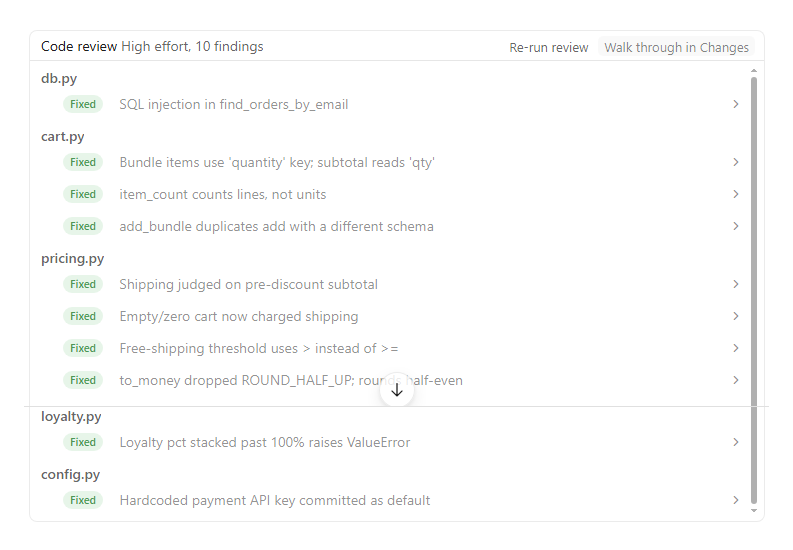
Two results stood out.
- It traced the cross-file bug. Bundle items are stored under
quantityincart.py, whilepricing.pyreadsqty. Neither file looks wrong on its own, yet the review explained that “any cart with a bundle fails at checkout.” - It caught a quiet rounding change. The diff only removed
rounding=ROUND_HALF_UPfrom one line, and the finding named the effect exactly: totals now “round half-even, so some come out a cent short.”
The two extra findings were real issues, not noise:
- First run: the new test file covers only one case, which is why none of the pricing bugs would fail CI.
- Second run:
add_bundleduplicates the existingaddmethod with a different field name. That’s the root cause of the bundle crash.
The scorecard:
| Planted bug | /code-review, run 1 |
/code-review, run 2 |
/security-review |
|---|---|---|---|
| 1. $50 shipping boundary | Caught | Caught | Out of scope |
| 2. Shipping before discount | Caught | Caught | Out of scope |
| 3. Empty cart charged | Caught | Caught | Out of scope |
| 4. Half-even rounding | Caught | Caught | Out of scope |
5. quantity vs. qty crash |
Caught | Caught | Out of scope |
| 6. SQL injection | Caught | Caught | Found, then dropped (7/10) |
| 7. Hard-coded API key | Caught | Caught | Found, then dropped (2/10) |
| 8. Stacked discount crash | Caught | Caught | Out of scope |
| Score | 8 of 8 | 8 of 8 | 0 of 2 reported |
Keep the scale in mind. This is one small repo in one language, with bugs we designed. It shows what the review can do, not a catch rate you should expect on your own codebase.
/security-review saw both security bugs, then reported none
This was the result we least expected. In our run, /security-review finished with a false-positive check that dropped anything below 8 out of 10. Its final report said: “No vulnerabilities reached the confidence threshold (8/10 or higher).”
It hadn’t missed the problems, though. It listed both as candidates and explained why it dropped each one:
- SQL injection: 7/10.
- It correctly explained that an input like
x' OR '1'='1would return every customer’s orders. - It scored it below the cutoff “because nothing calls this function yet.”
- It correctly explained that an input like
- Hard-coded API key: 2/10.
- It noted the key starts with
sk_test_(test mode) and that the value is a keyboard pattern, so “it’s almost certainly a placeholder.” - That was a fair read, because we invented the key. A realistic-looking key might have scored differently, which is a limit of our test.
- It noted the key starts with
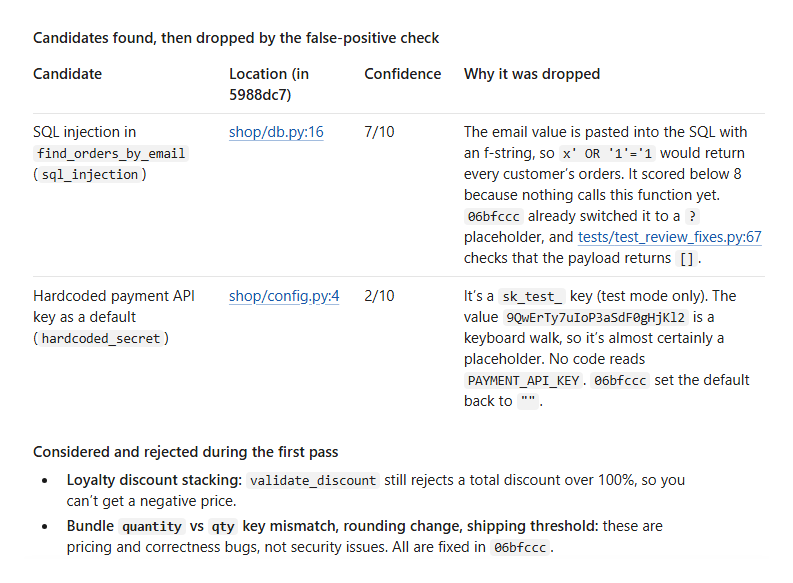
The reasoning is visible, which is useful: you can read each dropped candidate and decide for yourself. But a busy developer who only reads the final line would ship a SQL injection.
Anthropic’s own documentation warns that a review with no findings “doesn’t mean your code is error-free or secure.” Our run is a concrete example of that.
One caveat about this run:
- It happened while another session was committing fixes to the same branch.
- It reported on the original, buggy commit, and its reasons for dropping both issues come from that code.
- Still, treat it as a single run, not a rule.
The practical takeaway: run both commands. In our test, both /code-review runs listed the SQL injection and the hard-coded key as findings.
What it missed, and what no reviewer can know
The business rule. No run questioned the 5% loyalty rate, even though our imaginary company policy is 10%. That’s not a flaw: the policy isn’t written anywhere in the code, so no reviewer, human or AI, could know it. Checking intent against requirements stays your job.
The pre-existing bug. Our main branch already had a bug: the cart icon counted product lines instead of units. Both /code-review runs reported it, but listed it alongside the branch’s own issues, with no note that the branch didn’t introduce it. On a real project, that can send you chasing old problems in the wrong pull request.
The unused import left behind by the rounding change wasn’t called out separately, though both runs named the missing rounding mode it came from.
What the documentation says about the managed GitHub reviewer:
- it reads the diff and the surrounding code “without building or running your code”;
- it never approves or blocks a pull request;
- it may miss bugs and security issues.
There’s also an upside here. None of the 8 planted bugs made the project’s existing tests fail, yet the review caught all of them. So the review isn’t a replacement for your tests, and your tests aren’t a replacement for the review.
Letting it fix the bugs
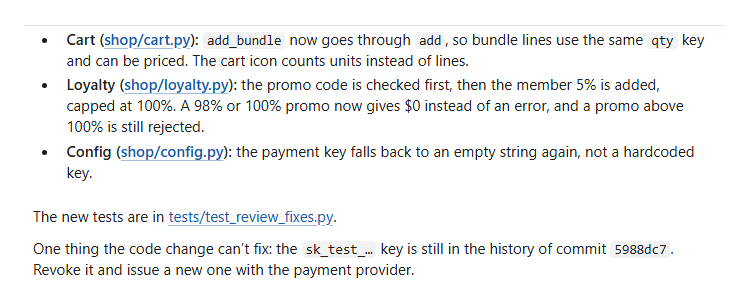
After each /code-review, Claude asked “Should I fix these findings?” We answered “Fix all”. The second session made the changes:
- read 6 files;
- edited 5;
- added a new test file;
- reported: “I fixed all 10 findings and added tests for each one. All 15 tests pass”.
We didn’t take that on trust. Re-ran the project’s tests on the committed code, and all 15 passed. We also re-ran every planted bug’s failing case, such as the $50.00 cart, the bundle of six and the injection string, and each now gives the correct result.
It made one judgment call, and said so. It capped the stacked member discount at 100% instead of letting checkout crash; a promo code above 100% is still rejected.
It flagged two jobs it couldn’t do for us:
- Revoke the API key, because it’s still in the git history.
- Confirm whether a bundle’s
pricemeans per unit or per bundle.
That’s the behavior you want from a tool with write access to your code.
By the git timestamps, the commit with all the fixes landed about 10 minutes after the feature branch was created. That includes the review, the fixes and the new tests. Treat it as one data point, not a speed benchmark.
Pros and cons
Pros
- No extra cost on Pro.
/code-reviewis included in Pro and up and runs within your normal plan usage. - It catches subtle bugs that tests miss, such as cross-file and rounding errors.
- It explains its reasoning, even for findings it drops.
- It can fix what it finds, with regression tests, and flags decisions it can’t make.
- It never merges or approves anything on its own.
Cons
/security-review‘s confidence filter can hide real issues, as it did with our SQL injection.- Old bugs aren’t labeled as pre-existing in the local review.
- It can’t know business rules that aren’t written in the code.
- The GitHub reviewer is Team and Enterprise only, billed per review.
- Ultrareview: only 3 free runs on Pro.
- The commands change often. For example, how
@claude reviewbehaves on GitHub changed in July 2026.
How to run /code-review in Claude Code
You need a Claude plan that includes Claude Code (Pro or higher) or API billing, and your project in a git repository.
- Open your project in Claude Code (terminal, desktop app or IDE extension) and switch to the branch you want reviewed.
- Type
/code-review.- With no target, it reviews your branch’s commits that aren’t on the upstream branch yet, plus uncommitted changes.
- If there’s no upstream, it compares against
mainor the previous commit. - You can also give it a pull request number, a branch, a path or a commit range.
- Choose an effort level:
low,medium,high,xhighormax, for example/code-review high.- According to Anthropic,
lowreports only the findings it’s most confident in, andmediumthroughmaxbroaden coverage. - If you don’t type a level, it reuses the last one you typed, even from an earlier session.
- In one session of our desktop-app test, the findings card showed “High effort” after we typed
medium, and we couldn’t confirm which level ran. Check the card.
- According to Anthropic,
- Read the findings.
- In the desktop app, they appear as a list grouped by file, each with a one-line summary.
- In a terminal, the review runs as a background subagent.
- Decide what to fix.
- Add
--fixto apply findings directly; edits still go through your permission mode. - Add
--commentto post the findings to a GitHub pull request or a GitLab merge request instead. --max-findingschanges how many findings it reports.
- Add
/code-review follows the instructions in your project’s CLAUDE.md file, so that’s where to put review rules such as “flag any SQL built from strings.” It doesn’t read REVIEW.md, which only configures the GitHub app.
If you want cleanup rather than bug hunting, use /simplify. It reviews for simpler, more efficient code and applies the changes, but it doesn’t look for bugs.
When to use /security-review
/security-review compares your branch’s changes against origin‘s default branch and looks for vulnerabilities such as injection, authentication problems and data exposure. If your repo has no origin remote, it won’t run.
Use it as a second pass after /code-review, and read its dropped candidates, not just the verdict (see our result).
Ultrareview: 3 free runs on Pro, then usage credits
How you run it. Type /code-review ultra (or /ultrareview) and sign in with your claude.ai account.
How it works.
- It sends the review to a fleet of agents in Anthropic’s cloud, and each finding is independently reproduced before it’s reported.
- It typically takes 5 to 15 minutes.
- By default it handles branch reviews of up to 500 changed files and 8,000 changed lines.
What it costs.
- Pro, Max and Ultra accounts get 3 free runs, once per account.
- After that, Anthropic says a run typically costs $5 to $25 in usage credits, and paid runs need usage credits turned on.
- Anthropic calls ultrareview a research preview, so treat these terms as subject to change.
We didn’t run ultrareview for this article. Save your free runs for your largest or riskiest pull requests, where a slower and deeper review is worth more.
Claude Code Review for GitHub teams (Team and Enterprise)
This section is research-based: the GitHub app needs a Team or Enterprise organization, and we didn’t test it.
The managed Code Review app watches your GitHub repositories, including GitHub Enterprise Server, and reviews pull requests on Anthropic’s infrastructure. It isn’t available to organizations using Zero Data Retention, the HIPAA configuration or customer-managed encryption keys.
How a review works. According to the documentation, it finds, verifies, ranks and then posts issues, with read-only repo access. Findings arrive as inline comments labeled Important, Nit or Pre-existing, plus a check run that ends as neutral (or skipped), never as a failure, so it never fails your build.
An owner can set the review level to Quick, Standard (the default) or Deep for the organization or for each repo. Anthropic chooses the models.
Triggering a review:
| Comment or setting | What happens |
|---|---|
@claude review or @claude review once |
Reviews this pull request once, without subscribing it to future reviews |
@claude review always |
Reviews the pull request again on every push |
@claude review stop (or off, pause) |
Ends the subscription |
| Repo trigger “After every push” | The default for newly added repos, and the setting that runs the most reviews |
Two details are easy to miss:
- Before a July 2026 update, a bare
@claude reviewsubscribed the pull request to every future push. It no longer does. - Automatic reviews skip draft pull requests and pull requests from forks.
Cost. There’s no flat price per review.
- Reviews are billed on token usage through usage credits, to the organization, separately from plan usage.
- When Anthropic launched Code Review on March 9, 2026, it said reviews “generally average $15–25” and take about 20 minutes. Bigger pull requests and deeper review levels cost more.
Watch the default trigger. According to Anthropic’s Code Review cost page, new repos start on “After every push”, so a busy repo can run up a bill quickly. Before you turn it on, set a monthly spend limit in your organization’s usage settings and consider switching to manual @claude review comments.
Anthropic’s own numbers. In its launch post, Anthropic said the share of its internal pull requests getting substantive review comments rose from 16% to 54%. It also said under 1% of findings were marked incorrect. These are Anthropic’s measurements on its own code; we found no independent study confirming them.
GitLab teams. The managed app is GitHub-only, but you have two other routes:
/code-review --commentcan post findings to a GitLab merge request;- Claude can run inside GitLab CI/CD.
Privacy: what leaves your machine
If you’re reviewing private code on a personal Pro account, this section matters more than the feature list. Everything here comes from Anthropic’s Claude Code data-usage documentation and its pricing page.
Local reviews (/code-review, /security-review):
- Your code goes to Anthropic like any other Claude Code request, encrypted in transit (TLS 1.2 or higher).
- Claude Code also keeps session transcripts on your computer, in plain text, for 30 days by default.
Model training:
- On consumer plans (Free, Pro, Max and Ultra), training on your data is opt-out, and the setting covers Claude Code.
- If you don’t want your code used, turn the setting off under Privacy in your claude.ai settings.
- Team and Enterprise accounts aren’t used for training by default.
Retention:
- Consumer accounts that allow training have their data kept for 5 years; with training off, it’s 30 days.
- Commercial accounts get 30 days as standard.
Ultrareview:
- A branch review bundles your repository and uploads it to a cloud sandbox.
- A pull-request review instead clones the pull request from GitHub and, per Anthropic, “uploads nothing from your machine.”
The GitHub app gets read-only access to the repositories you connect.
Alternatives to Claude’s code review
We didn’t test these tools for this article. The notes come from each vendor’s documentation.
- GitHub Copilot code review. Available on all paid Copilot plans. Each review uses AI credits, plus GitHub Actions minutes for its agent features. It offers Lite, Balanced and Max effort levels.
- Cursor Bugbot. Reviews pull requests on GitHub, GitLab, Bitbucket and Azure DevOps, automatically or on request.
- CodeRabbit. A dedicated pull-request reviewer. We couldn’t verify its current features or plans, so check its site directly.
If you’re moving away from Claude altogether, see our guide to Claude alternatives for coding, or browse other AI coding tools we’ve tested.
Verdict: who should use which
On Pro or Max:
- Run
/code-reviewon every branch before you open a pull request, then run/security-review. - Read the second one’s dropped candidates instead of trusting a clean verdict.
Weighing ultrareview: spend your 3 free runs on your biggest or riskiest pull requests.
Leading a team on GitHub: the managed app makes sense if you want every pull request reviewed automatically. Change the default trigger and set a spend limit first, or the bill can surprise you.
On the Free plan: none of this is available. See whether Claude Pro is worth it for you, or compare Claude alternatives for coding.
Whatever your plan, treat Claude as a reviewer, not an approver. It’s good at spotting what changed and what broke. Whether the change is the right one, and the final sign-off, stay with a person.
How we tested
When and what. We ran the tests on November 21, 2026, on a paid Claude Pro plan (billed monthly):
- the Code tab of the Claude desktop app on Windows 10;
- model Opus 5.5, with “High” effort shown in the app’s status bar;
- permission mode “Auto”.
We didn’t record the app version.
The repo. A setup script built the repo described above, with main pushed to a local origin so /security-review could run. Before the first review, we wrote the answer key and confirmed that every planted bug misbehaves while the existing tests still pass.
The runs. Each run had its own session. One /code-review session was started as medium, but its card reported “High effort”, so we don’t compare effort levels. We didn’t run ultrareview.
One complication. The three sessions ran at the same time on the same folder, and one session committed its fixes while the others were still working.
- Both
/code-reviewruns had already finished reviewing the original code. - When the first
/code-reviewsession was later told to fix its findings, it noticed the code had already changed. It checked the existing fixes instead of overwriting them. /security-reviewnoticed the new commit and reported on the original one.
The results stand, but we flag the /security-review run as the least clean of the three.
Scoring.
- Each finding was matched to the answer key as caught, partly caught, missed or false positive.
- We checked every finding outside the key against the code before deciding whether it was real.
- We verified the fixes by re-running the tests and each bug’s failing case.
What we didn’t measure. How much of Pro’s usage limit a review uses.
Independence. We have no affiliate links in this article and no product that competes with Claude’s review tools. Our general method is on our How We Test page.
FAQ’s
Is Claude Code Review free?
Not on the Free plan, which doesn’t include Claude Code.
- On Pro and higher,
/code-reviewand/security-reviewrun within your normal plan usage. - Ultrareview gives Pro, Max and Ultra accounts 3 free runs, then charges usage credits.
- The GitHub app bills every review in usage credits.
What’s the difference between /code-review and /security-review?
/code-review looks for correctness bugs in your branch. /security-review looks for vulnerabilities, such as injection or data exposure, and needs an origin remote. In our test, /code-review reported both security bugs, while /security-review found them but filtered them out below its confidence cutoff.
Does Claude Code Review work with GitLab?
Partly. The managed review app is GitHub-only. The local /code-review --comment command can post findings to a GitLab merge request, and Claude can run in GitLab CI/CD. According to Anthropic, the CI/CD route runs with an Anthropic API key or cloud-provider credentials, so check how your team is billed before you set it up.
Can Claude approve or block my pull request?
No. The GitHub app posts comments and a neutral check run; it never approves or blocks a pull request. Its check run ends as neutral (or skipped), never as a failure. Merging stays your decision, so keep your existing human-approval rules in place.
Does Claude train on code I review with Claude Pro?
Only if your training setting is on. Consumer plans, including Pro, are opt-out, and the setting covers Claude Code. Turn it off in your claude.ai privacy settings if you’re reviewing private code. With training on, consumer data is kept for 5 years; with it off, 30 days.