
Is ChatGPT Down Right Now? Live Status, Common Errors & Quick Fixes

You open ChatGPT, type a prompt, and… nothing happens. Maybe the page refuses to load. Maybe ChatGPT sits on “Thinking” forever, throws an internal server error, or suddenly logs you out.
The obvious question is: Is ChatGPT down, or is the problem on my side?
I’ve found that randomly refreshing the page ten times usually isn’t the best place to start. There’s a much faster way to figure out what is happening.
In this guide, I’ll show you how to check the ChatGPT status, tell a real OpenAI outage from a browser or network problem, understand the most common errors, and work through the fixes I recommend trying first.
Live Status Check
Last verified: September 4, 2026, 11:20 AM PKT
Source: OpenAI’s official status page
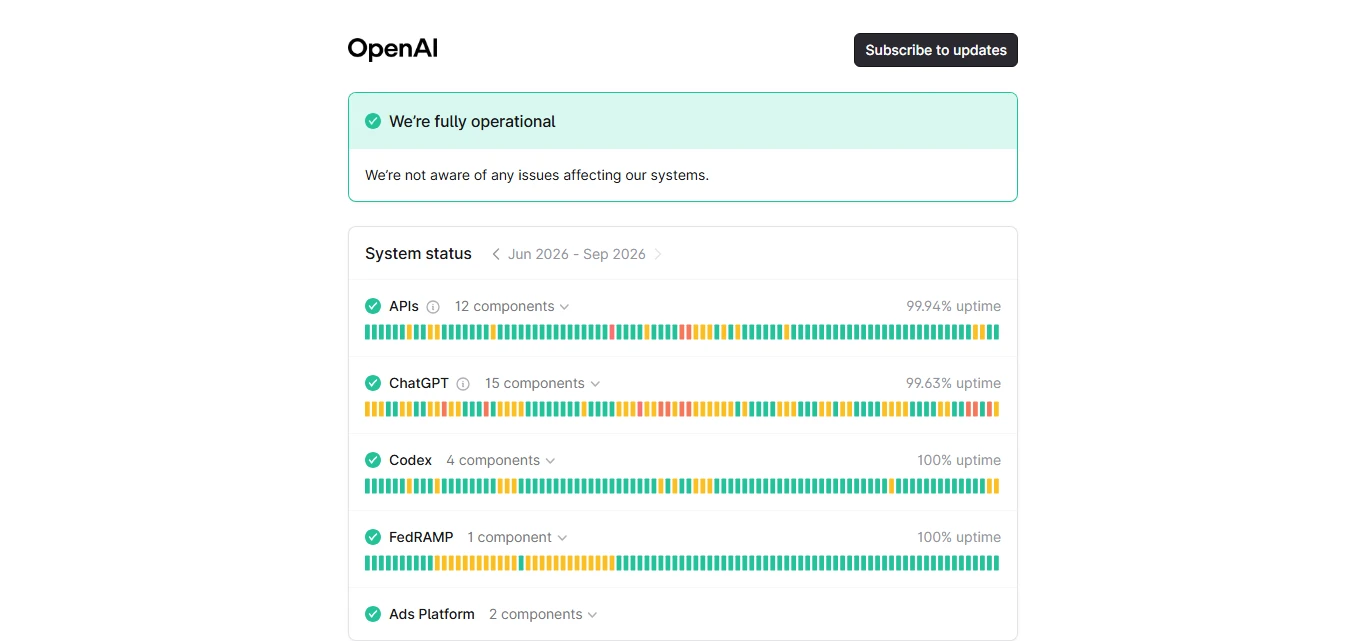
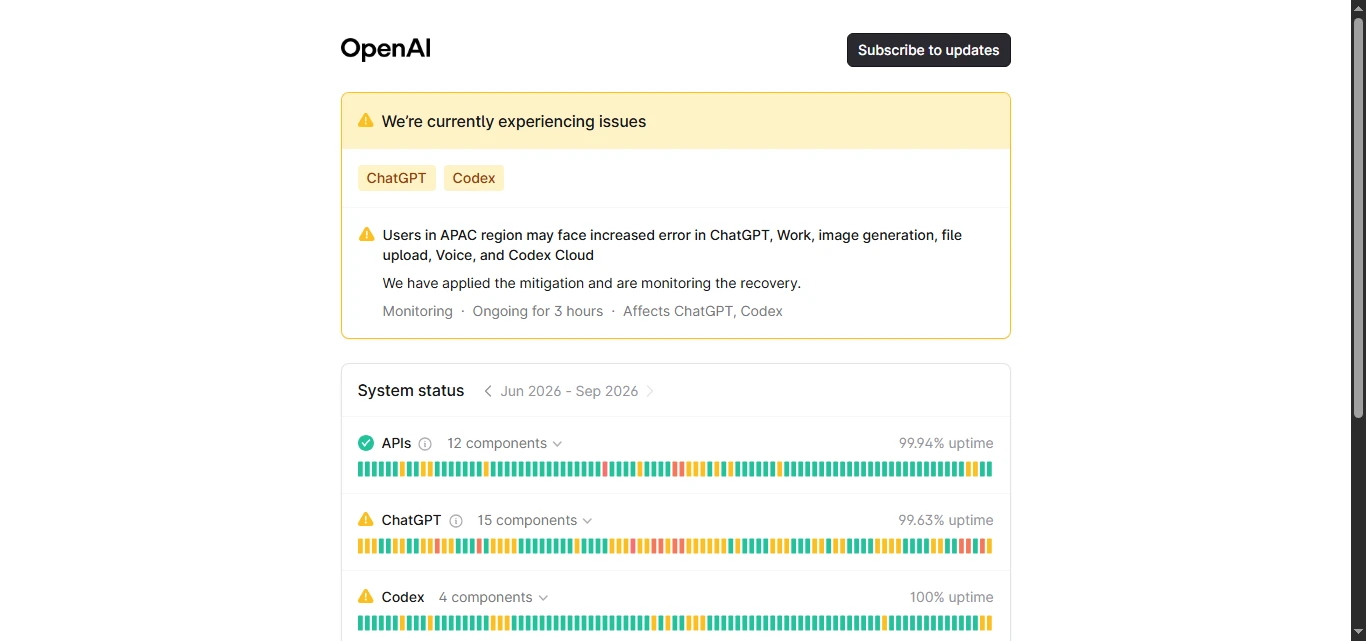
According to OpenAI’s official status page, ChatGPT is currently operational, with no active incidents reported. OpenAI’s incident history shows a brief period of elevated errors on September 3, which has since been marked resolved.
Status can change quickly. For the most current information, check the official status page directly → Official Status Page
OpenAI’s incident history shows a brief period of elevated errors earlier today, which has since been marked resolved. Status can change quickly, so check the live status page directly if you’re currently experiencing issues.
Is ChatGPT Down Right Now?
The fastest answer is:
Check OpenAI’s official status page first. If ChatGPT is marked operational but still doesn’t work for you, the problem may affect only a particular feature, account, network, browser, model, or subscription tier.
That distinction matters.
OpenAI explains that the availability information on its status page is reported at an aggregate level across different tiers, models, and error types. In other words, an “operational” status does not guarantee that every individual ChatGPT user is having a perfect experience.
So if you are searching for “is ChatGPT down right now for everyone?”, don’t rely on one signal.
I normally use three checks:
- Open the official OpenAI status page.
- Check a third-party ChatGPT down detector for unusual reports.
- Test ChatGPT from another browser, device, or internet connection.
If multiple sources are reporting problems, you are probably dealing with a wider ChatGPT outage today.
If ChatGPT works on your phone but not on your computer, however, the issue is much more likely to be local.
How I Check ChatGPT Status in Under Two Minutes
When ChatGPT suddenly stops working, I troubleshoot from the outside in. That keeps me from deleting cookies or changing settings unnecessarily.
-
Check the OpenAI status page
The OpenAI status page is the most important place to start because it can show incidents affecting ChatGPT, APIs, and other OpenAI services separately.
That distinction is useful for developers too. ChatGPT may be working while an API feature has elevated errors or the opposite may happen.
So if your real question is “is OpenAI down?”, look at the individual service components rather than assuming one incident affects everything.
-
Look at recent incident history
Don’t only look for a giant red “outage” warning.
Recent incidents can affect:
- conversations
- logins and signups
- file uploads
- image generation
- specific models
- mobile apps
- paid or free users
- API requests
OpenAI’s own 2026 incident history includes examples of disruptions affecting particular ChatGPT plans, login systems, files, images, and individual modes rather than every OpenAI service at once.
That’s why you may see people saying “ChatGPT is down” while other users are still chatting normally.
-
Run a quick local test
Before I start changing browser settings, I would try one simple comparison:
Open ChatGPT using mobile data instead of Wi-Fi.
If it suddenly works, your router, DNS configuration, workplace network, VPN, or ISP connection may be contributing to the problem.
You can also try an incognito window. If ChatGPT works there, an extension, cookie, or cached browser setting becomes a much stronger suspect.
Why Is ChatGPT Not Working If the Servers Are Up?
This is where a lot of troubleshooting articles become too simplistic.
ChatGPT not working does not automatically mean ChatGPT is down.
There are several things between your prompt and OpenAI’s servers, including your browser, internet connection, account session, extensions, VPN, security software, DNS configuration, and authentication method.
OpenAI itself recommends checking browser extensions, VPNs, proxies, cache, cookies, private browsing, other devices, and other networks when troubleshooting ChatGPT errors.
Here are a few common scenarios.
ChatGPT won’t load
A blank page or endless loading screen can be caused by a temporary service problem, corrupted site data, an extension, VPN, proxy, or network filter.
Try a hard refresh first:
Windows: Ctrl + Shift + R
Mac: Command + Shift + R
If that doesn’t help, open ChatGPT in a private/incognito browser window.
ChatGPT keeps logging me out
Unexpected logouts can occasionally be service-side issues. OpenAI, for example, recorded an incident affecting some ChatGPT web users with unexpected logouts in August 2026.
But repeated login problems can also come from cookies or authentication settings.
If you originally created your account using Google, Microsoft, or Apple, OpenAI recommends continuing to use the same authentication method when signing in.
ChatGPT is stuck on thinking

If ChatGPT gets stuck on “Thinking,” “Generating,” or “Working,” I wouldn’t immediately assume there is a major outage.
Give it roughly 30–60 seconds. Then stop the response and regenerate it.
If the problem continues, start a completely new conversation. Long or unusually complex chats can sometimes behave differently from fresh ones.
OpenAI also recommends refreshing the page, signing out and back in, disabling VPNs or extensions, switching browsers or networks, and checking its status page when ChatGPT hangs indefinitely.
Common ChatGPT Error Messages and What They Mean
The exact error message can tell you a lot.
“Something went wrong”
This is one of the least specific ChatGPT error messages.
It can indicate a temporary server problem, but it can also come from your browser or connection.
Start with a refresh. Then check the server status before clearing cookies or changing anything more substantial.
“Network error”
A ChatGPT network error usually means the connection between your device and OpenAI was interrupted or could not be maintained reliably.
VPNs, proxies, corporate networks, security filters, or unstable Wi-Fi can all contribute.
OpenAI specifically recommends testing another browser or network and temporarily disabling VPNs or proxy connections when troubleshooting network and WebSocket errors.
ChatGPT internal server error
An internal server error generally points more strongly toward the service handling a request unsuccessfully, especially if many users begin seeing it at the same time.
I would check the ChatGPT server status before changing local settings.
If no incident is listed, refresh the page and retry the same request in a new conversation.
ChatGPT not responding
If the interface loads but responses never arrive, test a simple prompt such as:
“Reply with the word hello.”
This helps separate a complicated conversation problem from a broader response-generation issue.
If even a basic prompt fails across multiple new chats, check the status page next.
How to Fix ChatGPT Not Working
If you searched “how to fix ChatGPT not working”, this is the order I recommend following.
The order matters because it starts with the quickest, least disruptive fixes.
Step 1: Check OpenAI status
Do this before troubleshooting your computer.
If OpenAI has already confirmed an outage, changing your browser probably won’t accomplish much.
Step 2: Refresh ChatGPT
Try a normal refresh first.
If the interface looks broken or stays frozen, perform a hard refresh.
Step 3: Start a new conversation
If one particular conversation is stuck, copy your latest prompt and try it in a fresh chat.
This takes seconds and often tells you whether the problem is conversation-specific.
Step 4: Use an incognito window
If ChatGPT works normally in private browsing, look at your browser extensions and stored site data.
Ad blockers, script blockers, security extensions, and privacy tools can sometimes interfere with web applications.
Step 5: Turn off your VPN or proxy temporarily
This is especially worth testing if you see connection, Cloudflare, authentication, or suspicious-activity errors.
OpenAI repeatedly recommends disabling VPNs or proxies as part of its troubleshooting guidance.
Step 6: Switch networks
Try your phone’s hotspot.
For someone working from an office, university, hotel, or managed network in the USA, this test can be particularly useful because corporate firewalls and network filtering may interfere with certain OpenAI connections.
OpenAI also advises organizations to check network configuration and required domains when ChatGPT works on one network but not another.
Step 7: Clear ChatGPT site data
I leave this until later because it will normally require you to sign in again.
Clear ChatGPT/OpenAI cookies and site data, reopen the browser, and log back in using your original authentication method.
If the problem continues across multiple browsers, devices, and networks while OpenAI reports no outage, it may be time to contact OpenAI Support.
ChatGPT Down: What Should You Do While You Wait?
If there really is a confirmed outage, repeatedly refreshing ChatGPT every few seconds is unlikely to get your work done faster.
For important work, I prefer having a backup AI tool available.
Depending on the task, you could temporarily use alternatives such as Gemini, Claude, Perplexity, Microsoft Copilot, or another AI assistant you already trust.
The best backup depends on what you were doing.
For example, if ChatGPT goes down while you are researching current information, a research-oriented assistant may make more sense than switching to another general chatbot. If you were drafting or brainstorming, Claude or Gemini might fit the workflow better.
There is one more thing I recommend before switching: save important prompts outside the chatbot when possible.
If AI tools are part of your daily workflow, keeping reusable prompts, research notes, and project instructions in your own document makes outages much less disruptive.
Frequently Asked Questions
Why does ChatGPT keep going down?
ChatGPT can experience outages because modern AI services depend on many interconnected systems, including authentication, models, databases, networking, file services, and APIs. Not every incident affects the entire platform. Some outages only affect certain features, plans, models, or users.
How often does ChatGPT go down?
There is no fixed schedule. Small service disruptions and feature-specific incidents can occur from time to time, while major platform-wide outages are less common. The most reliable way to judge recent reliability is to check OpenAI’s official incident history rather than relying on an old uptime figure.
Is ChatGPT down right now for everyone?
Not necessarily. If the OpenAI status page shows an active ChatGPT incident, many users may be affected. But if ChatGPT works on another device, browser, or network, your issue is more likely to be local. OpenAI also notes that individual availability can differ by tier, model, and feature.
Is ChatGPT Plus down too?
It can be, but an outage does not always affect Free and Plus users equally. OpenAI has previously documented incidents affecting specific ChatGPT plans rather than every tier at the same time. Check the incident description on the official status page for the affected services or users.
Is the ChatGPT API down when ChatGPT is down?
Not always. OpenAI tracks ChatGPT and its APIs as separate service areas on its status page. A problem with the ChatGPT website or login system therefore does not automatically mean API requests are failing too.
Final Takeaway
When ChatGPT suddenly stops working, I wouldn’t start by assuming the entire platform has crashed.
First, check the OpenAI status page. Then test ChatGPT in a new conversation, private browser window, another device, and another network.
That simple process usually tells you whether you are dealing with a genuine ChatGPT outage or something closer to home.
And if OpenAI does confirm an outage, the best move is usually to stop troubleshooting, check the incident updates periodically, and use a reliable alternative for anything that cannot wait.
If AI tools are important to your daily work, having a backup is worth the small amount of preparation. Next, read our guide to the best ChatGPT alternatives to see which AI assistant makes the strongest fallback when ChatGPT is unavailable.