ChatGPT vs Gemini: Which AI Is Worth Paying For in 2026?
Choosing between ChatGPT and Gemini starts with the work you need finished. (Illustration created with AI.)
By M. Zaid Imran, ToolsWorldAI Updated: October 17, 2026
A $20 AI subscription can become expensive if you spend your evening correcting what it produced. A fluent article still needs reliable sources. A working-looking script still needs tests. A detailed study guide still needs to match your course.
That is the question I care about in ChatGPT vs Gemini: which assistant helps you finish work you can actually use?
My starting recommendation is ChatGPT for a mix of writing, coding, and conversational study help. Gemini is my first shortlist for people whose work already revolves around Gmail, Google Docs, Drive, and Google’s research tools. These are choices about how the tools fit a job, rather than a claim that one wins every prompt.
For ToolsWorldAI, I want more than an impressive first answer. I want useful revisions, clear evidence, and a subscription that earns its place in the budget. Here is my approach to choosing between the free versions and paid plans, with practical tasks you can use to make your own decision.
ChatGPT vs Gemini: my quick verdict by use case
If you want a decision before reading the details, start here:
Your main need
My first shortlist
What makes it relevant
Blogging and recurring editorial work
ChatGPT
Projects can keep an article’s instructions, chats, and source files together
Writing inside Gmail and Google Docs
Gemini
Its Google app integration can reduce moving material between tools
Coding across an existing project
ChatGPT with Codex
A route from discussing a problem to editing files and reviewing test results
The product features behind these recommendations are documented by OpenAI and Google. The rankings are my editorial judgment about workflow fit.
How this comparison was prepared: I compared official product documentation, US subscription prices, and the practical demands of each use case. The examples below are original comparison exercises, not reported results from a head-to-head benchmark. Pricing and availability reflect the October 2026 pages linked throughout.
Gemini vs ChatGPT: Compare the Models, Plans, and Tools
“ChatGPT” and “Gemini” each cover more than one experience. The model, subscription, enabled tools, and account settings all affect what you can do.
A coding agent with access to your project has advantages that a plain chat containing one pasted function does not. Similarly, an assistant connected to the documents you need has a different starting point from one working without them.
For a fair comparison, record the plan and model shown in each account. Use the same source material and similar tool access. Compare the versions you would realistically use or buy.
My deciding question is simple: which tool leaves less work for me after its answer arrives? That includes checking facts, fixing formatting, correcting logic, and moving the result into the app where I need it.
If Claude is also on your shortlist, you can compare Claude, ChatGPT, and Gemini before choosing a subscription.
ChatGPT vs Gemini pricing: what US users pay
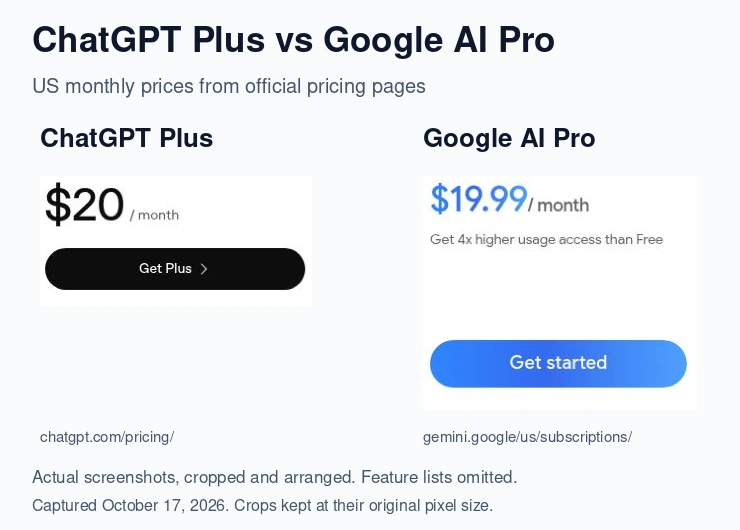
For most readers comparing ChatGPT vs Gemini, the starting point is ChatGPT Plus at $20 per month and Google AI Pro at $19.99 per month. Both companies also have other consumer tiers worth considering.
These are advertised US monthly subscription prices checked for this article. They exclude temporary introductory offers; check the checkout total for applicable taxes.
ChatGPT Plus ($20 per month) and Google AI Pro ($19.99 per month) price cards from the official US pricing pages, captured October 17, 2026. Feature lists omitted; prices exclude taxes and introductory offers.
ChatGPT Plus vs Google AI Pro: Which Offers Better Value?
At monthly list prices, twelve months of ChatGPT Plus costs $240; Google AI Pro costs $239.88. That twelve-cent difference should not decide your purchase.
Google’s bundle deserves attention if you already pay for storage. Its current AI Pro listing includes 5 TB across Gmail, Drive, and Photos, alongside AI features in Google apps and expanded access to Gemini Notebook.
That makes Gemini attractive for someone who genuinely needs those services. Storage you would never buy separately is an extra feature, not money saved.
ChatGPT Plus becomes more interesting if writing and coding share your working week. OpenAI lists Codex access across several environments as part of Plus, although usage allowances still apply.
My preference is to buy the plan that removes a recurring bottleneck. If you regularly need project coding tools, assess that benefit. If most of your effort happens in Google documents and email, assess the Google bundle first.
ChatGPT vs Gemini Free: When Should You Upgrade?
Stay on a free plan if your use consists of occasional rewrites, explanations, brainstorming, or short study sessions. Pay when you can name the limitation that repeatedly interrupts useful work.
Before upgrading, check which models and tools the plan actually includes. A larger allowance does not mean unrestricted use of every feature. Long conversations, research, and complex tasks can consume allowances differently. Google’s limits documentation and OpenAI’s pricing guidance both make these distinctions.
My advice for a first subscription is to try one month at the lowest tier that meets your needs. Keep a brief record of completed tasks and corrections. A $20 plan that saves two useful hours in a month costs $10 per hour saved; one you barely open is still a wasted purchase.
These are consumer subscription comparisons. API access and developer billing require a separate comparison.
ChatGPT vs Gemini for writing: my pick depends on where the draft lives
ChatGPT is my first choice for organizing a recurring editorial workflow. Gemini is my first choice when keeping the work inside Google Docs or Gmail matters more. Neither recommendation means every draft from that assistant will sound better.
Why ChatGPT Is My Pick for Blog Writing and Editing
For a ToolsWorldAI article, the job involves more than producing paragraphs. It includes defining the reader’s question, comparing sources, shaping a verdict, and revising sections without losing the original brief.
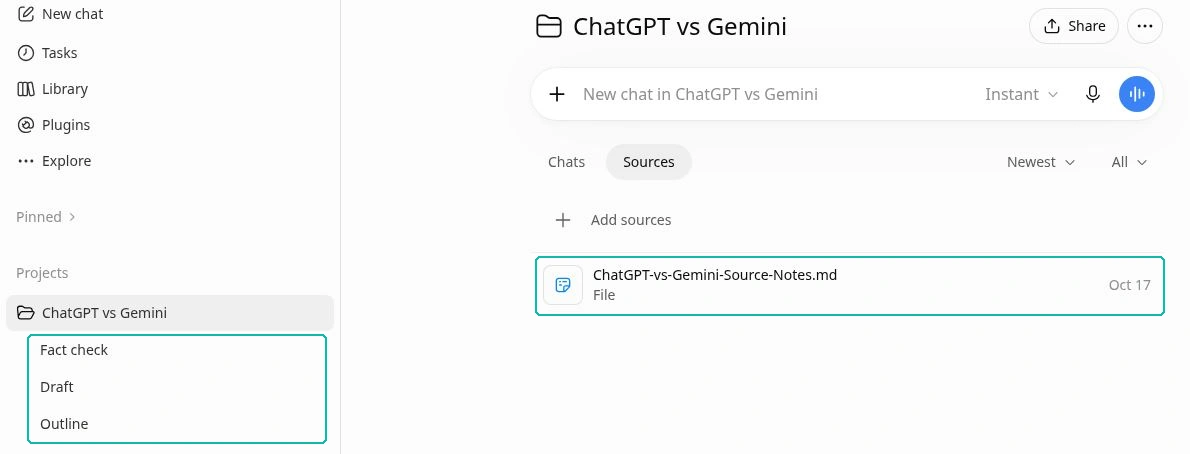
ChatGPT Projects can group chats, files, instructions, and sources around ongoing work. That structure suits the way I would organize a comparison article: one project for the brief and evidence, with separate conversations for the outline, draft, and factual review.
One ChatGPT Project holds the article’s source notes and separate chats for outlining, drafting and fact-checking. (Captured October 17, 2026.)
My writing instructions would be specific:
Write for a US reader choosing between two subscriptions. Use the supplied sources for factual claims. Preserve prices, dates, and limitations. Flag missing evidence. Give each section a clear recommendation, and remove sentences that repeat an earlier point.
This gives the assistant an editorial job it can be judged against. “Make it human” leaves too much open to interpretation.
When Gemini Is the Better Fit for Google Docs and Gmail
Google lists Gemini assistance within Gmail, Docs, and other apps among its AI Pro benefits. If your draft, comments, and supporting notes already live there, that convenience may outweigh a small preference for another assistant’s wording.
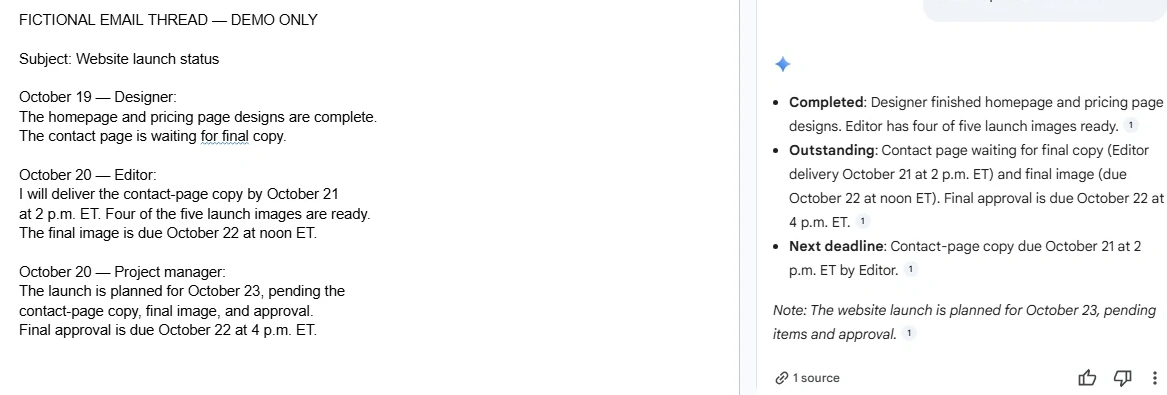
Consider a freelance marketer preparing a client update. The useful task might be to turn an email discussion into a concise status summary, then revise the document where the client already collaborates.
Gemini turning a fictional email thread in a Google Doc into a short project status update (October 17, 2026). Demo content only.
In that situation, the complete process matters to me: finding the right material, preserving commitments, making the edit, and getting it ready for review. Confirm the required integration is available on your account before paying for it.
If you are also considering Claude, read my Claude vs Gemini comparison before making your final choice.
How to Compare AI Writing Quality Without Losing Accuracy
Give both assistants a 250-word draft containing three facts you have verified. Ask for a 150-word revision that keeps every fact and removes repetition.
Then check whether the revision changes the meaning. For example, “participants reported improved focus” must not become “the tool improves focus.” A shorter sentence can still be a worse sentence if it strengthens the claim beyond the evidence.
Also give it one firm preference: no invented examples, no new statistics, or no changes to quoted wording. See whether that instruction survives a second revision.
For blog and client writing, the final standard is whether the revision saves you editing time. A useful assistant preserves your verified facts, respects your word-count ceiling, and leaves your core argument intact without padding the draft with generic filler.
ChatGPT vs Gemini for coding: compare the whole development task
My first shortlist for general project coding is ChatGPT with Codex. Google’s Antigravity tools deserve a direct comparison if you prefer Google’s developer environment. For a small programming explanation, try the free assistants before buying anything.
Why Codex Matters for Debugging and Project Coding
A chat response can explain an error or suggest a function. Project work also requires reading related files, installing dependencies, running checks, and showing what changed.
OpenAI documents those repository and review workflows in Codex Cloud. That is the basis for my recommendation: the ability to work through a development task, rather than a claim that its code always outperforms Gemini’s.
For an existing application, my requirements are the smallest reasonable fix, a regression test, and a clear account of which checks actually ran. A confident description of a test is not evidence that it passed.
Google Antigravity: What Changed for Developers in 2026?
Google says its Code Assist IDE extensions stopped serving consumer tiers on June 18, 2026, including the affected Gemini CLI access. Its documentation directs those users toward the Antigravity product family.
Antigravity currently lists a free individual plan, with additional allowances through Google AI Pro and Ultra. If an older comparison recommends buying a subscription for a particular Code Assist entitlement, verify the current replacement before relying on that advice.
This also makes a simple “ChatGPT subscription versus Gemini chat” comparison incomplete for developers. Check the actual editor or agent you plan to use.
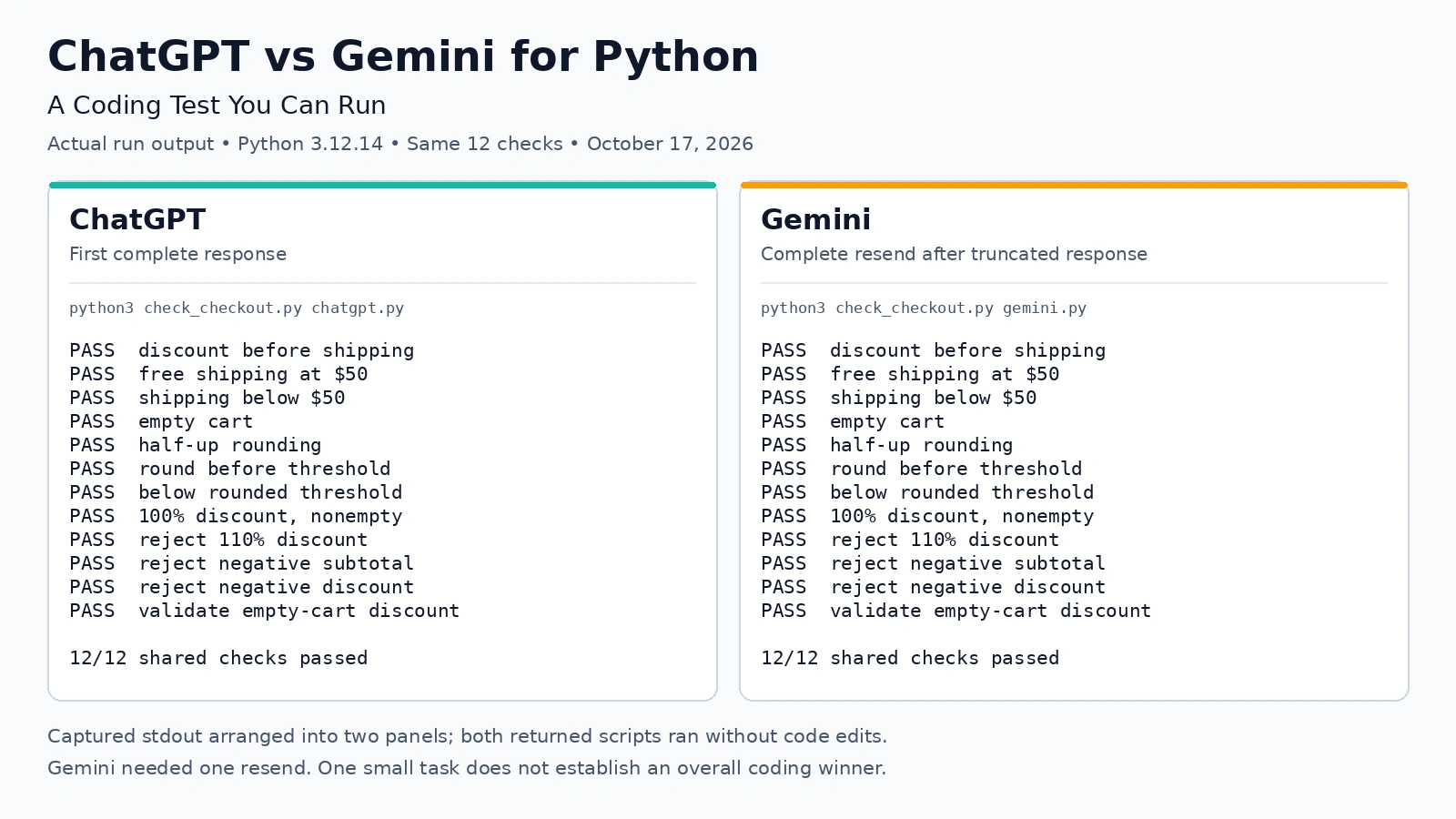
ChatGPT vs Gemini for Python: A Coding Test You Can Run
Here is an original test you can give both tools. Ask for a Python checkout function using these rules:
Accept a nonnegative merchandise subtotal and a discount percentage from 0 to 100. Apply the discount first. Shipping is $4.99 when the discounted subtotal is below $50; otherwise it is free. An input subtotal of $0 represents an empty cart and has no shipping charge. Ignore tax. Use decimal arithmetic, round the discounted subtotal to cents using round-half-up before checking shipping, and include tests.
These cases have clear expected results:
Subtotal
Discount
Expected total
$60.00
20%
$52.99
$50.00
0%
$50.00
$49.99
0%
$54.98
$0.00
0%
$0.00
$60.00
110%
Reject the invalid discount
Both scripts passed all 12 shared checks on Python 3.12.14 (October 17, 2026); Gemini needed one resend after a truncated response. One small task doesn’t establish an overall coding winner.
The first case checks whether shipping uses the discounted amount. The next two check the boundary. The last cases check input handling and the empty-cart rule.
Run the code and inspect the tests. Then change the threshold and ask for an update. My preferred assistant would preserve the business rules and change only what the new requirement affects.
For production work, add tests for your real requirements, review security-sensitive changes, and use a separate development environment before deploying.
ChatGPT vs Gemini for students and research
I would start with ChatGPT for conversational tutoring and Gemini’s research tools for studying a collection of documents. Both can support learning; the useful distinction is the kind of session you want.
ChatGPT Study Mode: Step-by-Step Help for College Students
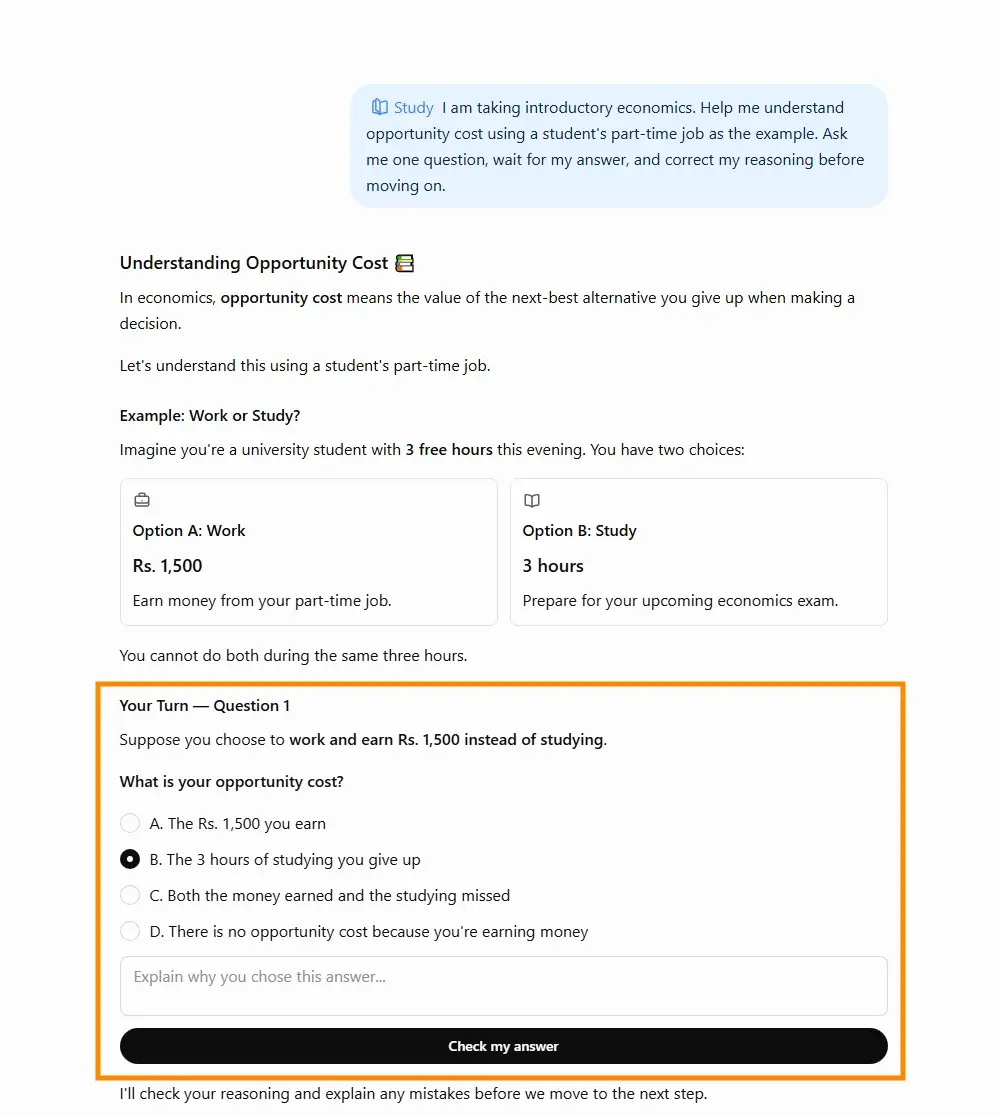
ChatGPT Study mode is available across its plans and is designed to guide understanding through questions, explanations, and feedback. OpenAI says to use a regular conversation; Study is not available in Projects, GPTs, or Temporary Chats.
A useful opening request is:
I am taking introductory economics. Help me understand opportunity cost using a student’s part-time job as the example. Ask me one question, wait for my answer, and correct my reasoning before moving on.
Study mode turns the opportunity cost prompt into a guided question: the student chooses and explains an answer before ChatGPT checks it. (Captured October 17, 2026.)
The key is what happens after the explanation. Can you apply the idea to a different situation without help? If not, ask for another question rather than a longer summary.
My preference for ChatGPT here is a starting point for testing that tutoring format, not evidence that it produces better grades.
Gemini Guided Learning and Notebook: Quizzes and Source-Based Study
Gemini has Guided Learning, and Google documents tools for creating quizzes, flashcards, and study guides. Students who prefer organized practice materials should try these alongside conversational tutoring.
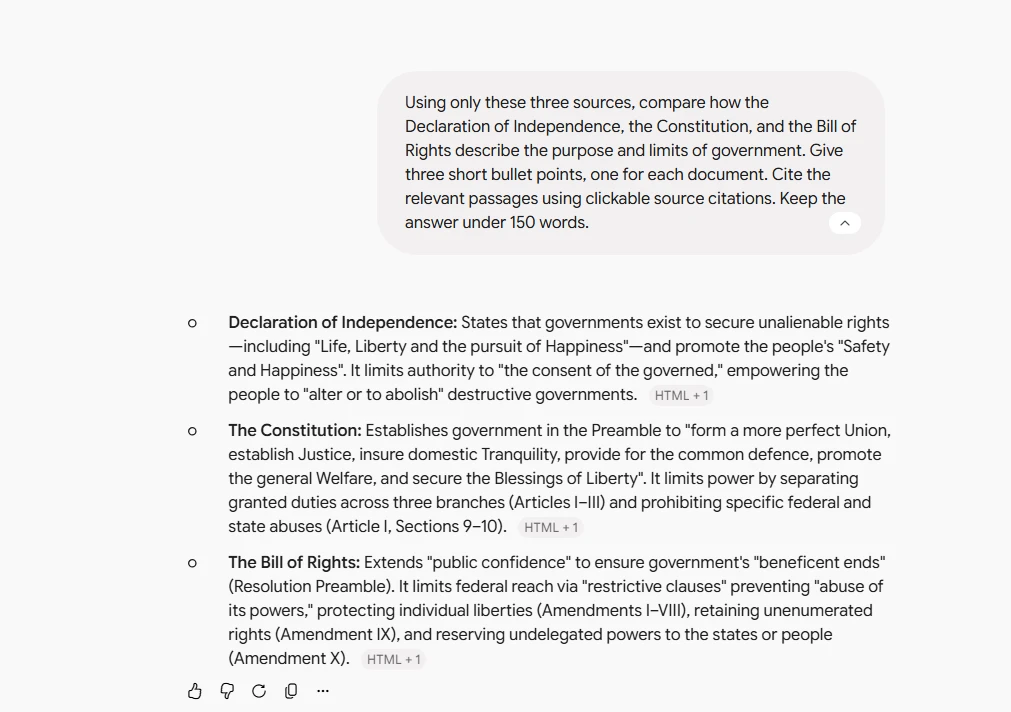
For a group of readings, Gemini Notebook is particularly relevant. Its source-based chat can link answers to passages in the supplied material, making it easier to inspect the supporting text.
A practical request would be: “Compare how these three readings explain the same concept. Cite the relevant passages and identify any disagreement.” Follow those citations before turning the response into revision notes.
A source-grounded answer comparing three founding documents, with citation chips that link back to the passages. (Captured October 18, 2026.)
This is why Google’s tools would be my first shortlist for a document-heavy course. The advantage I am looking for is a shorter path back to the reading, rather than a more confident summary.
ChatGPT vs Gemini for Research: Long PDFs and Web Sources
Google currently lists a one-million-token context window for Gemini Apps on AI Pro and Ultra. Tokens are pieces of text used by the model, and this limit describes how much context it can handle at once.
That is a reason to consider Gemini for substantial source collections. It does not guarantee that every detail will be retrieved correctly.
Ask narrow questions, identify the relevant files, and require page or section references where available. Check whether the answer follows the assigned reading or quietly introduces outside information.
For current web research, ChatGPT supports web search, while Gemini Deep Research uses Google Search by default and can work with other selected sources. Google’s search connection alone does not establish that its final interpretation is more accurate.
Should Students Pay for ChatGPT or Gemini?
First, find out whether your college already provides an approved AI account. Then check your instructor’s rules for the specific assignment. Permission to brainstorm does not necessarily include permission to submit generated writing.
Avoid budgeting around a student promotion until you confirm current eligibility, the end date, and the renewal price.
For most students starting out, I would use free access to establish a study routine first. Upgrade only when a specific limit repeatedly interrupts that routine. For more study options, see my guide to thebest AI tools for students.
Accuracy, privacy, and my comparison checklist before subscribing
A useful recommendation needs to account for errors and data handling, as well as features.
How to Check AI Answers, Citations, and Factual Accuracy
For a research response, inspect the claims that would change your decision: a price, a product restriction, a study finding, or a deadline. Open the linked source and check whether it supports the exact statement.
A citation to a real page is not enough if that page discusses a different plan or an older version. Ask the assistant to separate documented facts from its recommendations. If evidence is missing, the answer should say so.
For ToolsWorldAI, getting that evidence right matters more to me than polishing another adjective. An attractive comparison table is only useful when its entries are correct.
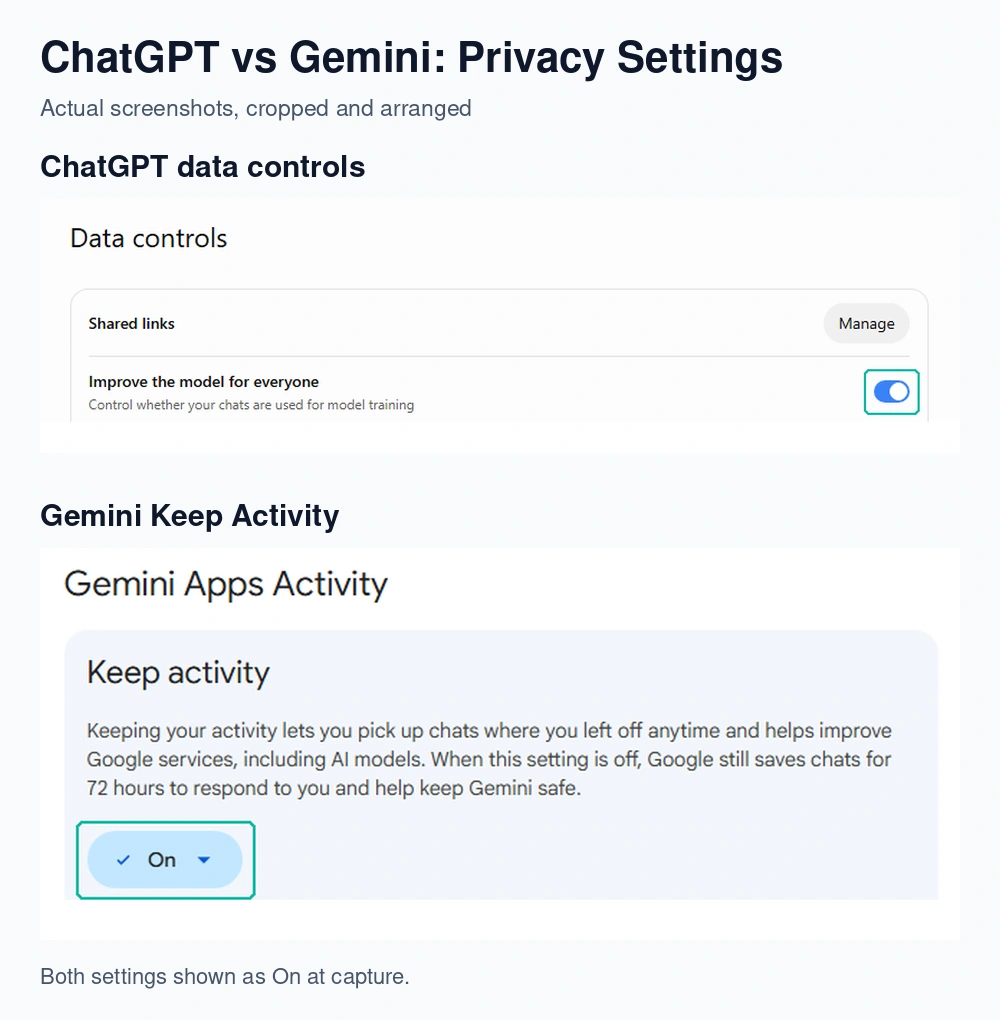
ChatGPT vs Gemini Privacy: Training and Data Controls
The consumer products offer controls, but their settings and retention rules differ:
ChatGPT: Turning off “Improve the model for everyone” prevents new conversations from being used for model training. Temporary chats are not used for training while they remain temporary, though OpenAI may retain a copy for up to 30 days for safety. Feedback can follow different data-use rules.
Gemini: With Keep Activity off, future chats are not used to train Google’s AI models unless you submit feedback. Google says these chats are still retained for 72 hours, and some connected apps become unavailable with this setting off.
ChatGPT’s “Improve the model for everyone” toggle and Gemini’s “Keep activity” setting, both shown switched on at capture (October 17, 2026). Turning either off changes how future chats are used for training. Menus and wording change often.
For client documents or workplace material, use your organization’s approved account and sharing rules. A personal subscription is not automatically the right place for confidential files.
How to Choose an AI Assistant With a Three-Task Comparison
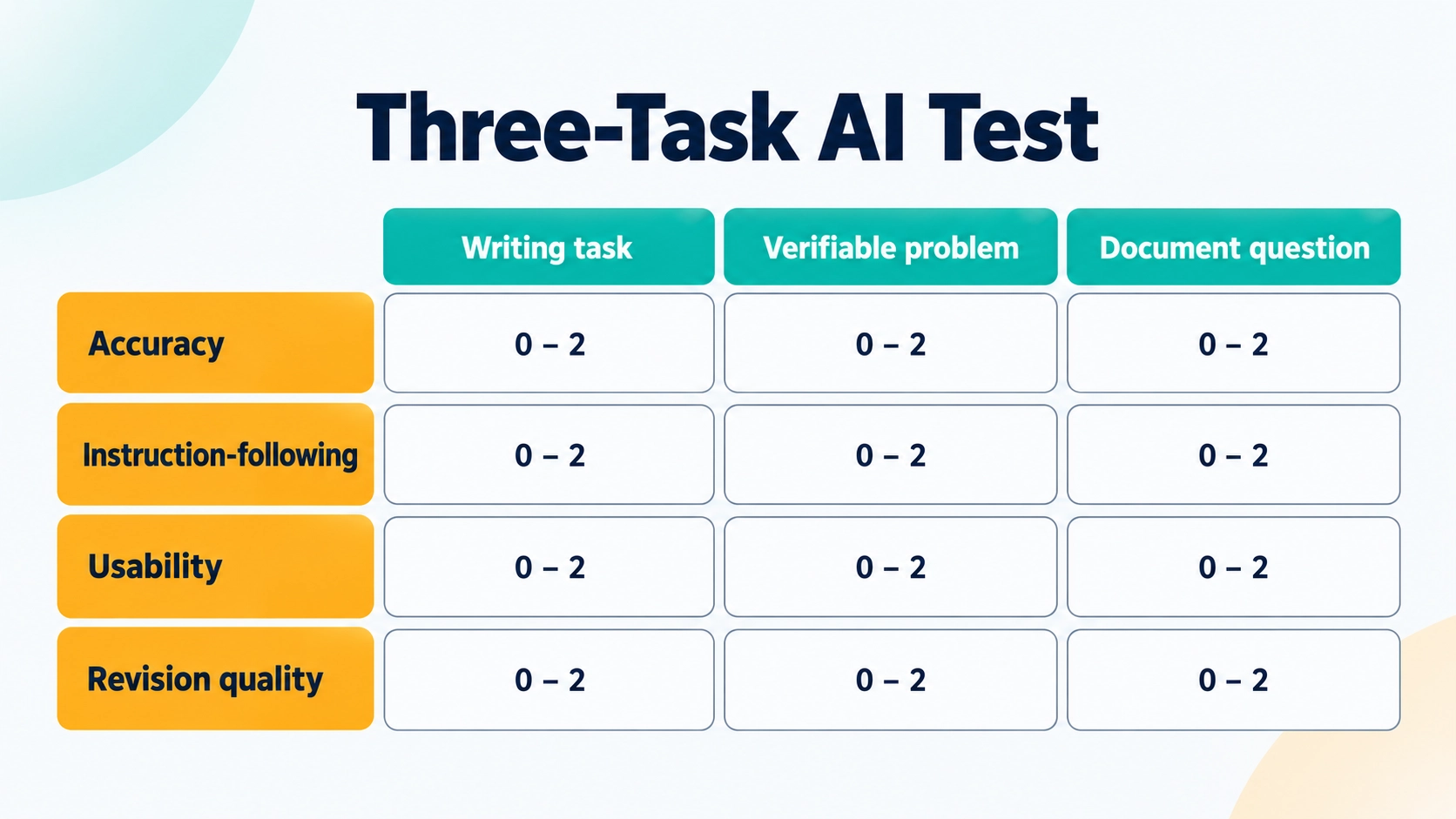
Choose three tasks from your actual week: one writing task, one problem with an answer you can verify, and one question about a document you know well.
Give both assistants the same inputs. Record the plan, model, and tools enabled. Save the first response, then allow each assistant one specific correction request.
Score each task from zero to two on four criteria:
Accuracy: Are the facts, calculations, or results correct?
Instruction-following: Did it respect your constraints?
Usability: Can the result go into your normal workflow?
Revision quality: Did the follow-up fix the problem without creating another?
Score each task from 0 to 2 on four criteria, then repeat your most important task with fresh material. (Graphic created with AI.)
This is a suggested evaluation method, not a published benchmark. Record the correction time as well. A pleasant writing style should not compensate for a serious factual or coding error.
Repeat the most important task with fresh material before deciding. If one assistant consistently leaves you with less checking and rewriting, that is a stronger reason to subscribe than a generic winner’s badge.
Frequently asked questions
Is Gemini Better Than ChatGPT?
Gemini is my first recommendation when Google app integration and document-based research are the priorities. ChatGPT is my starting choice for a mixed workload involving writing, coding, and conversational tutoring. Neither recommendation establishes a universal quality winner; compare the plans and tasks you will actually use.
Which AI Is Best in 2026 for Free Users?
Start with ChatGPT for a broad mix of everyday tasks, or Gemini if Google’s tools already organize your work. Both have free access. Try your recurring tasks before paying, because a free plan that completes them may be the best value for you.
Is ChatGPT Plus Worth It If I Already Have Google AI Pro?
Only if it adds something you use regularly. Compare your existing Google tools with ChatGPT on a real writing or coding task. I would add a second subscription only when the improvement in finished work justifies the extra monthly cost.
Can Students Use ChatGPT or Gemini for College Assignments?
Follow the rules for your course and assignment. Possible uses include practice questions, explanations, and feedback on your own outline. Verify factual claims and references, and disclose assistance when required. Being able to explain the final work yourself should remain the goal.
Can ChatGPT and Gemini Search the Web for Current Information?
Yes, through their available search and research features. ChatGPT supports web search, and Gemini Deep Research can use Google Search. Check that the response actually used current sources, then inspect the publication dates and cited evidence.
My final recommendation: choose the tool that fits your week
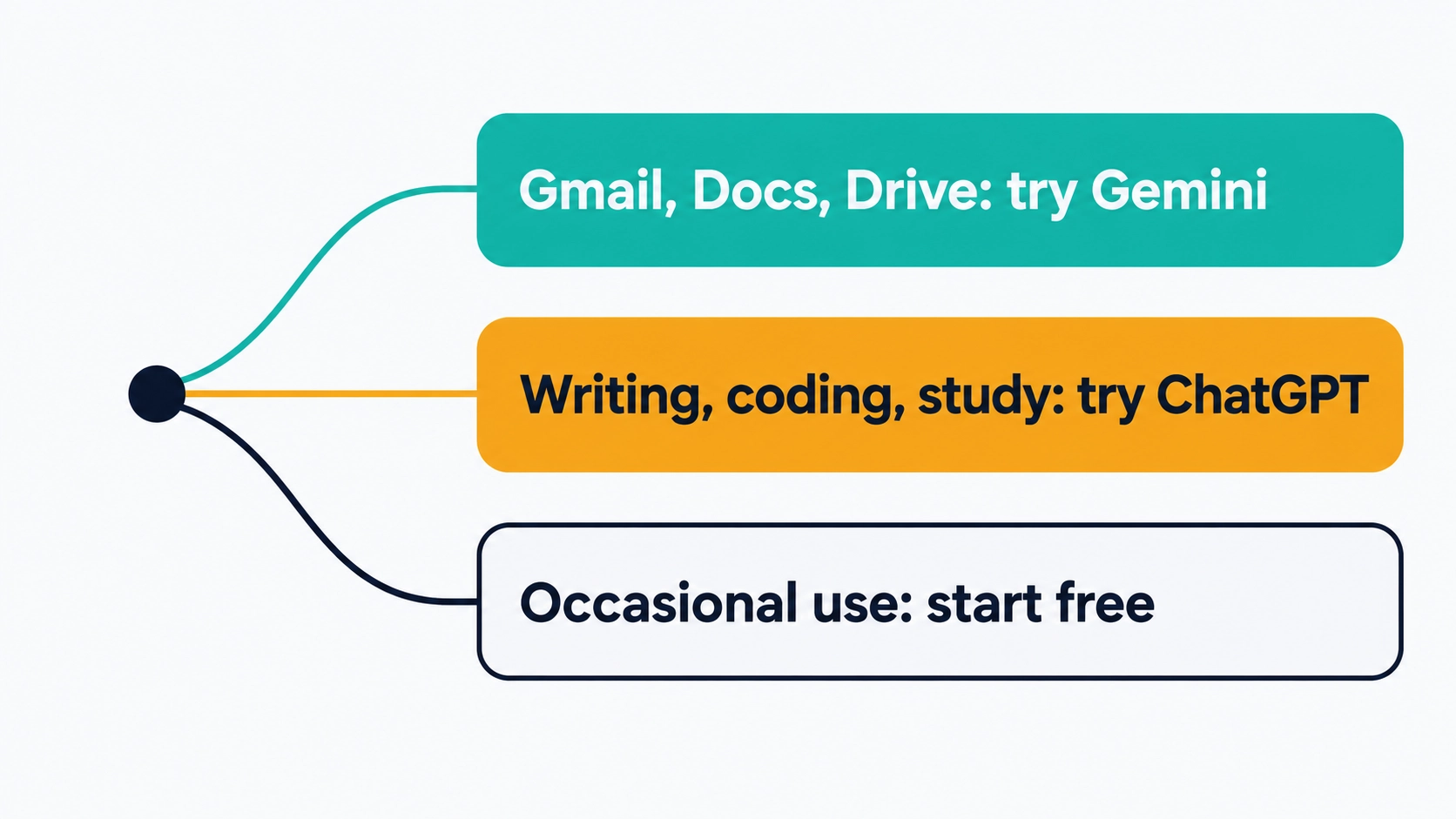
For a reader balancing blog writing, coding questions, and learning, ChatGPT would be my first assistant to try. For someone whose work depends on Gmail, Docs, Drive, and source-based study, Gemini deserves the first trial.
A quick way to pick your first trial, based on workflow fit rather than a benchmark winner. (Graphic created with AI.)
My advice on ChatGPT vs Gemini is to pay for one initially and use the other’s free plan when useful. Run the three-task comparison above, measure the corrections, and choose the subscription that improves your finished work.
If writing is your main reason for subscribing, read the ToolsWorldAI guide to writing with AI without sounding AI next. A clear brief, checked sources, and thoughtful editing will remain valuable whichever assistant you choose.